MCPJam vs MCP Inspector V2: Choosing the Right MCP Testing Tool
Compare MCPJam and MCP Inspector V2 for testing Model Context Protocol (MCP) servers. Learn when to use protocol testing versus end-to-end agent behavior evaluations.
In this guide11 sectionsHide
An MCP server can pass every protocol check and still fail the user.
Consider a task server that exposes create_task, create_subtask, and search_projects. A user asks an AI application to "add a follow-up under the Q3 launch item." The agent calls create_task instead of create_subtask. The call is valid and succeeds, but the result is wrong: the board gains a top-level task instead of a follow-up.
This failure contains two separate questions. Did the call execute correctly? And did the agent make the right call in the first place? MCP Inspector V2 confirms the call executed correctly. MCPJam does the same, then goes further and checks which tool the agent selects and how a client handles the server's declared capabilities.
Read on to see where the tools overlap, how they differ, and when to use each one.
For options beyond these two tools, see this guide to MCP Inspector alternatives, including when to keep Inspector V2 and which tools to add for agent evals, conformance checks, and production tracing.
TL;DR
- Use Inspector V2 to validate protocol behavior, inspect MCP messages, and debug a specific method with known arguments.
- Use MCPJam to combine the protocol checks above with behavioral testing: evaluate agent decisions, compare versioned client profiles, emulate client configurations, test multi-server workflows, verify strict server security boundaries, and turn failures into repeatable evaluations.
Quick Comparison
Use this table to choose a starting point. The sections below explain how each testing surface works and where its limits apply.
Swipe to see all columns →
| What you need to test | MCP Inspector V2 | MCPJam |
|---|---|---|
| Is my server conformant to the protocol? | Invokes tools, prompts, and resources manually or through its CLI. Supports both the legacy and 2026-07-28 protocol eras. | Invokes tools, prompts, and resources through its Playground or CLI. Pins a run to either protocol era. Adds conformance checks with behavioral coverage beyond what Inspector CLI offers. |
| Will an agent choose the intended tool from a prompt? | Not designed to test agent tool selection; executes the method and arguments supplied by a person or script without an agent-in-the-loop. | Playground sends the prompt to a selected agent and records its tool calls and arguments. |
| Is my declared surface compatible with different clients? | Tests the server without an agent-in-the-loop. | Client Compatibility compares server declarations with versioned client profiles. Playground can load emulated client configurations. |
| Can I use several servers in one workflow? | Stores multiple server definitions. Its CLI and terminal client select one server per run or session. | Multi-server connections run simultaneously within a project. |
| Where did authorization fail? | Supports OAuth, persistent authorization state, loopback callbacks, and mid-session reauthorization. | OAuth Debugger visualizes the exchange and runs guided conformance checks. XAA Debugger configures and tests Cross-App Access flows. |
| How does a tool-returned interface render? | Renders MCP Apps in a sandboxed browser origin and exposes app metadata for scripted checks. | Playground renders ChatGPT Apps and MCP Apps with client presets, device controls, and widget debugging panels. |
| Can this check run in CI? | CLI client runs one named method per invocation, emits machine-readable output, and returns meaningful exit codes. | CI / CD workflows run protocol, OAuth, and Apps conformance checks. The @mcpjam/sdk supports deterministic tests and model-driven evaluations. |
| Can I explore unplanned user journeys? | Not designed for unplanned exploration | Swarms runs configurable AI personas. User Testing provides shareable user-acceptance environments. |
Will a Agent Choose the Intended Tool?
Inspector V2 executes the method and arguments supplied by a person or script. This tests whether the server handles that request correctly.
To test agent behavior, start with a real prompt and observe which tool the agent chooses and which arguments it sends.
MCPJam Playground runs the prompt through a selected model. It records the prompt, model response, tool calls, arguments, results, and trace. Treat one run as a sample. Repeated runs or a saved evaluation show whether the behavior is stable.
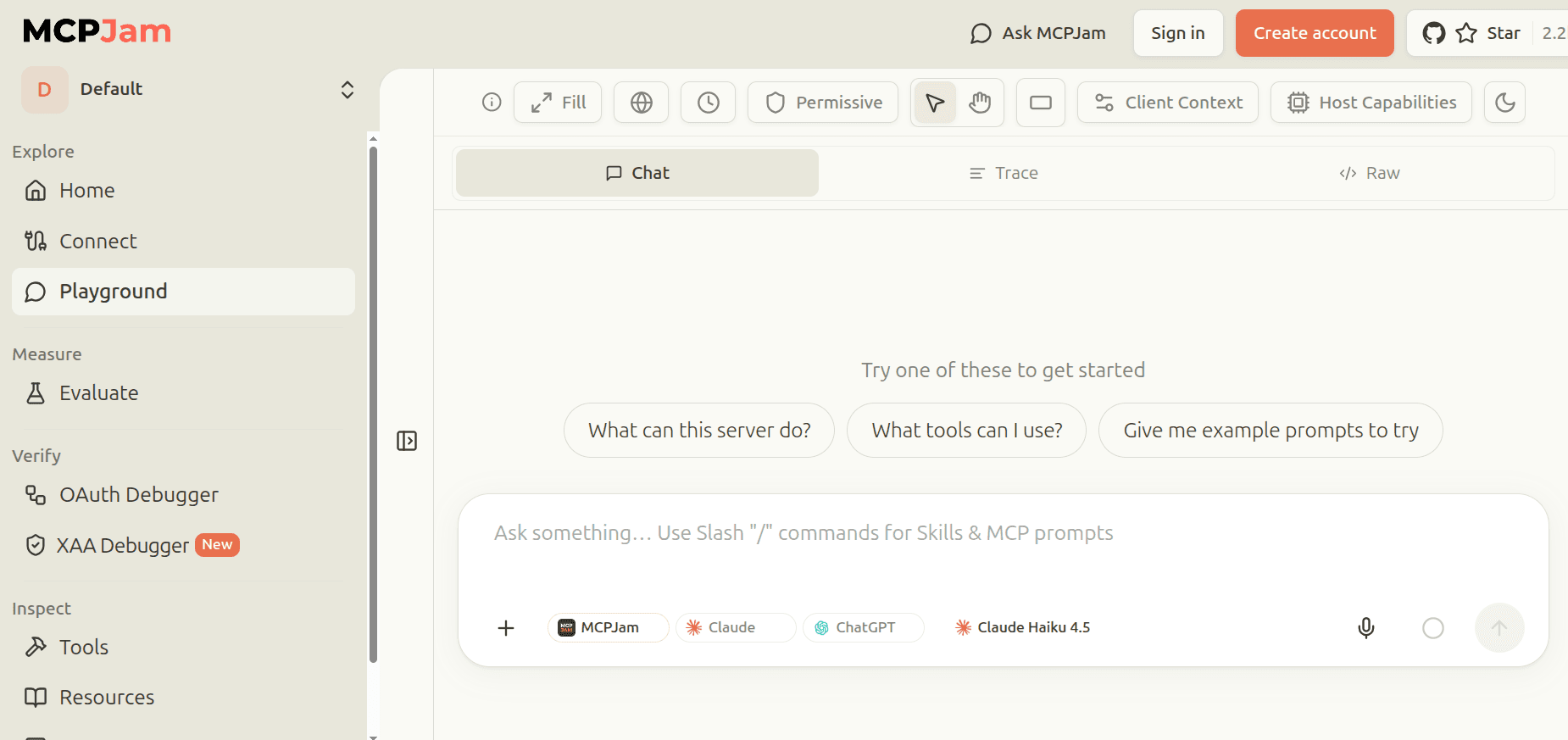
When a run does not do what you expected, it is usually one of three things. Each one maps to a stage in the User-Value Chain we lay out in Effective MCP, Part 1: >
- Tool selection (the Tool Selection stage). The agent picks a valid but inappropriate tool. Overlapping descriptions or weak distinctions between related operations can produce this failure.
- Argument grounding (the Tool Call stage). The agent picks the intended tool but supplies a schema-valid value that misses the user's meaning. Examples include relative dates, ambiguous entity names, and implicit parent-child relationships.
- Input repair (the Tool Response stage). The server rejects the request. The next turns show whether the server returns a useful error, the agent corrects the request, and the retry succeeds.
MCPJam's waterfall trace shows the user, model, and server timeline. Its JSON-RPC logger shows the requests and responses on the wire.
Why Should You Test Agents, Hosts, and MCP Clients Separately?
The MCP architecture separates three concepts:
- An agent is a model (like Claude Opus 5 which interprets prompts and may select tools) selected and running against a harness, coordinating tool use within a session.
- A client (commonly called a host), such as Claude Desktop, coordinates the model, user experience, policy, and MCP connections.
- An MCP client is the protocol component inside a client that maintains a connection to an MCP server. For example, Claude Desktop's MCP client maintains the connection between Claude Desktop and your server.
Changing the model can alter tool selection and arguments. Changing the client can alter available capabilities, approval behavior, and presentation. A model release can change behavior while the server code and schema stay fixed.
Inspector V2 focuses on server behavior inside its own environment. MCPJam's Client Compatibility report uses connect-time declarations and static widget analysis. It compares those inputs with profiles for clients such as Claude, ChatGPT, Cursor, Copilot, and Codex. Each result carries a vendor-documented, probe-captured, or best-effort provenance label.
MCPJam Playground can load an emulated client configuration with corresponding capability and sandbox presets. Final validation belongs in the actual target application because the compatibility report is a static check and the Playground runs an emulation.
Can You Test a Workflow That Spans Multiple Servers?
A single request can touch two servers. "Book time to review the Q3 launch" needs the task server to find the item and a calendar server to schedule against it.
Inspector V2 connects to one server at a time. It stores as many server definitions as you like, in a catalog it can import from your existing client configs, but a run or session works against one live connection.
MCPJam's multi-server connections hold several live connections inside one project, so the agent sees the combined tool surface. That is where the interesting failures are: two servers exposing similarly named tools, the agent calling the right action against the wrong service, or context from the first call never reaching the second.
How Do You Find Which Authorization Step Failed?
A single authorization error can hide a failure in discovery, registration, redirects, token exchange, or reauthorization.
Inspector V2 supports OAuth, persistent authorization state, loopback callbacks, and mid-session reauthorization across its web, CLI, and terminal clients. Protocol traffic and error output may identify the failing step directly.
MCPJam OAuth Debugger turns the authorization exchange into a guided sequence with the underlying messages attached. Its conformance checks cover multiple protocol versions and registration mechanisms.
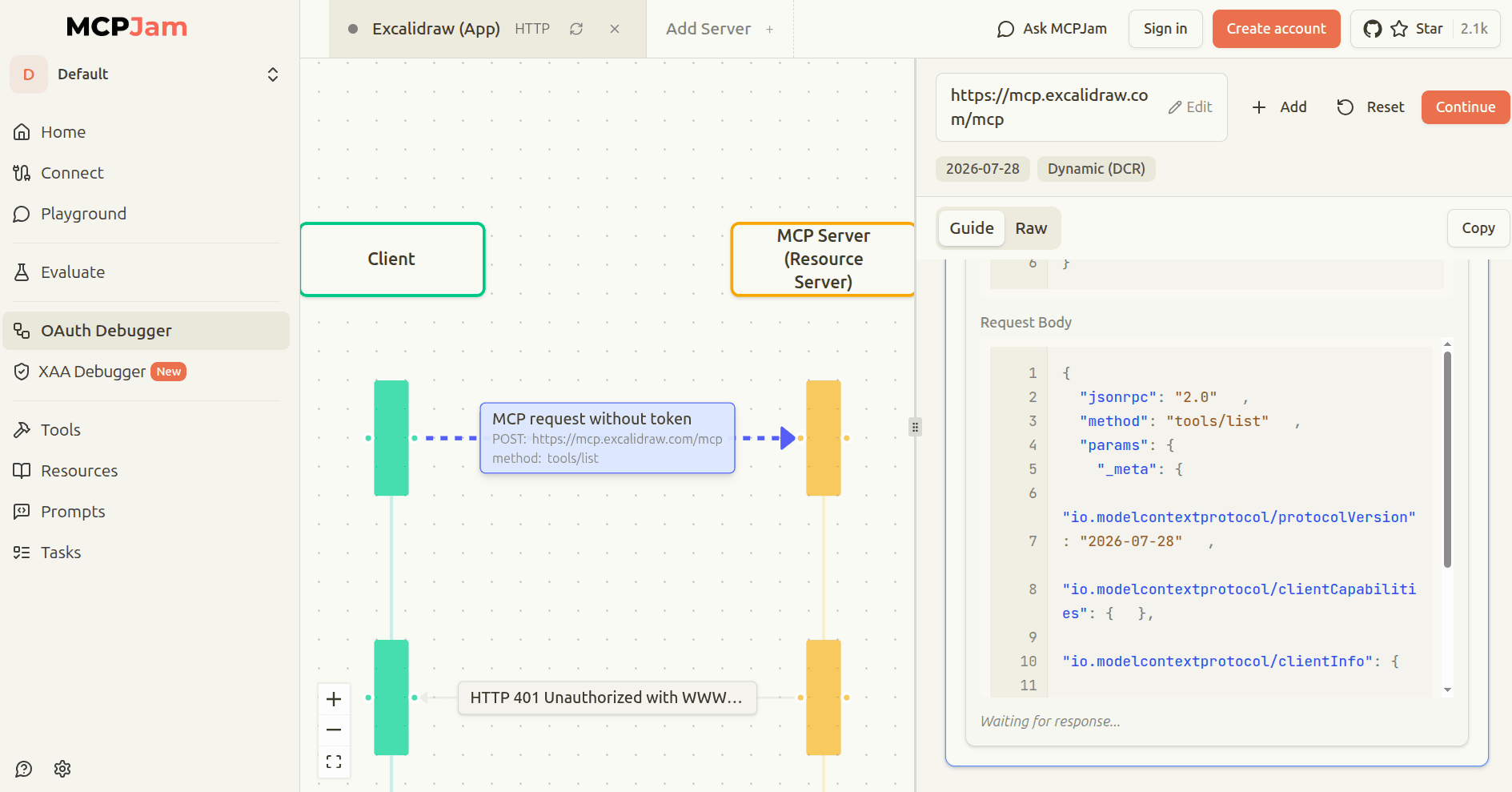
The selected protocol version determines which registration mechanisms the test should use. The 2026-07-28 MCP revision deprecates Dynamic Client Registration in favor of Client ID Metadata Documents. Dynamic Client Registration remains available for backward compatibility, so both client and server support determine which mechanism a test should use.
How Do You Test Widget Rendering?
MCP Apps add an interactive interface to a tool result, creating a second failure surface. A tool can return the correct data while a Content Security Policy (CSP) rule blocks an image or the widget renders incorrectly.
Inspector V2 renders MCP Apps from a separate sandboxed origin. Its CLI exposes app metadata, including the declared CSP, permissions, and resource URI.
MCPJam's Playground uses a unified renderer for ChatGPT Apps and MCP Apps. It provides client presets, device controls, inline and fullscreen display modes, widget state, model context, CSP violations, raw data, and protocol logs.
How Do You Catch Regressions in CI?
Finding a behavior bug once is useful. Saving it as a script, test case, or evaluation turns the finding into a gate that protects every release.
Deterministic checks compare exact outcomes such as schema validity, required response fields, expected error codes, tool-result properties, and command exit status.
Model-driven evaluations run a prompt through a model and inspect tool selection, arguments, recovery, or task completion. A model can return different results across identical runs, even when the assertion is exact. Stable gating therefore needs repeated runs, a pass threshold, and a policy for flaky outcomes.
The Inspector V2 CLI client can gate connectivity, protocol, and exact tool-call checks. MCPJam CI / CD workflows run protocol, OAuth, and MCP Apps conformance suites and emit JUnit XML. The @mcpjam/sdk integrates with Jest or Vitest and supports deterministic tests, end-to-end model runs, and statistical evaluations.
For the opening task example, a behavioral evaluation can require create_subtask, verify the parent identifier, repeat the prompt across runs, and fail the build when the pass rate drops below the team's threshold.
How Do You Explore User Journeys You Did Not Predefine?
Inspector V2 supports manual and scripted method calls for predefined cases. MCPJam adds two workflows for exploring user journeys the team did not predefine.
MCPJam Swarms runs configurable AI personas through multi-turn journeys. MCPJam User Testing gives human testers hosted, shareable user-acceptance environments. Their sessions can be replayed and converted into regression cases.
When either workflow finds a failure, engineers can inspect the trace and protocol calls, reproduce the interaction, and save a deterministic or model-driven regression test.
Which MCP Testing Tool Should You Use?
Both tools cover the protocol layer. Three things separate them: whether a agent has to choose among your tools, whether you ship to more than one host, and whether last month's fix has to hold the next release.
For a broader comparison, see our guide to the best MCP testing tools for server reliability, including options for protocol inspection, API workflows, Python regression tests, security testing, and CI release gates.
Swipe to see all columns →
| Feature / Goal | MCP Inspector V2 | MCPJam |
|---|---|---|
| Philosophy | Minimalist / Protocol-first | Comprehensive / Workflow-first |
| Primary Testing Focus | Protocol & manual debugging | Agent decisions & end-to-end behavior |
| License | MIT (Fully open source) | Apache 2.0 (Core) \+ Commercial Tiers |
| Test Coverage | Protocol compliance | Protocol \+ Agent behavior \+ Client compatibility |
| Environment | Local / Self-hosted only | Managed Cloud \+ Local / Self-hosted |
| Scalability | Standard CLI / Manual CI | Integrated CI/CD \+ Model Evaluations |
Keep Inspector V2 when you want an independent protocol view, a reproduction surface that MCP project and SDK maintainers will act on, or a tool with no commercial licence anywhere in the path. It is MIT licensed and free at every tier.
Reach for MCPJam when any of those three apply. Its manual inspection and conformance tools cover the protocol layer too, so it can be the only tool in the loop rather than an addition to one. Its core engine, CLI, and SDK are Apache 2.0, with a small number of server paths under a separate licence and paid tiers above solo usage.
We built MCPJam to take testing past "the agent did the wrong thing." Each failure becomes a trace, the trace becomes a diagnosis, the diagnosis becomes a repeatable evaluation, and the evaluation becomes a CI gate that runs on every release.
Run MCPJam locally:
npx @mcpjam/inspector@latestOr start at app.mcpjam.com.
Frequently Asked Questions
What is the difference between MCPJam and the MCP Inspector V2?
Inspector V2 is protocol-first: it verifies that your server handles requests correctly. MCPJam adds behavioral testing on top, recording which tool a agent selects, comparing your server against versioned client profiles, holding multiple live server connections, and running conformance suites in CI.
The MCP Inspector is limited to single-server testing. What are the best alternatives that support simultaneous multi-server connections?
MCPJam holds multiple live server connections inside one project, so the agent sees the combined tool surface. Inspector V2 stores multiple server definitions but connects to one server at a time per run.
Which evaluation tools for MCP servers can integrate into a CI/CD pipeline to automatically catch regressions on every deployment?
The Inspector V2 CLI gates protocol and exact tool-call checks. MCPJam CI/CD workflows run protocol, OAuth, and MCP Apps conformance suites and emit JUnit XML. The @mcpjam/sdk integrates with Jest or Vitest and supports deterministic tests, model-driven evaluations, and a pass-rate threshold to fail builds when behavior degrades.
Our MCP integration passes standard CI tests but behaves differently across ChatGPT, Claude Desktop, Cursor, and other hosts. What tools can test host-specific compatibility before release?
MCPJam Client Compatibility compares your server's declarations against profiles for Claude, ChatGPT, Cursor, Copilot, and Codex, with each result tagged by its provenance. Playground can also load an emulated client configuration for interactive testing. Both are static checks, so final validation should still happen inside the actual target application.
What software provides automated OAuth and authorization testing for my MCP server?
MCPJam OAuth Debugger steps through the authorization exchange with the underlying protocol messages attached, covering both Dynamic Client Registration and the Client ID Metadata Documents format from the 2026-07-28 MCP revision. The XAA Debugger handles Cross-App Access flows.
What testing platforms allow engineers to execute specific tool calls and verify the exact UI output a user will see?
Inspector V2 renders MCP Apps from a sandboxed origin and exposes app metadata, including CSP, permissions, and resource URI, through its CLI. MCPJam Playground provides a unified renderer for ChatGPT Apps and MCP Apps with client presets, device controls, CSP violation logs, and protocol logs in one view.