MCPJam: The Complete Overview
Explore MCPJam for end-to-end MCP server testing, client emulation, evaluations, OAuth debugging, CI/CD automation, local development, and pricing.
In this guide9 sectionsHide
Building an MCP server that follows the Model Context Protocol specification is only part of the work. The harder part is getting that server to behave reliably once ChatGPT, Claude, Copilot, Cursor, or another AI client is deciding what to call, what arguments to send, and what the user ultimately sees.
A server can pass protocol checks while the user still gets the wrong outcome. An agent can pick the wrong tool, send a valid-but-wrong argument, ignore useful returned data, or render an app differently across clients. The logs can look technically clean even when the user's request is mishandled.
MCPJam is built for these gaps. It gives teams a pre-production environment to compare client capabilities, reproduce failures before customers do, and turn important user journeys into repeatable checks.
TL;DR
- MCPJam is pre-production reliability infrastructure for MCP servers and other agent-facing software.
- The Playground supports testing across 16 tracked AI clients, with client-specific capability data for comparing how the same server behaves across environments.
- Evaluations turn important user journeys into scored, repeatable tests that can become release criteria in CI/CD.
- The CLI and TypeScript SDK bring MCPJam checks into scripts and CI, with JUnit output for conformance reporting.
- Acceptance testing expands coverage beyond known cases. Swarms send synthetic personas through multi-turn journeys, while User Testing captures real tester sessions, ratings, comments, and sentiment.
- MCPJam supports testing for WebMCP-enabled pages and tools, Agent Skills, Skills over MCP, OAuth conformance, Enterprise-Managed Authorization (EMA), and the Cross-App Access (XAA) flow.
Why MCP testing goes beyond protocol compliance
Protocol tests check that the client can connect, the expected tools are exposed, JSON-RPC works, and arguments match the schema. These checks establish that the server is technically usable. They do not establish that an AI client will use it correctly.
Consider a project-management server with tools for finding a project and creating a task. A user asks an assistant to add a follow-up to a particular launch project. The tool call can succeed even if the agent selected a similarly named project. From the developer's point of view, the request and response can look valid while the user outcome is wrong.
Passing a protocol test does not prove the integration will behave consistently from one client to another. Client-specific testing isolates compatibility issues that server-level checks cannot reproduce, helping teams distinguish a server defect from behavior introduced by the surrounding AI client.
What is MCPJam?
MCPJam is a pre-production reliability platform for MCP servers and other agent-facing software. Rather than replacing the server runtime, it gives engineering teams a controlled environment to reproduce agent and client behavior, convert failures into repeatable test cases, and carry those checks from local development into CI. The same workflow stays useful as the integration changes, so release decisions are based on recorded test results instead of one-off manual prompts.
MCPJam stays outside the production request path, so it functions as a testing layer rather than the system serving live customer traffic.
What MCPJam covers
Playground and client emulation
The Playground is where agent behavior and client behavior meet. Connect a server, ask a natural-language question, inspect the resulting tool calls and responses, render app output, and compare what changes when you switch the agent or client configuration.
MCPJam maintains client-specific configurations rather than treating every AI client as equivalent. The current catalog tracks 16 clients, including ChatGPT, Claude, Claude Code, Copilot, Cursor, Codex, VS Code, and Slackbot, and the Playground can test the same server with models across Claude, GPT, Gemini, and other providers. Teams can test the same server across different capability and presentation contexts without repeatedly moving between separate products.
Swipe to inspect the full diagram →
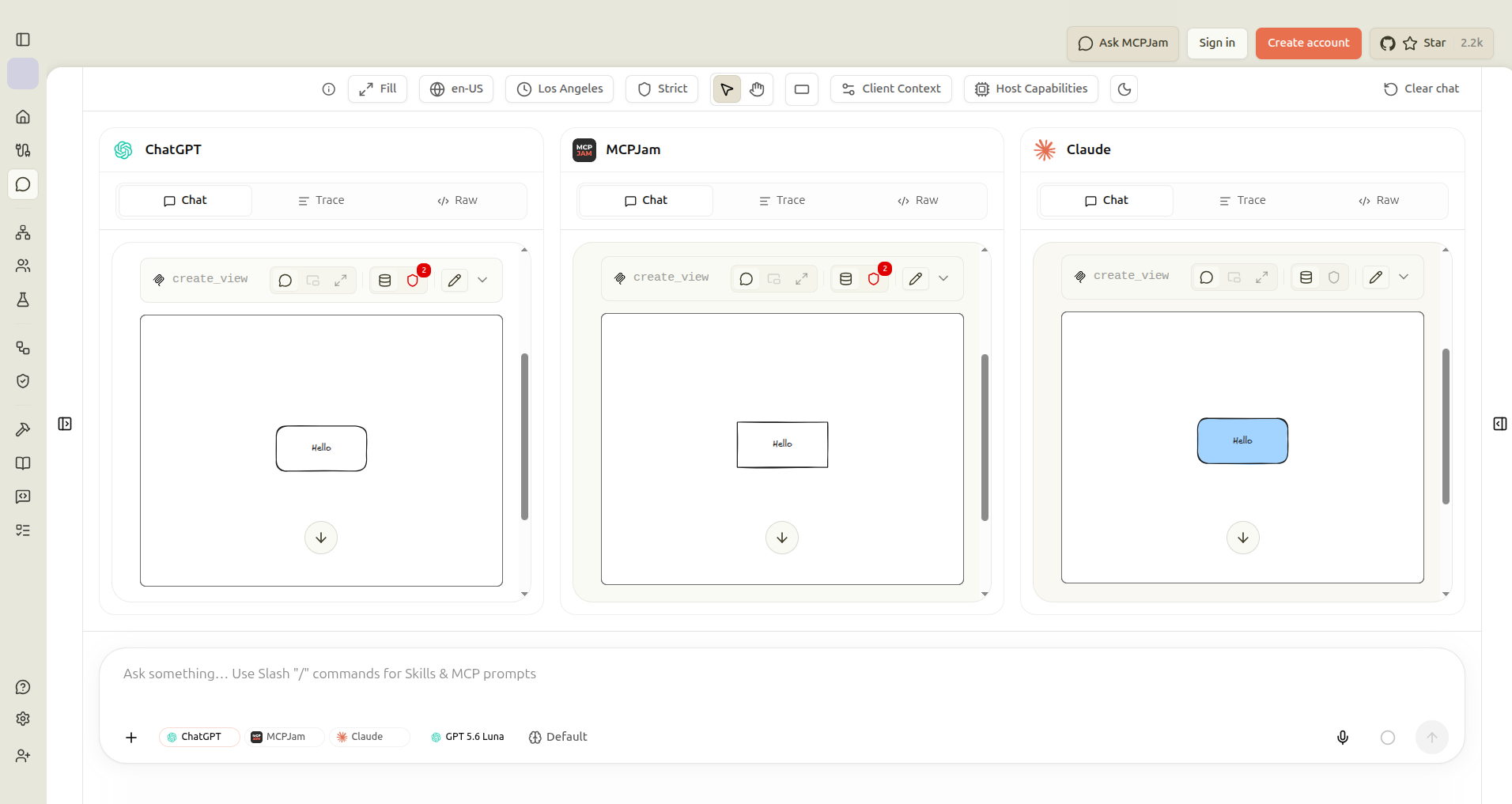
For software that runs inside clients you do not control, compatibility becomes something you can test before release.
MCP Apps and App UI testing
The Playground can render MCP App interfaces across supported client configurations, alongside the protocol and agent activity that produced them. You can validate both outputs of an app integration: the structured result returned by the server and the interface the user actually sees.
If a widget behaves differently across clients, you can compare the data path and presentation context in the same workflow instead of debugging them as unrelated systems.
Inspect tools, resources, and prompts
Not every check needs a model. This is the deterministic side of the workflow: you confirm that the server itself behaves before you ask whether a client uses it well. In the Playground, you can invoke a tool by hand, read the request and response payloads, and trace the JSON-RPC traffic with no agent involved. The Inspect section adds a dedicated page for each of Tools, Resources, Prompts, and Tasks.
MCPJam supports local STDIO development as well as remote MCP connections, so testing can be done while the server is still under active development. You can connect to multiple servers at once, when a task depends on more than one integration working together, and save workspace configurations for servers you test regularly. A public MCP server registry is available for exploring servers built by others.
The open-source tooling can also run from the desktop app, CLI, SDK, or local Inspector depending on how teams prefer to work.
WebMCP and Skills
WebMCP is a proposed web standard for exposing website functionality as structured tools to AI agents. With the WebMCP Inspector, you can open a WebMCP-enabled page, inspect its registered tools, call a tool with known inputs, and then ask an agent to perform the same task in Playground. Comparing the two runs separates a broken page tool from an agent-selection problem.
For workflow instructions, MCPJam supports local Agent Skills and Skills over MCP. Skills over MCP follows the draft MCP extension for serving skills through resources. Because the proposal is still in draft, its fields and client behavior can change.
Evaluations
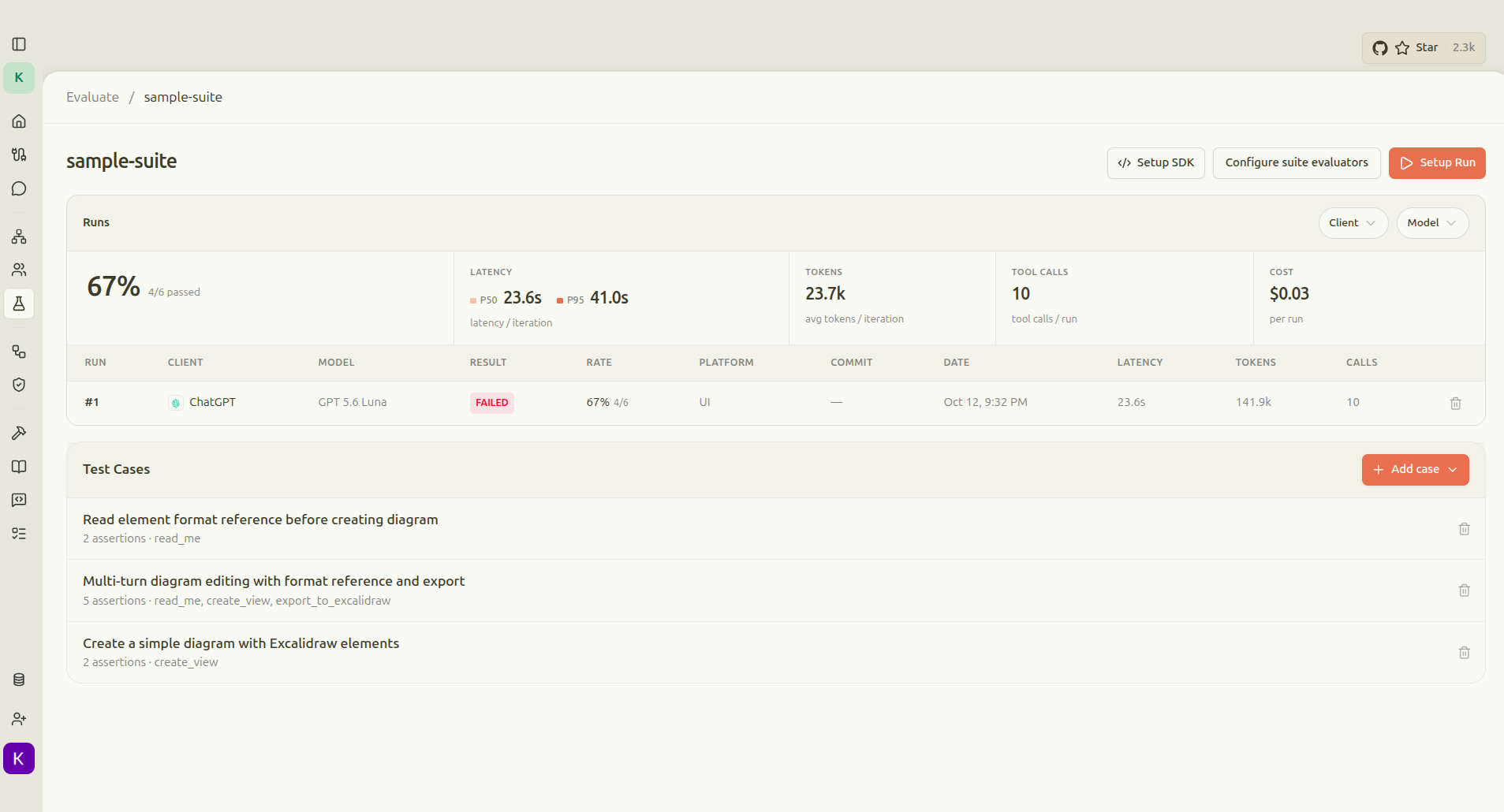
Manual testing helps discover a problem once. Evaluations make the behavior repeatable. A test case can assert which tool should be selected, which arguments should be supplied, whether the call succeeds, and whether the final response or task outcome meets the intended goal, plus non-functional signals like latency and token usage.
Repeated runs matter because agent behavior is probabilistic. Teams can run the same scenarios across agent and client configurations to expose failure rates that a few manual prompts can miss. MCPJam records those runs as comparable results instead of isolated screenshots and intuition.
Run reports track pass rate, latency, token usage, and tool calls across runs, while Run Insights identifies recurring failure patterns. A failing case that matters can then be promoted into regression coverage.
Swipe to inspect the full diagram →
Deterministic checks and LLM as judge
Use deterministic assertions when correctness can be stated exactly, such as tool selection, argument values, or output structure. For outcomes with a meaningful qualitative component, MCPJam uses an LLM as a judge to score the result against a goal or rubric.
MCPJam applies both types of checks across the stages of the User-Value Chain: connection, discovery, tool selection, tool call, tool response, and user value, so a suite can test whether the integration worked technically and whether the user got the intended outcome.
CLI testing from the terminal
Use the CLI when you want MCPJam checks in a shell, script, or CI job instead of the app. mcpjam server doctor performs a one-shot health check, mcpjam tools call invokes a specific tool, and the CLI includes protocol, OAuth, and MCP Apps conformance commands. Health and conformance workflows return machine-readable results and exit states that CI can act on, with JUnit reporting available for conformance suites.
SDK testing in TypeScript
The TypeScript SDK, @mcpjam/sdk, lets you keep MCP tests in the test runner your team already uses. MCPClientManager accepts the same server configuration shape as an mcp.json file; direct calls support deterministic unit tests, HostRunner puts a real model in front of the server for end-to-end checks, and EvalTest repeats that path to measure pass rate across probabilistic runs. The SDK also covers protocol, OAuth, and MCP Apps conformance and works with Jest, Vitest, or other TypeScript test runners. OAuth conformance can export JUnit XML for CI reporting.
CI/CD regression gating
Once a behavior is defined as an evaluation, it can become part of the release process. The CLI and SDK integrate with GitHub Actions or other CI systems, so the same checks can run automatically on pull requests instead of relying on manual reruns.
Failed checks return non-zero exit states, so CI can block a pull request or deployment when required behavior regresses. Teams can run fast conformance and authentication checks on each pull request, then reserve broader cross-client and performance runs for later release stages. Conformance suites export JUnit results, while evaluation history makes accuracy regressions visible across runs.
Acceptance testing
Evaluations are strongest when you already know what behavior to measure. Acceptance testing asks a more open question: what happens when different users try to complete real tasks, and how do they feel about the experience?
MCPJam approaches that from both synthetic and human directions.
Swarms
Swarms generate configurable personas and goals, then run realistic multi-turn journeys across selected clients and agents. They help teams discover scenarios they did not encode beforehand and classify how those journeys ended.
A useful workflow is to find an unexpected path with synthetic users, inspect why it happened, and turn that case into a durable evaluation.
User Testing
User Testing puts the integration in front of real people through a shareable, sandboxed pre-production experience. Testers can rate turns and leave comments, while teams can revisit sessions and analyze goals and sentiment.
The captured session gives engineering a direct path from human feedback to regression coverage. A confusing or unsuccessful interaction can become a reproducible test instead of remaining anecdotal.
OAuth and conformance testing
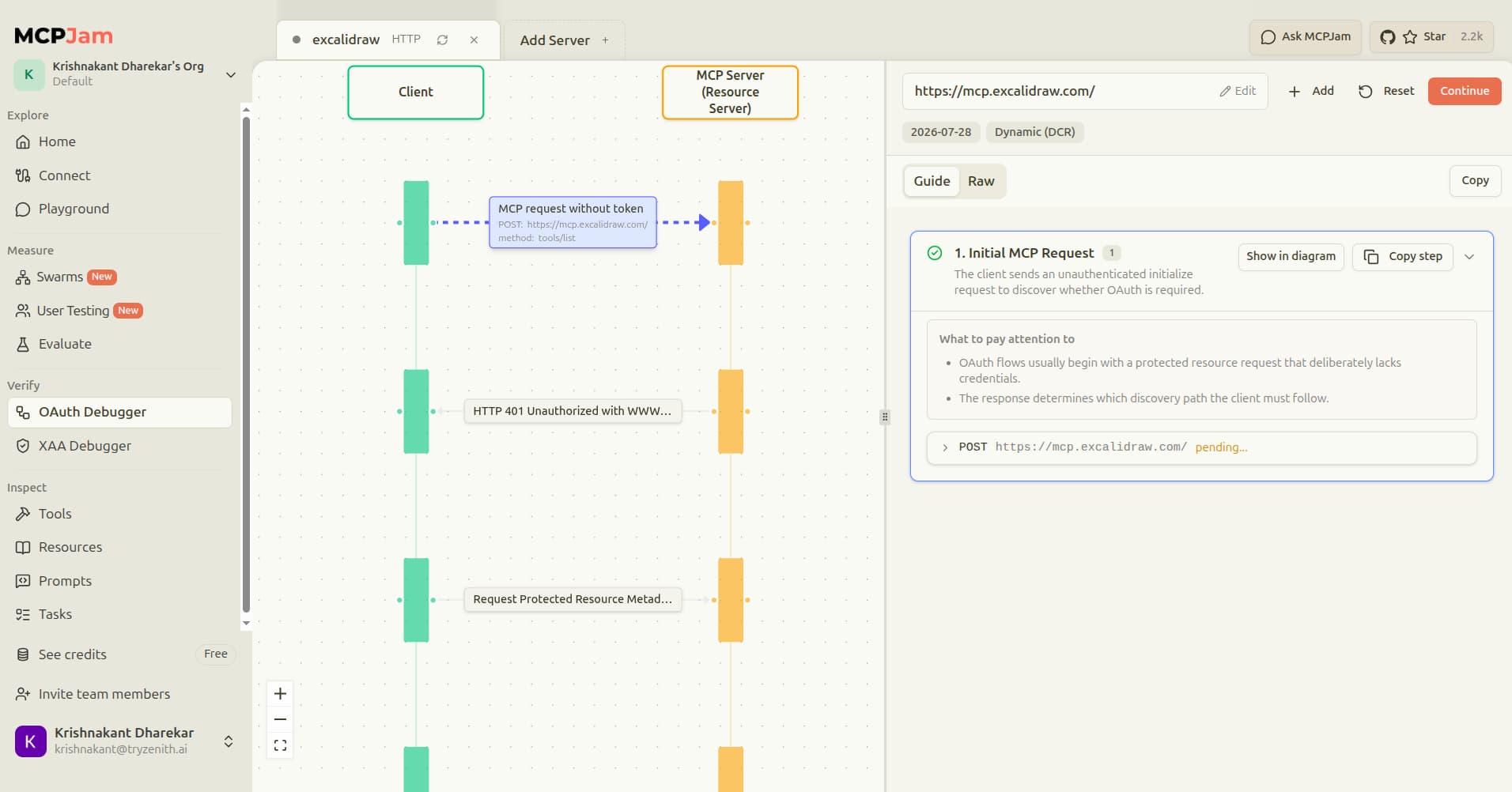
Authorization can fail before an MCP tool ever runs. OAuth Debugger renders the flow step by step and exposes the underlying requests, so teams can isolate whether discovery, registration, redirects, or token exchange caused the failure before debugging the server itself.
The OAuth Debugger supports four authorization revisions: 2025-03-26, 2025-06-18, 2025-11-25, and 2026-07-28, plus Dynamic Client Registration, pre-registration, and Client ID Metadata Documents. A separate XAA Debugger covers Cross-App Access within Enterprise-Managed Authorization (EMA), so teams can inspect that flow separately from personal OAuth. The CLI exposes XAA debugging for terminal and CI workflows.
Swipe to inspect the full diagram →
Projects and shared testing
Projects organize servers, hosts, test suites, sessions, and results in one place. A server can be shared with a teammate much like a document, so a colleague opens the same history instead of re-creating a test setup from a description. Reliability history keeps a comparable record of results across branches and releases, and team dashboards roll that record up into organization-wide reporting.
Local-first architecture and data handling
MCPJam combines open-source local tooling with hosted capabilities. The Inspector, CLI, SDK, eval runner, and conformance tooling can run in development or CI, while the hosted app supports shared execution and collaboration when teams need a common workspace.
MCPJam is intentionally outside the production request path. Teams can therefore reproduce and fix failures during development and CI, before customers depend on the integration.
Jeppesen ForeFlight reported 10x faster testing and schema iteration compared with testing directly in ChatGPT by moving iteration into local development.
From first prompt to release gate
MCPJam is designed to stay useful as testing matures. A developer can start by inspecting a local server and reproducing behavior in Playground. Once a failure matters, the team can encode it as an evaluation, run it across relevant client configurations, and move the same check into CI.
This keeps debugging, acceptance testing, and release decisions connected. Teams can carry proven cases forward instead of rebuilding test logic at each stage, then use accumulated results to decide whether a change is ready to ship.
MCPJam pricing and tiers
Pricing below is verified against the current pricing page as of October 2026. Plans are Free, Pro, Team, and Enterprise, with unlimited seats and projects across all four tiers.
Free is $0/month, with 200 credits per day, 30-day trace history, and a one-time grant of 500 eval iterations. Evals and User Testing cost 3 credits per prompt; Swarms cost 5 credits per prompt.
Pro is $24 a month billed annually, or $29 billed monthly, with 5,000 credits a month, unlimited trace history, and email support.
Team is $199 a month billed annually, or $249 billed monthly, with 50,000 pooled credits a month, basic RBAC, and priority support.
Enterprise uses custom pricing and adds advanced RBAC, SSO, audit retention, dedicated support, and DPA and SLA terms.
All four tiers include the same core testing surface: Playground, OAuth Debugger, Evals, User Testing, Swarms, and CI/CD checks. What changes across tiers is usage volume, trace history, RBAC, and support.
Conclusion
MCPJam turns pre-production failures into reusable regression coverage that can run in CI before the next release.
Teams can ship changes with recorded evidence of how the integration behaves across clients and user journeys, rather than waiting for production feedback.
To get started with the open-source Inspector:
npx @mcpjam/inspector@latestFrequently Asked Questions
What is MCPJam and what is it used for?
MCPJam is pre-production reliability infrastructure for MCP servers and other agent-facing software. It lets teams compare how the same server behaves across AI clients, test whether user journeys reach the intended outcome with Evals, Swarms, and User Testing, debug authorization, and carry repeatable checks into CI.
What problems does MCPJam solve for developers building MCP servers?
It catches failures that protocol checks alone cannot see: incorrect tool selection, wrong-but-valid arguments, client-specific capability differences, app UI problems, authorization failures, and user journeys that complete technically but miss the intended outcome.
Can MCPJam test the same MCP server with different models and clients?
Yes. The Playground supports agent and client comparison, and MCPJam maintains client-specific configurations for major AI environments. Comparing them separately helps teams distinguish an agent difference from a client capability difference.
Can MCPJam evaluations run in CI/CD?
Yes. MCPJam provides CLI and SDK workflows for automated evaluation and conformance checks, with pass/fail states that can gate a pull request or deployment.
Can I run MCPJam checks from the command line or in code, not just the web app?
Yes. The CLI runs health checks, OAuth conformance, tool calls, and conformance suites from the terminal with pass/fail exit codes. The TypeScript SDK runs unit tests, end-to-end tests, evals, and conformance checks inside Jest, Vitest, or another TypeScript test runner, with JUnit output available for conformance reporting.
What software provides automated OAuth and authorization testing for my MCP server?
MCPJam's visual OAuth Debugger covers multiple MCP authorization revisions and registration methods. It also supports Enterprise-Managed Authorization (EMA), including the Cross-App Access (XAA) flow, with a sequence view that exposes where authorization failed.
Is there a testing platform that allows developers to test MCP servers end-to-end locally without deploying them first?
Yes. MCPJam's open-source Inspector supports local STDIO workflows, direct tool inspection, agent-driven Playground testing, and local evaluation workflows so a server can be tested while it is still under active development.
Is MCPJam open source, and what is the difference between its free and paid tiers?
Yes. MCPJam has an open-source local core for inspection, CLI and SDK use, local evaluations, and conformance testing. Pricing verified October 2026: Free is $0/month with 200 credits per day and a one-time grant of 500 eval iterations; Pro is $24/month when billed annually with 5,000 credits per month and unlimited trace history; Team is $199/month when billed annually with 50,000 pooled credits per month and basic RBAC; Enterprise uses custom pricing with SSO and advanced RBAC. Check the pricing page for current rates and packaging.