MCPJam now supports Skills over MCP
Test the tools and the workflow instructions delivered by an MCP server in one place.
Test the tools and the workflow instructions delivered by an MCP server in one place.
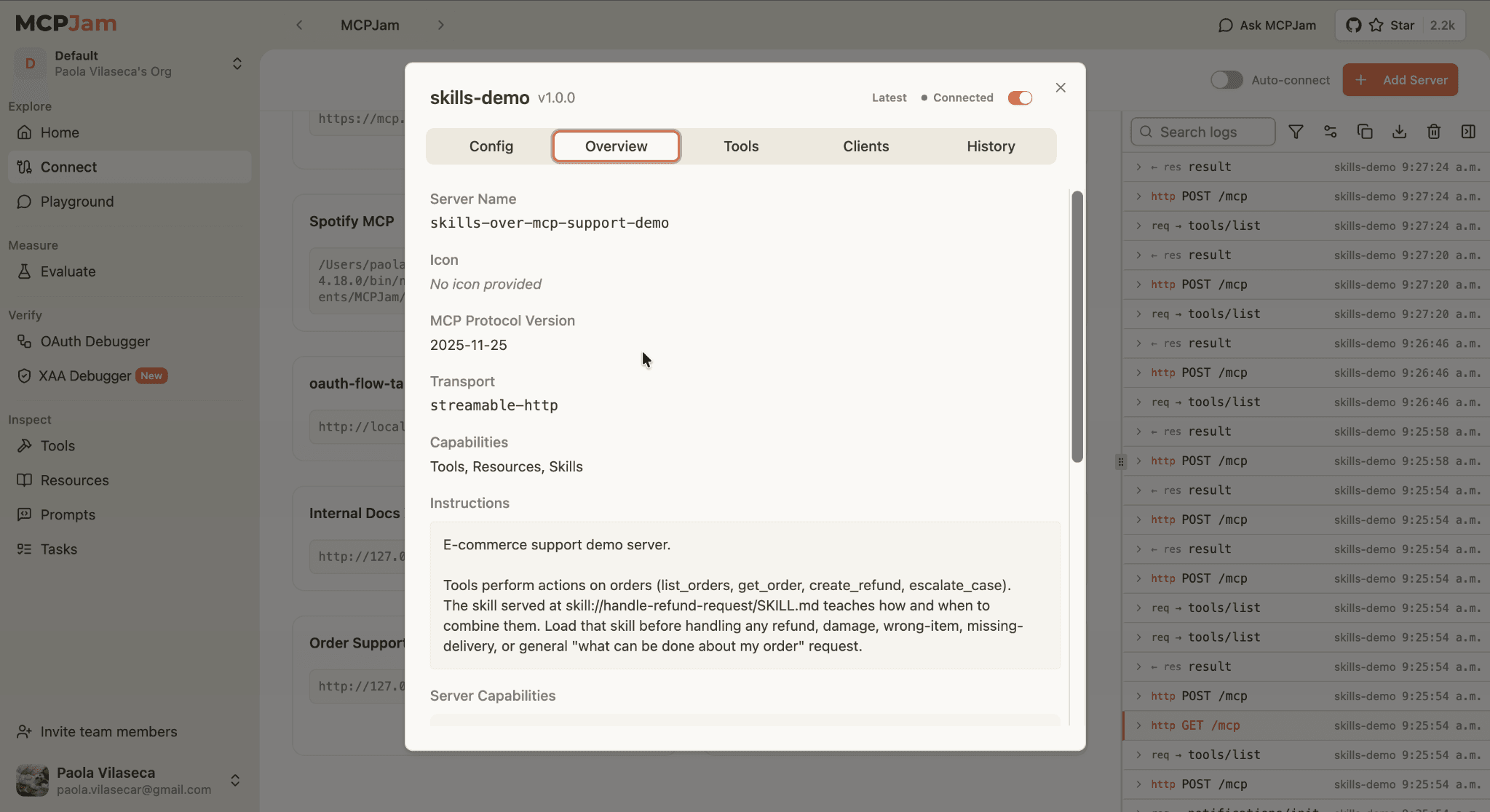
MCP servers can give an agent access to tools, but access alone does not guarantee that the agent knows how to complete a workflow correctly. For example: a tool can explain how to retrieve an order or create a refund. It does not necessarily teach the agent that it should check the order first, verify the refund policy, ask for confirmation before taking a financial action and escalate cases that need a human review.
Those workflow instructions usually live somewhere else: in documentation, system prompts or files that developers have to install and maintain separately from the server.
MCPJam now supports Skills over MCP, allowing developers to connect a server, discover the skills it provides and load them directly in the Playground. This makes it possible to test the tools and the instructions for using them together instead of treating them as two separate parts of the agent. More importantly, MCPJam makes it possible to inspect whether the agent actually followed those instructions instead of judging the workflow only from its final answer.
Tools tell the agent what it can do. Skills explain how to do the job
To make this easier to understand, we'll use a customer support server throughout this article. The server can look up orders, create refunds and escalate cases for manual review through tools such as get_order, create_refund and escalate_case.
Each tool has a name, a description, an input schema and a result.
A skill provides the workflow around those tools. It can tell the agent which tool to call first, which conditions it must check, when it needs confirmation and when it should stop instead of taking an action.
Swipe to see all columns →
| Tool | Skill |
|---|---|
| Performs an action | Describes how to complete a workflow |
| Defines inputs and outputs | Contains instructions and supporting files |
Example: create_refund | Example: handle-refund-request |
| Answers "What can the agent do?" | Answers "How should the agent do it?" |
A skill does not replace tools. It gives the agent the instructions it needs to combine them correctly.
This distinction becomes important as MCP servers support more complete workflows. Good tool descriptions help the model understand each individual action, but they are not a practical place to store hundreds of lines of procedures, policies, conditional steps and reference material.
Why serve skills through MCP?
Agent applications already support skills, but those instructions are usually distributed separately from the MCP servers and tools they describe.
Skills over MCP brings them through the same connection. A host can discover a server's skills and retrieve their instructions and supporting files only when needed. This means:
- Skills can be discovered when a server is connected.
- The instructions stay connected to the tools and service they describe.
- Supporting files can be retrieved only when needed instead of loading everything into context immediately.
- Server owners can maintain workflow knowledge without requiring users to manually reinstall a local copy after every change.
- The same server can provide different skills for different tasks without turning each workflow into another tool.
The Skills over MCP Working Group is developing the proposal through SEP-2640. MCPJam supports its resources-based approach as reviewed on August 25, 2026. SEP-2640 remains a draft, so its fields and client behavior may change.
How skill discovery works
The current flow has three main steps:
skills/listallows the host to discover the skills exposed by a server.skills/getreturns the selected skill and the files declared by it.resources/readretrievesSKILL.mdand any supporting files when they are required.
The server declares the io.modelcontextprotocol/skills extension in its capabilities. Each skill has a canonical SKILL.md resource and can include other files with policies, examples or more detailed instructions.
This design uses progressive disclosure. The host can show lightweight information about the available skills first, then load the full instructions and supporting material only when the user chooses a skill. A server with several large skills does not need to place all of their content into the model's context when the connection starts.
Swipe to inspect the full diagram →
Testing a refund workflow in MCPJam
To test the complete flow, we built a support server with eight sample orders, four tools and one skill.
The complete demo is available in the MCPJam customer-support-skill repository. To run it locally:
Scroll code horizontally →
git clone https://github.com/MCPJam/customer-support-skill.git
cd customer-support-skill
npm install
npm start
Then connect MCPJam to http://localhost:3001/mcp. The server uses Streamable HTTP and does not require authentication or custom headers.
The server exposes:
list_ordersto see the available test orders.get_orderto retrieve the current state of one order.create_refundto process an eligible refund.escalate_caseto send a case for manual review.
The handle-refund-request skill teaches the agent how to use those tools. It requires the agent to retrieve the order before making a decision, use the refund policy as the source of truth, avoid duplicate refunds and never invent order information.
It also defines the decision points that are difficult to express as isolated actions:
- A damaged or incorrect order inside the refund window can be refunded, but only after the user confirms the financial action.
- A damaged order outside the refund window should be escalated.
- A package marked as delivered but reported missing requires an investigation instead of an automatic refund.
- An order that was delivered correctly should not trigger a refund or an escalation.
- An order that has already been refunded should not be processed again.
The same tools are available in every case. The skill changes how the agent decides between them.
Swipe to see all columns →
| Order | Situation | Expected behavior |
|---|---|---|
order_1042 | Damaged and inside the refund window | Check the order, explain eligibility, ask for confirmation, then refund |
order_4177 | Marked as delivered but reported missing | Open an escalation for investigation |
order_6104 | Delivered correctly with no reported problem | Explain the current status and take no action |
Loading the skill in the Playground
After connecting the server, MCPJam shows Tools, Resources and Skills in the server capabilities. The available server skills also appear in the Playground's / menu.
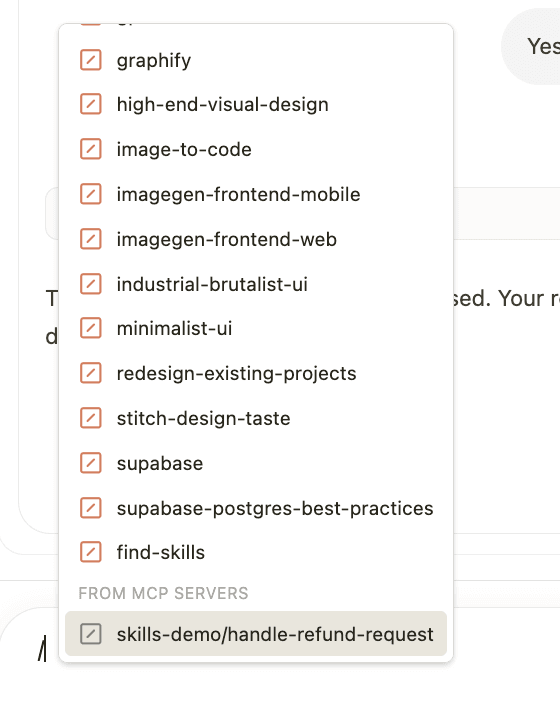
Select handle-refund-request, then send:
Scroll code horizontally →
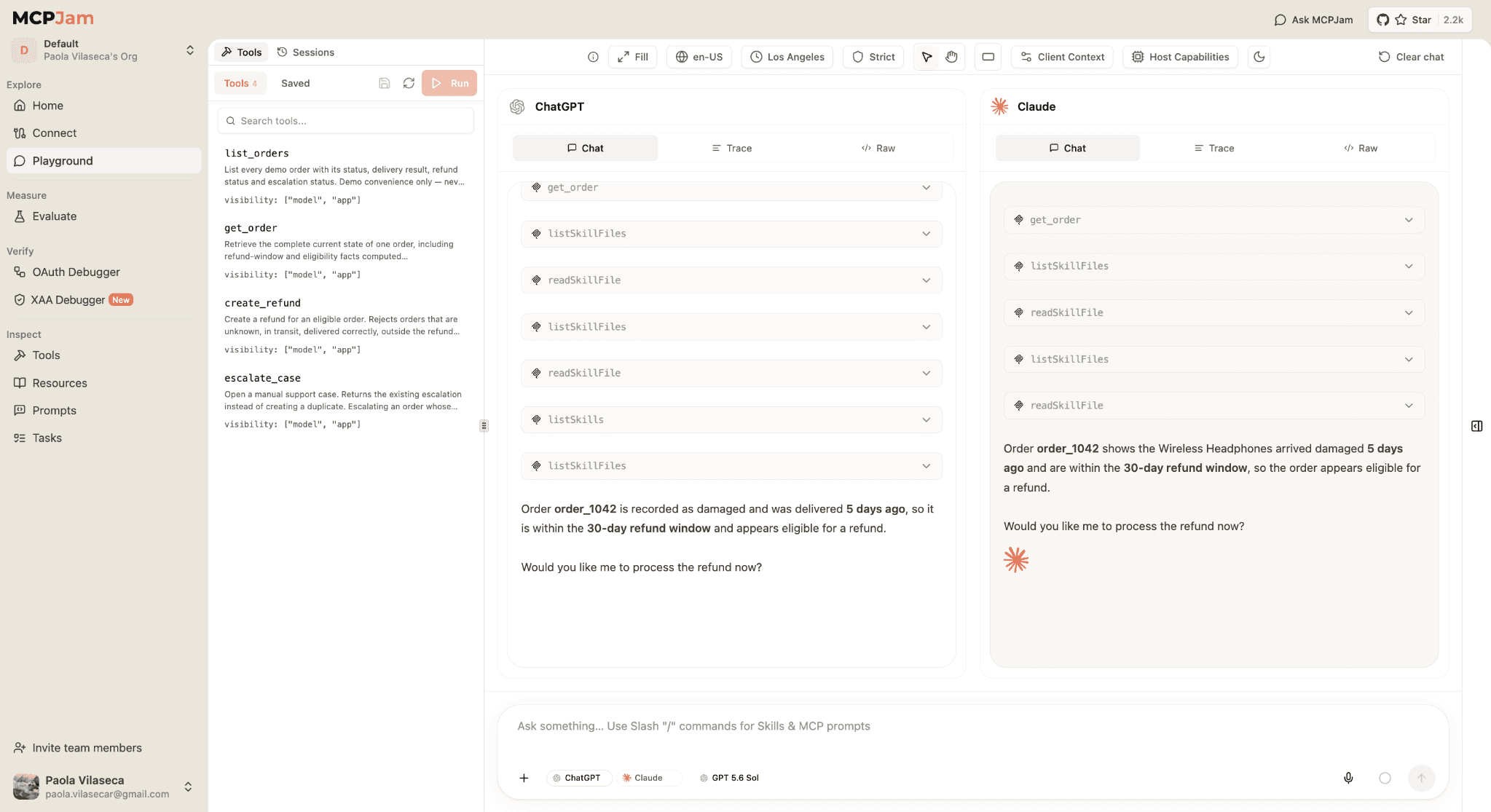
My order order_1042 arrived damaged. Can you help me get a refund?The obvious action would be to call create_refund immediately. The skill requires a safer workflow. The agent first retrieves the order, confirms that the item is damaged and still inside the 30-day window, explains that it is eligible and stops to request confirmation.
Swipe to inspect the full diagram →
Only after the user replies:
Yes, please process the refund.should the agent call create_refund and return the refund ID.
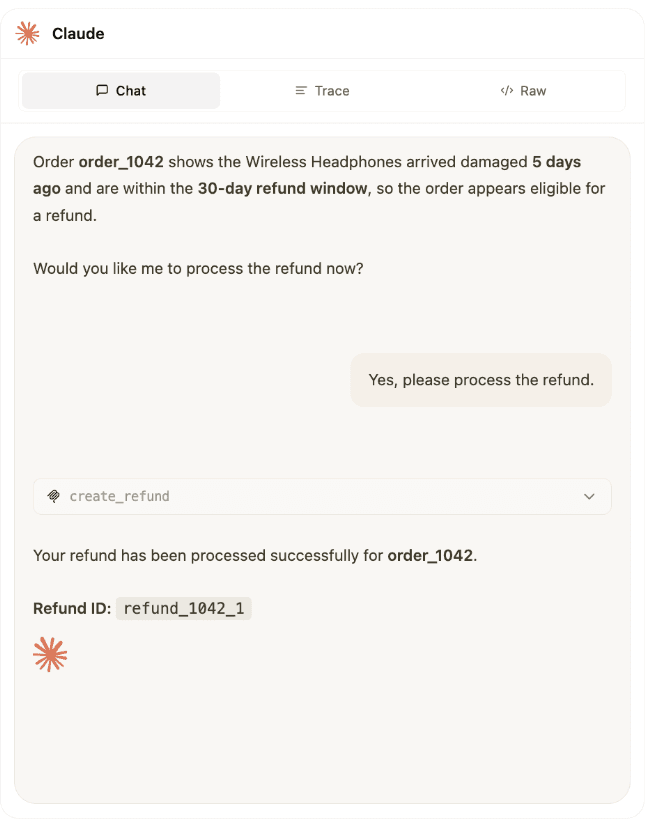
The confirmation step is a small example, but it shows why testing the skill matters. Calling the tool successfully is not the only requirement. The agent must call it at the correct point in the workflow.
The same skill can then be tested with a different case:
Scroll code horizontally →
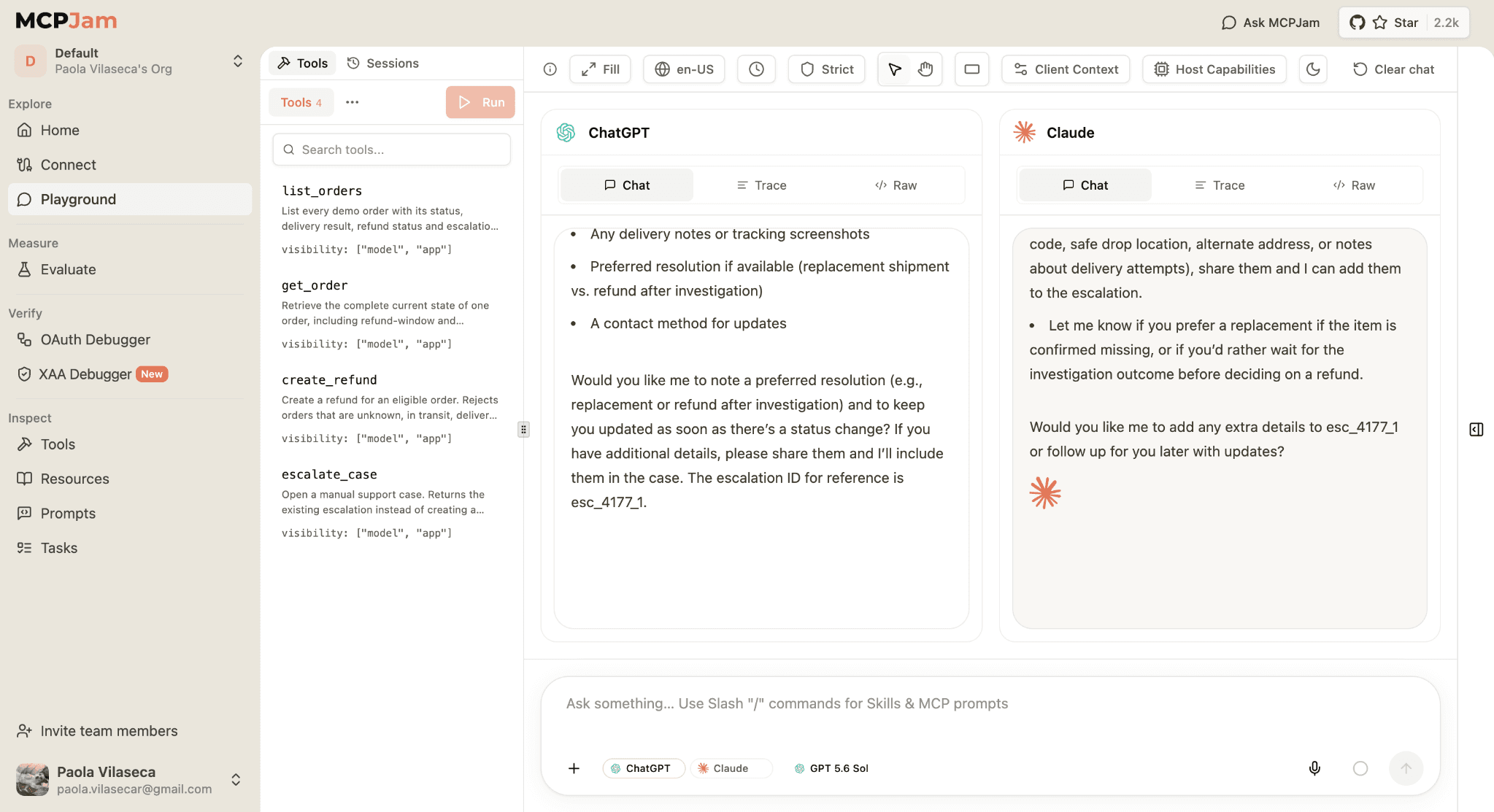
Order order_4177 says delivered, but I never received it.This time the agent should call get_order, recognize that a missing delivery needs investigation and use escalate_case instead of create_refund. The escalation ID makes the manual-review path explicit.
Swipe to inspect the full diagram →
The skill can also be tested with a correctly delivered order:
Scroll code horizontally →
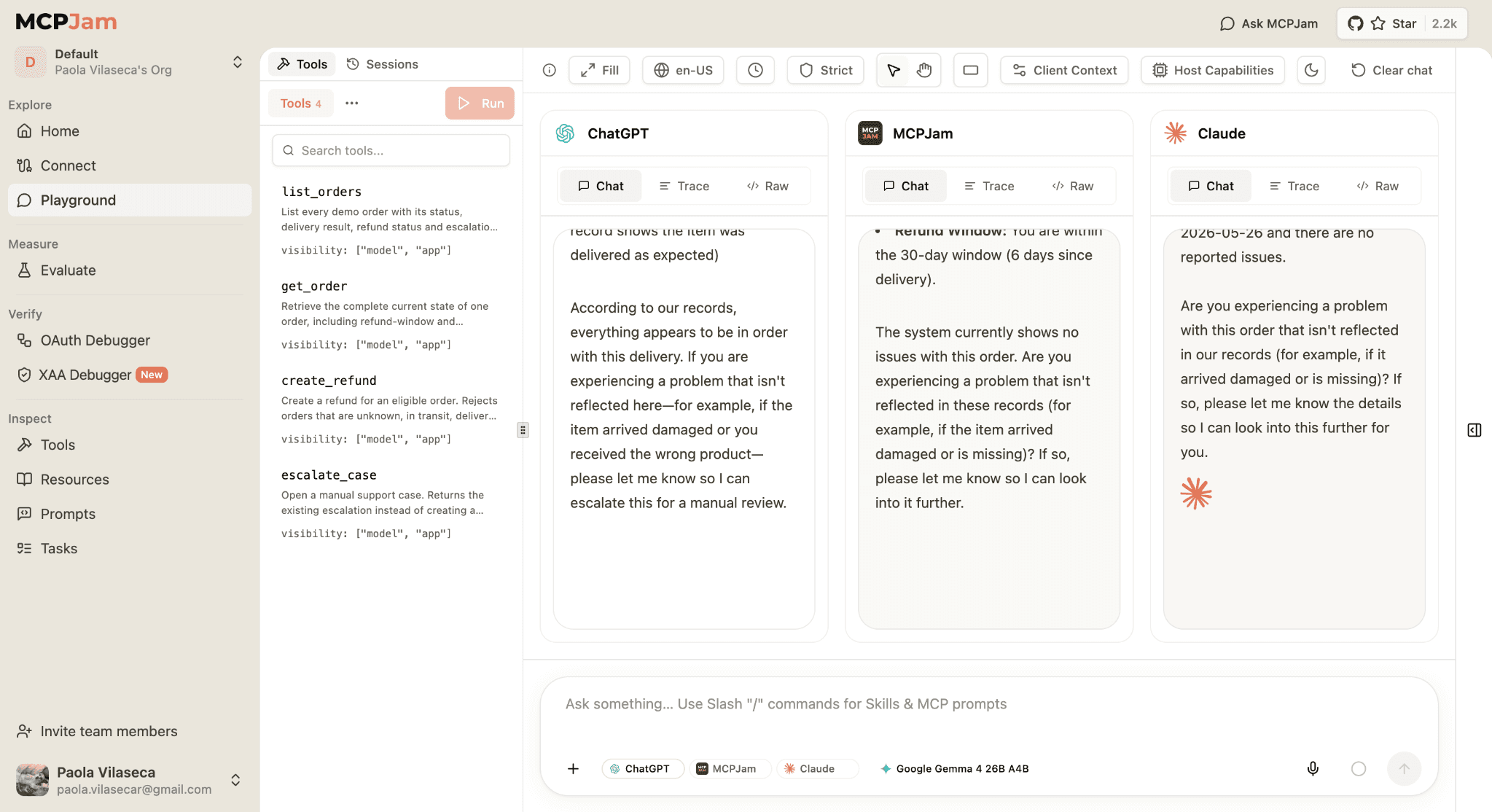
Can you check whether anything is wrong with order_6104?This time the agent should call get_order, recognize that the order was delivered correctly and avoid both create_refund and escalate_case. The tools have not changed; the skill gives the agent the decision process required to take no action when the record does not justify one.
Swipe to inspect the full diagram →
Inspecting more than the final answer
A final answer can look correct even when the agent skipped an important step. MCPJam makes the underlying behavior visible so developers can check:
- Whether the server declared the Skills extension.
- Which skills the client discovered.
- Which skill was loaded for the conversation.
- Which resources were retrieved.
- Which tools the agent called and in what order.
- Whether the tool inputs and results matched the intended workflow.
- Whether the agent stopped for user input when the skill required it.
The Playground is useful for the conversation itself, while Trace and Raw provide the evidence behind it. This is especially relevant for workflows involving approvals, financial actions, access controls or manual escalation. The response is only one part of the test; the path the agent took to produce it also matters.
Start testing Skills over MCP
Skills over MCP makes it possible for a server to ship the manual with the product: tools provide the actions and skills provide the workflow knowledge required to use them.
With MCPJam, developers can connect a server implementing the extension, inspect the skills it exposes, load them in the Playground and verify whether the agent follows the intended process across different cases.
SEP-2640 is still under development, and implementations will continue to change with the proposal. Testing now helps server and client developers see where discovery, loading and agent behavior work as intended and where compatibility still needs attention.
Clone the customer-support-skill demo, connect it to MCPJam and test the complete workflow. You can also connect your own server implementing the extension and inspect how its skills behave across models.
For tools exposed by a website, follow our WebMCP testing guide to compare direct tool calls in Inspector with agent behavior in Playground.