Jeppesen ForeFlight uses MCPJam to iterate 10x faster on AI experiences for pilots
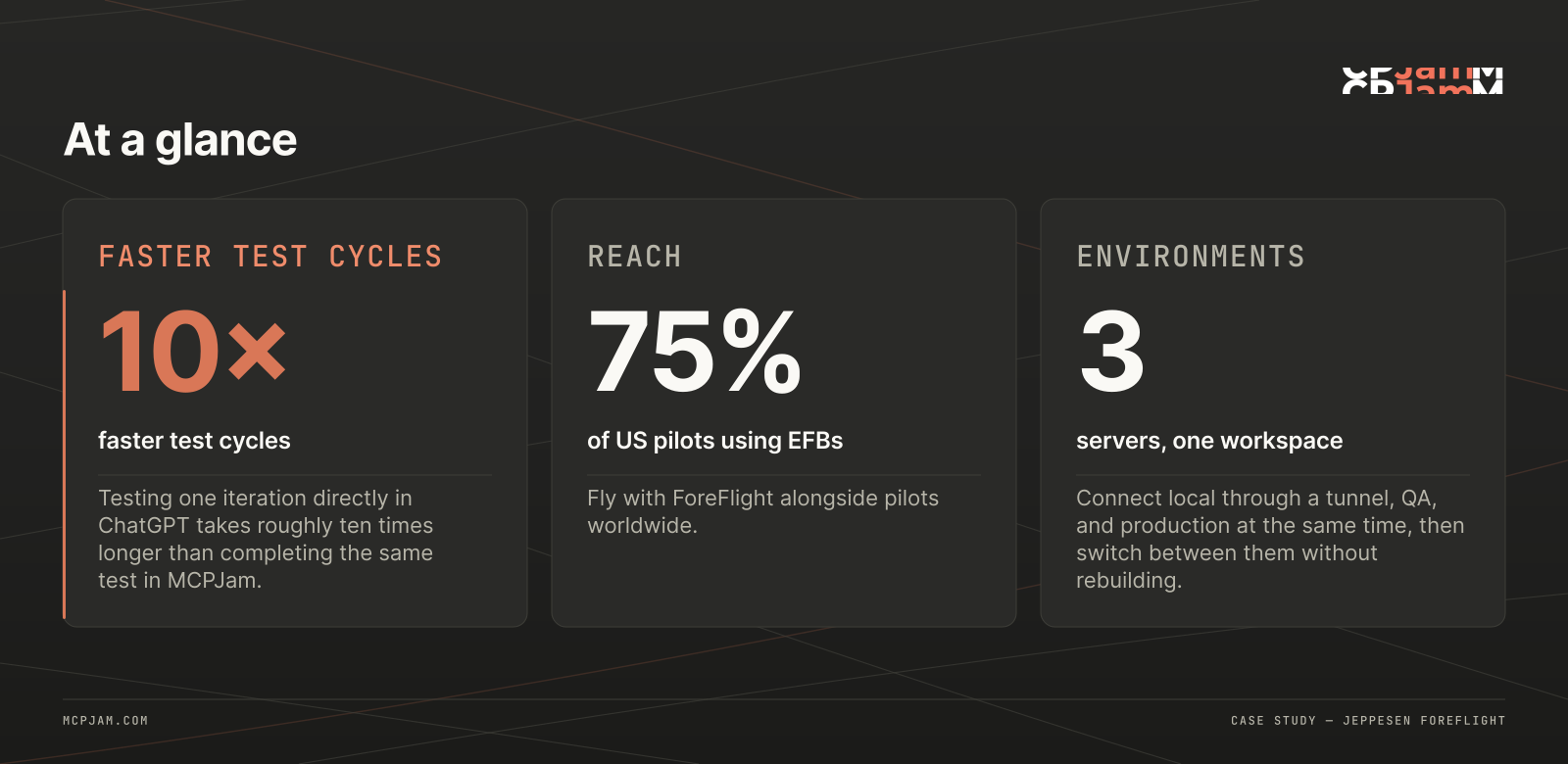
How MCPJam supports secure, personalized flight app experiences for the 75% of US pilots using ForeFlight.
Swipe to inspect the full diagram →

At a glance
- Company: Jeppesen ForeFlight
- Product: ForeFlight AI Connector
- Use case: Developing and debugging a remote MCP server with OAuth and interactive UI.
- MCPJam products: MCPJam's hosted app, Playground, OAuth Debugger
- Key result: 10x faster testing and schema iteration compared with testing directly in ChatGPT.
Swipe to inspect the full diagram →
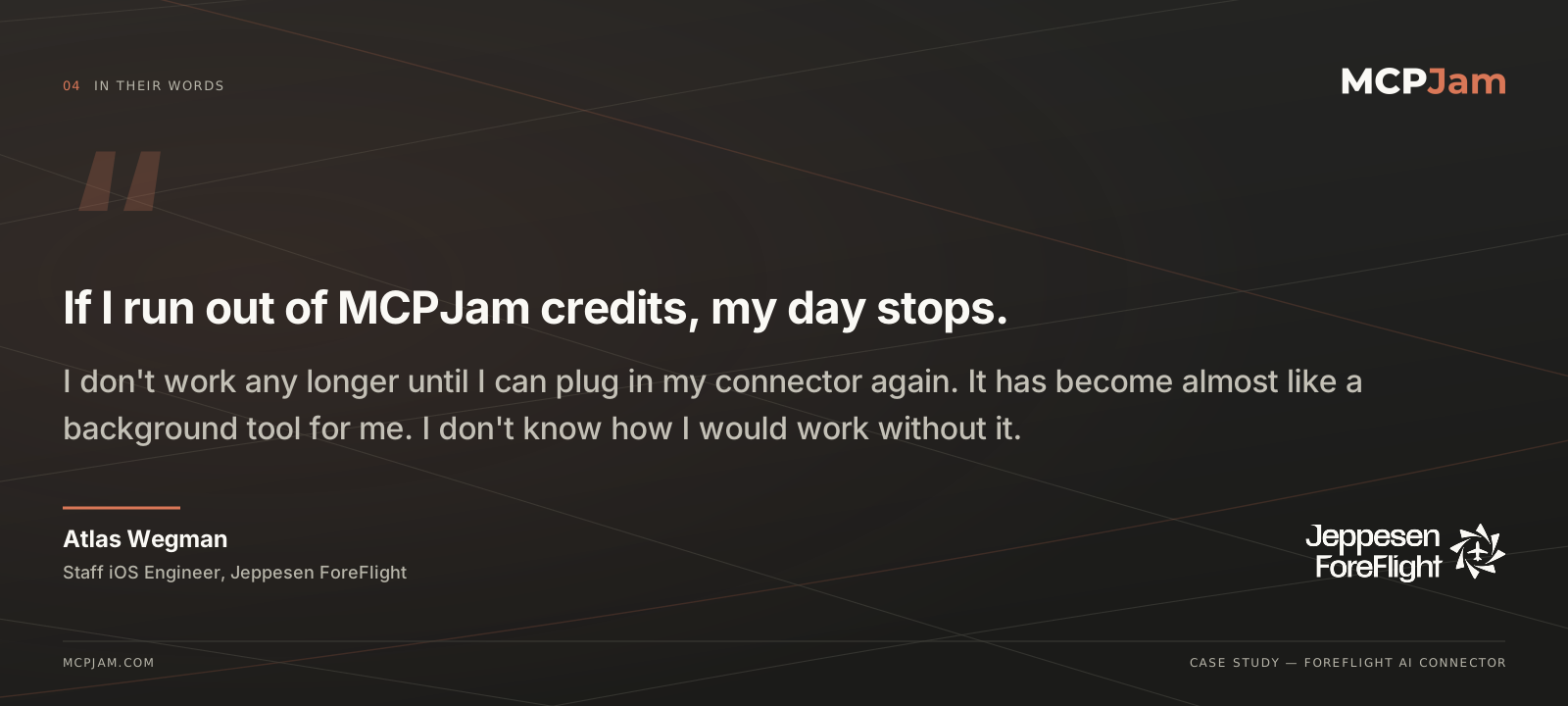
"MCP server design is really flaky… When you need the model to do it right 10 times in a row, it falls apart. … MCPJam has become a background tool for me; I don't know how I would work without it. It gives me the control I need to iterate on the schema rapidly." — Atlas Wegman, Staff iOS Engineer at ForeFlight
Bringing the gold standard in aviation software to AI
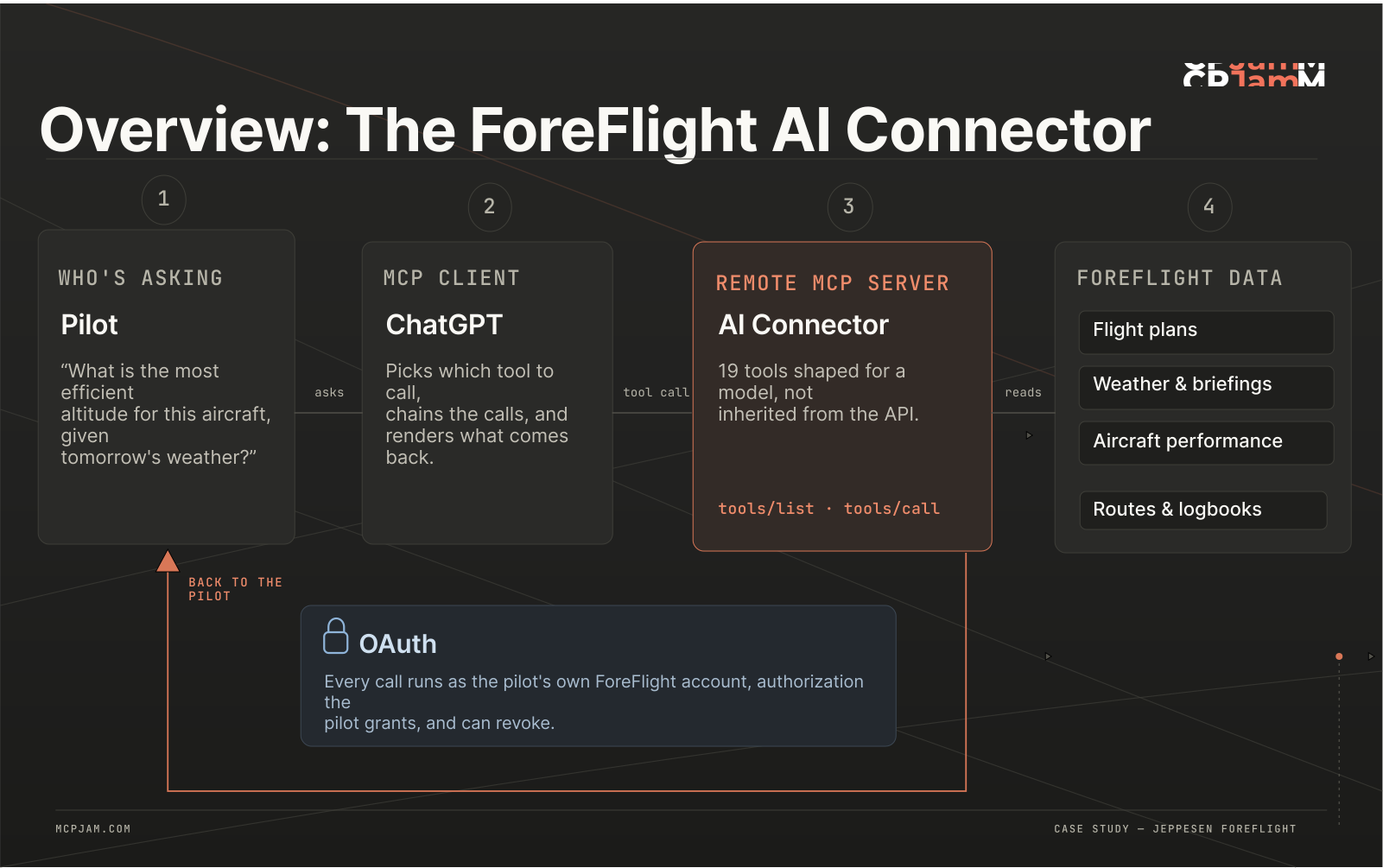
Atlas Wegman had been a pilot for roughly a decade before joining Jeppesen ForeFlight, whose integrated flight app, ForeFlight, gives aviators access to flight plans, aircraft performance, weather, routes, logbooks, and other critical tools. The ForeFlight app is used by 75% of US pilots who use digital flight management tools (EFBs) and hundreds of thousands pilots worldwide– “undeniably the gold standard in our industry,” in Wegman’s words.
In June, the team launched ForeFlight AI Connector to make that information accessible through a new interface: Natural-language conversations in applications like ChatGPT.
The connector allows pilots to securely connect their ForeFlight accounts and ask personalized questions about their flights and aviation data– to find the most efficient altitude a specific plane should fly given current weather conditions, for example, or to quickly get insights from a preflight briefing. Beyond offering a secure, interactive experience for existing users to manage their flight information, the AI Connector also aims to bring new users onto the platform by making ForeFlight discoverable to a cohort of younger, AI-native pilots who are still getting familiar with aviation software.
Swipe to inspect the full diagram →
In designing the ForeFlight AI Connector, accuracy was obviously the top priority for the team. Design quality was close behind.
"We're a super visual product, and we take pride in our design craft. To be able to bring that UI to the chat experience, expanding beyond plain text, was the first little glimmer of, 'This could be cool.'" — Atlas Wegman, Staff iOS Engineer at Jeppesen ForeFlight
The challenge: Getting MCP servers ready for takeoff
The Jeppesen ForeFlight app contained a broad set of mature APIs and workflows. The initial instinct was to expose much of that functionality directly to the model; in practice, that approach created a series of issues.
Swipe to inspect the full diagram →
"I kicked off a prototype with that, and then it immediately ran into a million issues. The built-in MCP Inspector is nowhere near sufficient for actually inspecting the tool responses, connecting to multiple servers, or debugging OAuth. [MCP Inspector] left a lot to be desired– and then I pretty quickly found MCPJam, which filled all the voids from day one up till now."
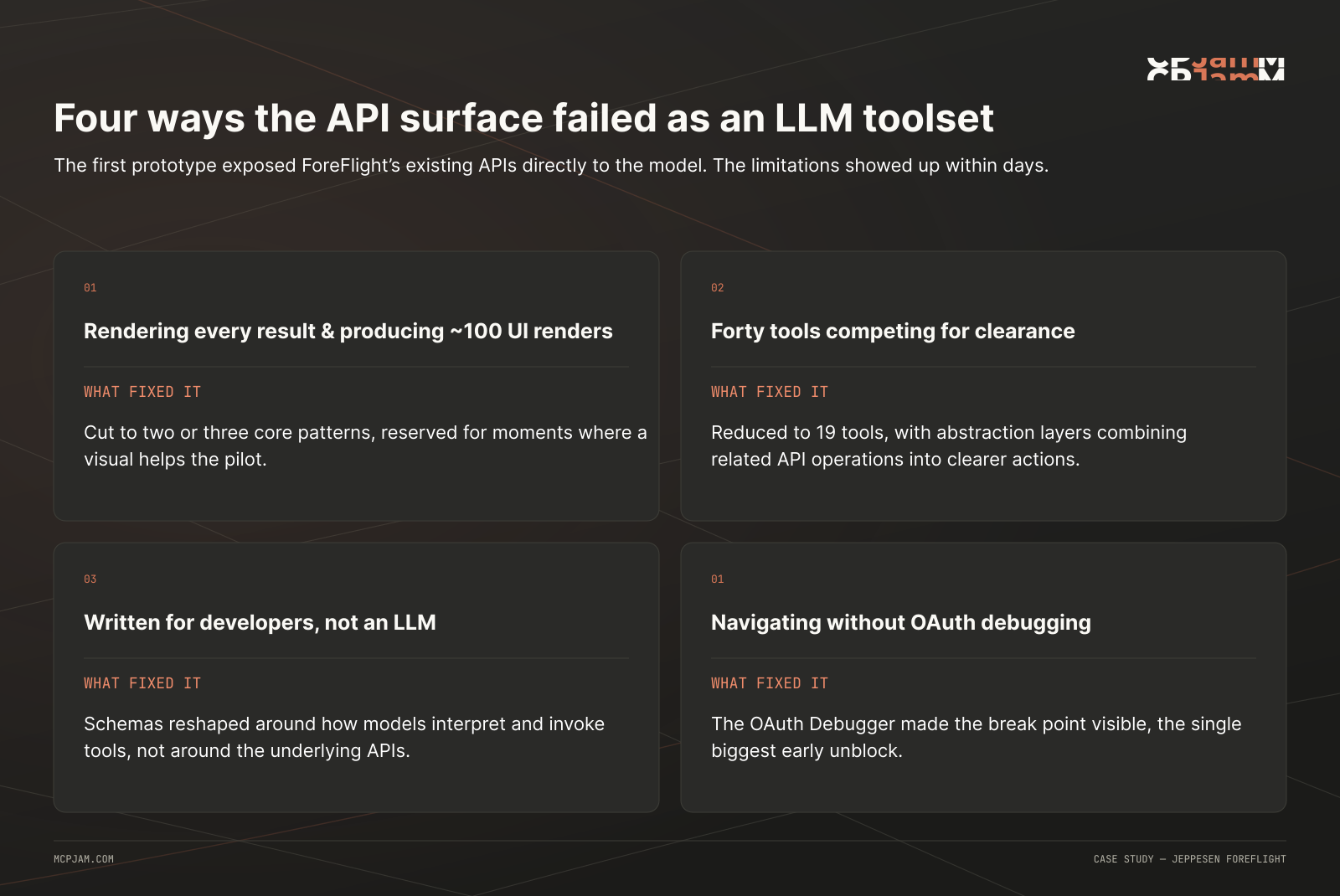
1. UI rendering: Refining Jeppesen ForeFlight’s visual approach
Jeppesen ForeFlight initially built roughly 100 possible UI renders for the connector.
When the assistant chained multiple tool calls together, each response could produce another visual component. Instead of creating a richer experience, the accumulated interfaces flooded the conversation, consumed context, and made it harder for the user and model to follow the task.
The team ultimately reduced the connector to only two or three core UI patterns. Rather than rendering every intermediate result, Jeppesen ForeFlight reserved interactive components for the moments when a visual interface materially improved the pilot’s experience.
2. Server endpoints: Forty tools competing for clearance
The first iteration exposed more than 40 server tools directly to the client.
Those endpoints made sense as an API surface, but not necessarily as an LLM toolset. The model struggled to determine which tools belonged together and how to move information between them. Small inconsistencies– like one endpoint expecting a trip_ID while another used a flight_ID– could derail an otherwise straightforward multi-step workflow.
The model was being asked to perform integration logic that would have been more reliable in code. Ultimately, Jeppesen ForeFlight reduced the server to 19 tools and introduced abstraction layers that combined related API operations into clearer, higher-level actions. That gave the model fewer decisions to make and reduced the number of opportunities for parameter mismatches.
3. Schema design: Giving models a better flight plan
Even after reducing the tool count, Jeppesen ForeFlight found that schemas designed for conventional developers were not always understandable to an LLM.
Field names, descriptions, optional parameters, identifier formats, and tool boundaries all affected whether a model could call a tool correctly. Multi-turn conversations magnified small ambiguities: A schema that worked in isolation might break when the assistant needed to retain an identifier and use it several calls later.
The team spent significant time reshaping its schemas around the way models interpret and invoke tools– not simply around the structure of the underlying APIs.
4. OAuth debugging: Navigating without instruments
Authorization was perhaps the biggest source of uncertainty for Jeppesen ForeFlight’s AI Connector team.
Early in development, it was often unclear whether a failed connection came from Jeppesen ForeFlight’s server, its OAuth implementation, ChatGPT, or stale client state. In some cases, a flow that failed one day would begin working the next, without an obvious explanation.
The team initially tried to debug issues using native MCP tools, but quickly found that the MCP Inspector did not provide enough visibility on tool responses, multi-server connections, or OAuth behavior for Jeppesen ForeFlight’s development workflow.
That’s when Jeppesen ForeFlight began using MCPJam.
"MCPjam made it way easier to see where it was breaking. And that was key– absolutely key– in the early setup here."
The solution: How MCPJam’s Playground and OAuth Debugger cleared the runway for Jeppesen ForeFlight
Jeppesen ForeFlight connected its local, QA, and production MCP servers to MCPJam, where they could move between the three environments without repeatedly recreating connections or authorization state.
"I sign in, and all my servers pop up. I run a local one through a tunnel, but I also have our QA server and the production server wired up, so I can quickly toggle between those three. That is sweet."
Most testing began in the MCPJam Playground. When something failed during authentication, Wegman could move directly into the OAuth Debugger, inspect the flow, resolve the issue, and return to testing.
"I'll go right into the Playground unless something's broken, in which case I go to the OAuth Debugger. The debugger is a lifesaver."
Over time, MCPJam replaced the built-in MCP Inspector entirely in Jeppesen ForeFlight’s debugging and development workflows.
"I have not cracked MCP Inspector open in eight to ten months. MCPJam has fully taken that over– just 'cause it works perfectly, I have no reason to do the other thing."
Schema cache: Breaking out of the holding pattern
One of the biggest development bottlenecks had little to do with Jeppesen ForeFlight’s code; it came from testing schema changes directly in ChatGPT.
After modifying a tool definition, the team could not always tell whether ChatGPT had loaded the new schema. Developers had to open a fresh window, reconnect the connector, authenticate again, and attempt to refresh the toolset. When the result was still wrong, the source of the problem remained ambiguous.
Was the new schema broken? Was the old schema cached? Had authentication failed? Was ChatGPT holding on to stale state?
"You could spend a whole day in this loop of, 'Whose problem is this? Is this an OAuth thing? Is this a ChatGPT thing?'"
MCPJam gave Jeppesen ForeFlight direct control over that state. Wegman could clear the session, reconnect the server, refresh the tool list, and immediately test the revised schema.
"In MCPJam, I can just clear the session, reconnect, and refresh the tool list without going crazy. It gives me the control I need to iterate on the schema rapidly."
That changed schema development from a frustrating, uncertain loop into a repeatable engineering process.
The result: 10x faster testing cycles
Swipe to inspect the full diagram →
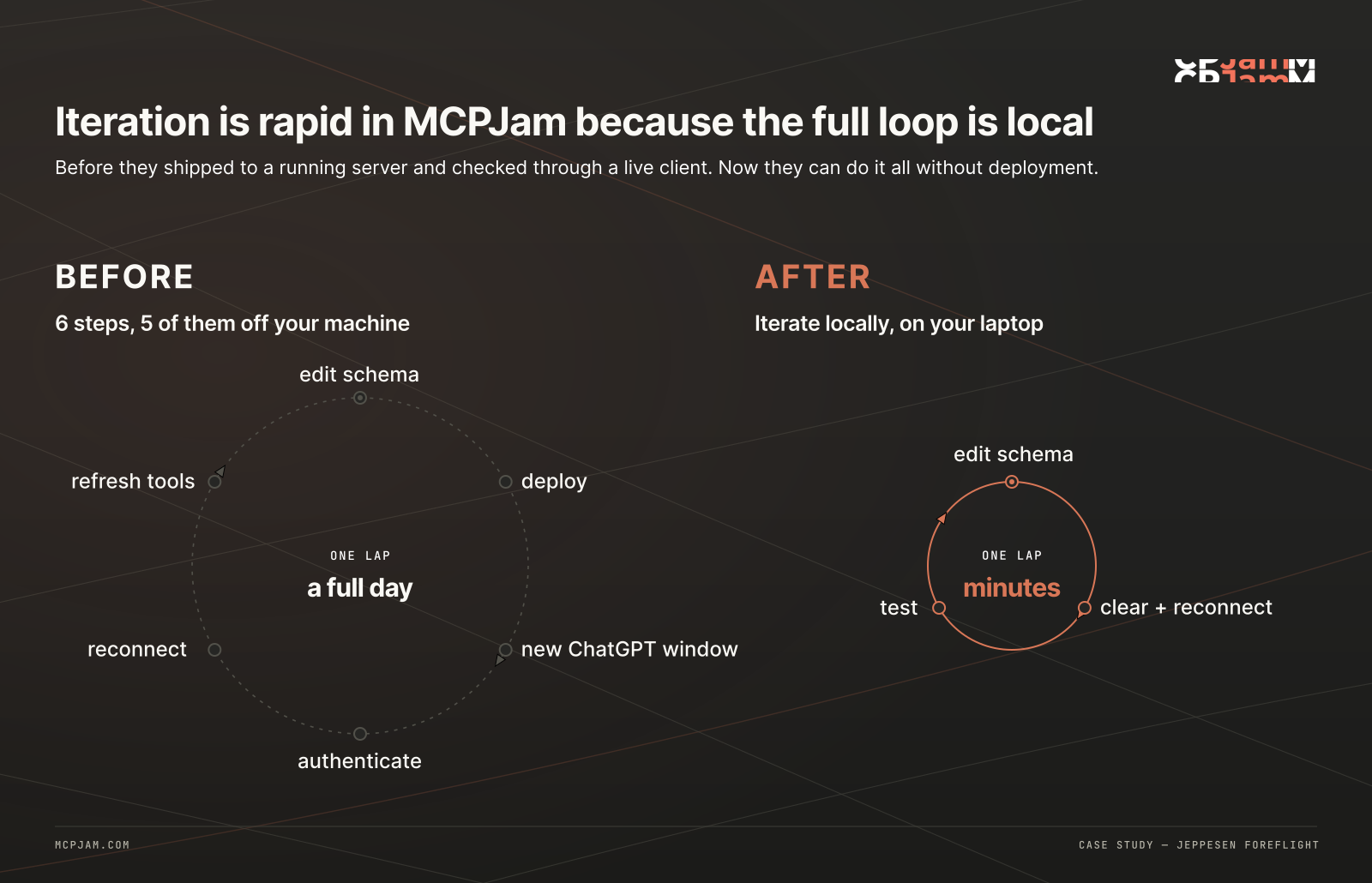
Altogether, Jeppesen ForeFlight estimates that testing an iteration directly in ChatGPT can take approximately 10 times longer than completing the same test in MCPJam.
Without MCPJam, each change may require a fresh conversation, a new connection, another login, a connector refresh, and additional work to determine whether ChatGPT is still using a cached schema. In MCPJam, the equivalent cycle can be completed by clearing the current session, reconnecting, and refreshing the tool list.
The improvement is not limited to time saved. A controlled testing environment makes it easier to identify whether a failure originates in the server, schema, OAuth flow, or MCP client. That confidence allows Jeppesen ForeFlight to experiment more aggressively without losing hours to hidden state.
MCPJam has consequently become part of Wegman’s everyday development environment rather than a tool reserved for exceptional debugging.
What Jeppesen ForeFlight learned about building effective MCP servers
Jeppesen ForeFlight’s experience points to a broader lesson for teams bringing established products into AI interfaces: More functionality does not necessarily produce a more capable agent.
Reliable MCP servers are intentionally designed for models.
That can mean exposing fewer tools, moving deterministic workflows into code, designing abstractions around user intent, and treating UI as a scarce resource rather than rendering a component after every call. It also means testing schemas through multi-turn flows, where identifiers and context must survive across several actions.
MCPJam gave Jeppesen ForeFlight the environment it needed to discover those principles before putting the AI connector in pilots’ hands.
What’s next: Guiding pilots with skills
Jeppesen ForeFlight is now using MCPJam to experiment with skills that help users begin common, high-value workflows.
Rather than requiring pilots to know exactly what the connector can do or how to formulate a request, skills can give the assistant additional guidance for tasks such as reviewing a briefing, analyzing a route, or extracting insights from a logbook.
The team is testing these skills alongside the MCP server to understand when they improve tool selection and chaining (and when additional instructions might interfere with an otherwise successful flow).
As Jeppesen ForeFlight expands the AI Connector, MCPJam will remain central to evaluating those interactions across local, QA, and production environments.
For Wegman, the value is straightforward:
"Hitting all these snags was really a nightmare– I'd be nowhere without your tool, for sure." — Atlas Wegman, Staff iOS Engineer at Jeppesen ForeFlight