5 Best MCP Testing Tools for Server Reliability (2026)
Compare the 5 best MCP testing tools for 2026, including MCPJam, MCP Inspector, Postman, FastMCP, and Promptfoo for security, CI, and reliability.
In this guide7 sectionsHide
An MCP server advertises tools, resources, and prompts that an AI client discovers and calls during a task. When those tools read or change application data, a successful local call only shows that the handler ran. You still need to know that the caller was allowed to make the call and that the data ended up in the state you expected.
A failure can surface at any step: discovery, transport, authentication, authorization, schema validation, tool execution, or the application state a call leaves behind. The client and the agent add their own variation. The same server can behave differently when a client sends different credentials, when an agent picks the wrong tool, or when it sends arguments the server didn’t expect. So a test suite has to check the MCP contract and also the real side effects of each operation.
This guide compares five MCP testing tools by the job each does best: inspecting the protocol directly, debugging requests, writing code-first regression tests, running security checks, and gating releases in CI. For each tool we cover where it fits, what coverage you still need to add, how pricing affects your choice, and how to turn a failure it finds into a repeatable check before release.
TL;DR
- Choose MCPJam for a connected workflow from manual server inspection to automated release checks.
- Use MCP Inspector for protocol investigation, Postman for MCP requests alongside API work, FastMCP + pytest for Python tests, and Promptfoo for security-focused checks.
- Test rejected operations and their side effects. A readable error is insufficient when an unauthorized write still reaches the database.
Quick comparison: MCP testing tools
Swipe to see all columns →
| Tool | Best fit | Setup and automation | What to add yourself |
|---|---|---|---|
| MCPJam | Pre-release server testing | Inspector, TypeScript SDK, CI checks | Confirm launch-critical flows in real clients. Emulated client profiles are not production sessions |
| MCP Inspector | Direct protocol investigation | Visual inspection and CLI scripts | Supply your assertions and release policy |
| Postman | MCP and API workflows together | Native MCP requests and saved configurations | Postman CLI runs do not list MCP; plan a separate CI path |
| FastMCP + pytest | Python server regression tests | Server/data fixtures. Open the client inside each test | Exercise deployed transport and credentials |
| Promptfoo | Security and robustness | Direct MCP or agent-mediated test configurations | Keep protocol and OAuth conformance separate |
What should an MCP testing tool validate?
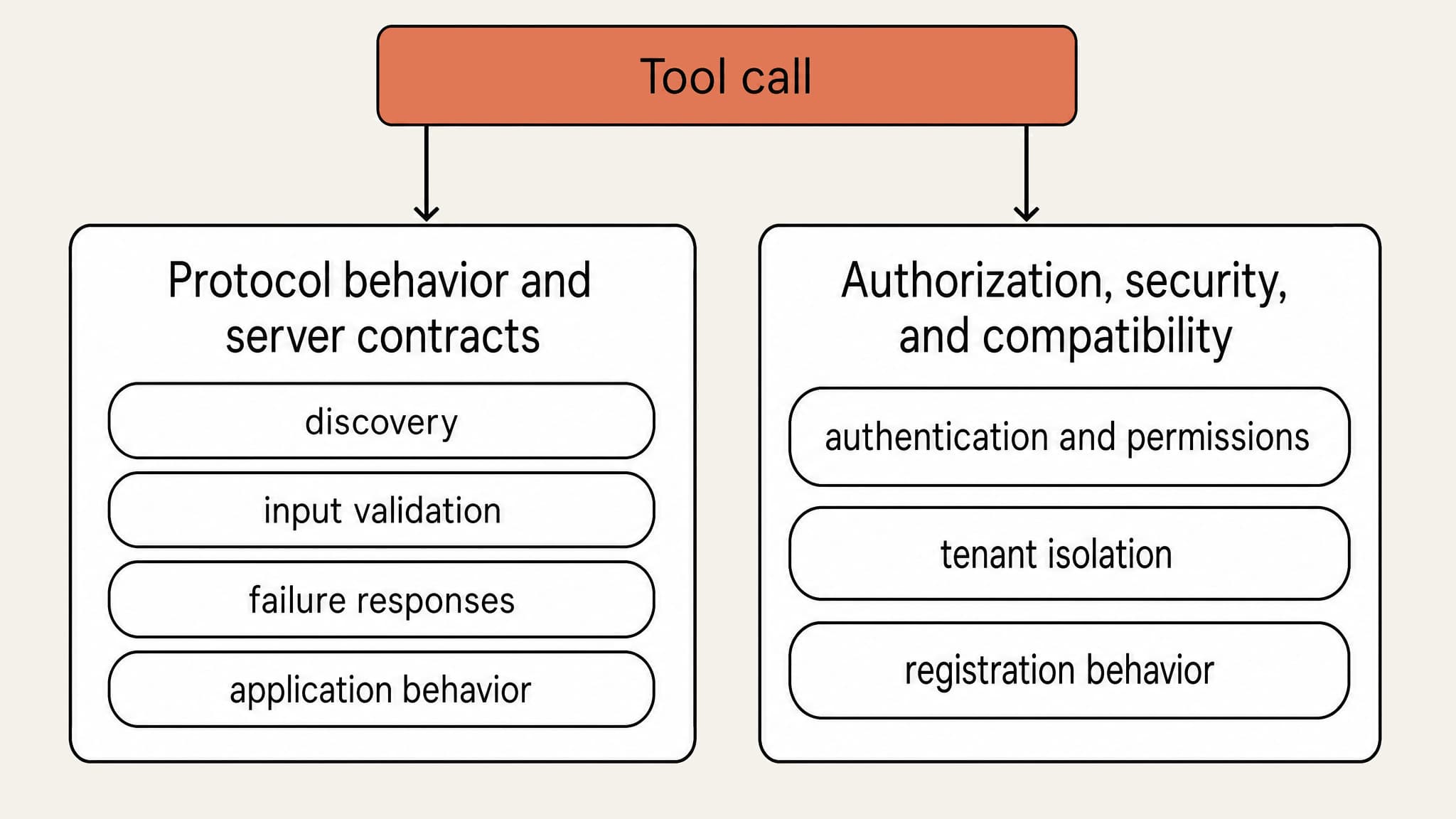
Protocol behavior and server contracts
Start with the interface your server exposes. Check that discovery lists every tool with an accurate input schema, that the server rejects arguments the schema doesn’t allow, and that successful and failed calls both return results in the shape the MCP specification defines. If your server also exposes resources, resource templates, or prompts, test those too. A suite that only calls tools never checks them.
Then check what the tools actually do. Suppose an issue-tracker server exposes search_issues, get_issue, and create_issue. search_issues should return the issues that match the query. get_issue should reject an identifier that doesn’t exist. Neither read tool should create or change an issue, and create_issue should create exactly one. If the server implements pagination, check that the second page picks up where the first ended. If it handles cancellation, check that a cancelled request stops. If it has timeouts, check that a slow call fails instead of hanging.
Keep the two kinds of failure separate. A protocol error, such as a call to a tool that doesn’t exist, comes back as a JSON-RPC error. A tool that ran but couldn’t complete the operation, such as get_issue called with a missing ID, returns a normal result with isError: true. A test that treats both as one failure won’t catch a server that reports one kind as the other.
Authorization, security, and compatibility
Test authentication and application permissions separately. Under MCP 2026-07-28, authorization is optional. HTTP transports should use the MCP authorization flow when supported, while STDIO implementations should read credentials from the environment. For HTTP servers, insufficient scope can surface as HTTP 403 with error="insufficient_scope" rather than as a tool-level error, so assert on the signal your server actually sends.
Client compatibility includes how a client gets a client ID. The spec lists three registration methods:
- Client ID Metadata Documents, which clients and authorization servers should support.
- Pre-registration.
- Dynamic Client Registration (DCR), which is deprecated and kept only for authorization servers that don’t support metadata documents.
Test the methods your supported clients use. Suppose your authorization server accepts only DCR and a client supports only metadata documents. That client can’t register, even though both sides follow the spec.
For security checks, use OWASP's MCP guidance for confused-deputy and tool-output injection checks, and its Multi-Tenant Security guidance for tenant isolation. Run these cases in an isolated environment with synthetic data. If an injection works or a tenant boundary leaks during a test, the attack reaches whatever data the server can access.
What are the five best MCP testing tools?
MCPJam
What it does
MCPJam Inspector combines manual tool calls, agent-driven testing, and JSON-RPC inspection in one local workspace. Developers can call a tool with known inputs first, then put an agent in front of the same server when the failure depends on tool selection or arguments.
The OAuth debugger shows the authorization exchange step by step. It helps separate discovery or token-exchange failures from application-level permission failures after authentication succeeds.
Cross-client testing records per-client outcomes for protocol checks, OAuth, MCP Apps, and agent-driven evals. MCPJam maintains emulated client profiles. Where enabled, runtime integrations run the real Claude Code, Codex, or Cursor CLI runtime, so report those results separately. Confirm launch-critical flows in the real clients your users run.
When to use it
Use MCPJam when you want one workflow from manual server inspection to repeatable checks and release gates, whether you start from a failure you have seen or from generated or imported cases. The walkthrough below carries the read-only create_issue case from Inspector into CI.
Limitations
Local Inspector, CLI, and SDK workflows support STDIO and Streamable HTTP. The hosted application requires an accessible HTTPS endpoint. Protocol-conformance checks that depend on HTTP behavior do not prove native STDIO behavior. For STDIO servers, write diagnostics to stderr. Standard output must contain only valid MCP messages.
Pricing
MCPJam pricing starts at $0 on Free, with 200 credits per day and unlimited seats. Pro is $24/month billed annually with 5,000 credits per month. Team is $199/month billed annually with 50,000 credits per month and basic RBAC. Enterprise pricing is custom. Evals use 3 credits per prompt, and work that runs on your own provider API keys keeps working when hosted credits run out.
MCP Inspector
What it does
MCP Inspector provides visual and command-line interfaces for examining an MCP server. It is useful when you want to inspect exposed operations and request/response behavior without building a separate test interface.
The CLI supports scripted checks. For example, npx @modelcontextprotocol/inspector --cli node build/index.js --method tools/list --format json emits a single JSON object on stdout for assertions.
When to use it
Use MCP Inspector when you want the reference protocol debugger without agent-driven or release-gate features. It overlaps with MCPJam on direct inspection, so choose it when that narrower scope is enough.
Limitations
Plan the surrounding workflow yourself: fixtures, business-state checks, artifact retention, and the CI policy that turns a failed assertion into a blocked merge. Direct inspection alone does not establish that an agent will choose the appropriate tool.
Pricing
MCP Inspector is open source, so there is no software subscription fee. The practical cost is the infrastructure and CI time you use to run and maintain its checks.
Postman
What it does
Postman supports native MCP requests over STDIO and Streamable HTTP. Teams can connect to a server and work with its tools, resources, and prompts without constructing JSON-RPC bodies manually.
Postman fits teams that already use it for API development. Keeping an MCP request beside the related backend API request can help developers compare the two paths when results diverge. Postman's MCP tooling also supports inspecting OAuth exchanges.
When to use it
Use Postman when the MCP call needs to be compared with an existing backend API workflow. Reproduce the issue-creation request with a fixed payload, then compare the MCP result with the backend state to determine whether the problem sits in the MCP layer or the underlying API.
Limitations
Postman saves MCP requests in collections, but Postman CLI collection runs support HTTP, plus gRPC and GraphQL on paid plans. MCP is not listed, so plan a separate CI path for MCP checks.
Pricing
Postman pricing starts at $0. Solo is $9/month billed annually, and Team is $19/user/month billed annually. The Team tier is the more useful baseline for shared testing because it adds collaboration, while some usage-based features and add-ons are billed separately.
FastMCP + pytest
What it does
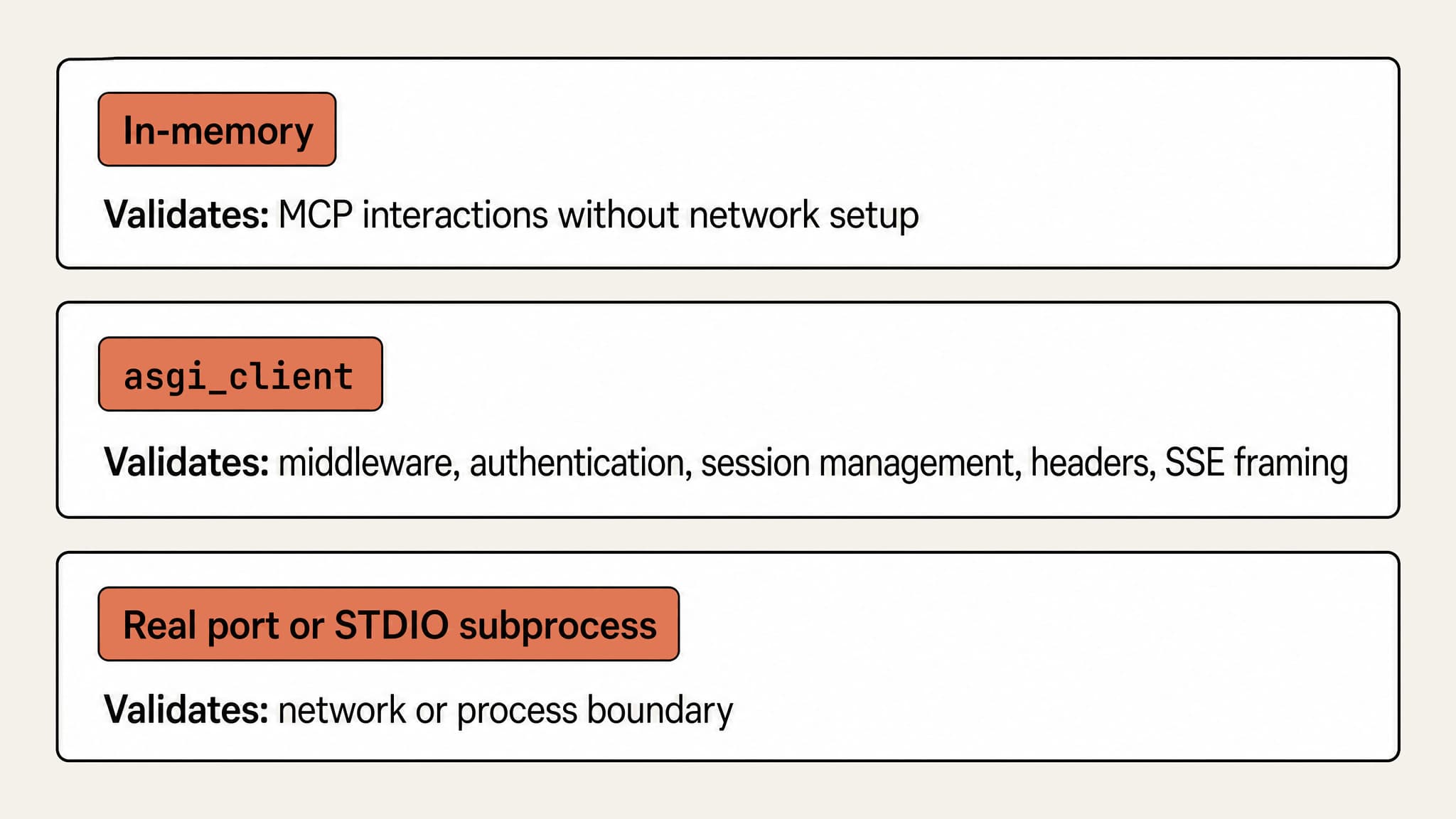
FastMCP + pytest suits Python teams that want server tests beside implementation code. FastMCP's client supports in-memory execution as well as STDIO and HTTP transports. The in-memory option removes network setup from focused regression tests. MCP interactions still occur inside the test.
Use pytest fixtures, reusable setup and teardown functions, to create the server configuration and seed records: the known data a test starts from, such as one existing issue. Open the FastMCP client inside each test. FastMCP warns that clients opened in fixtures can create hard-to-diagnose event-loop issues. Parameterize valid and invalid arguments so schema changes are checked against the same cases.
When to use it
An issue-tracker fixture can start with a known issue, test retrieval, and confirm that invalid creation input leaves the record count unchanged. Keep test state isolated, including when tests run concurrently. Cleanup should execute even when an assertion fails.
Limitations
In-memory tests do not exercise deployment boundaries. For middleware, authentication, session management, headers, and SSE framing, FastMCP's asgi_client runs the full HTTP application in process without binding a socket. Use a real port or STDIO subprocess only when the network or process boundary is itself under test. This remains a code-first workflow that assumes Python test ownership.
Pricing
FastMCP and pytest are open-source, so the software-license baseline is $0. Budget instead for CI compute and any external services your tests call.
Promptfoo
What it does
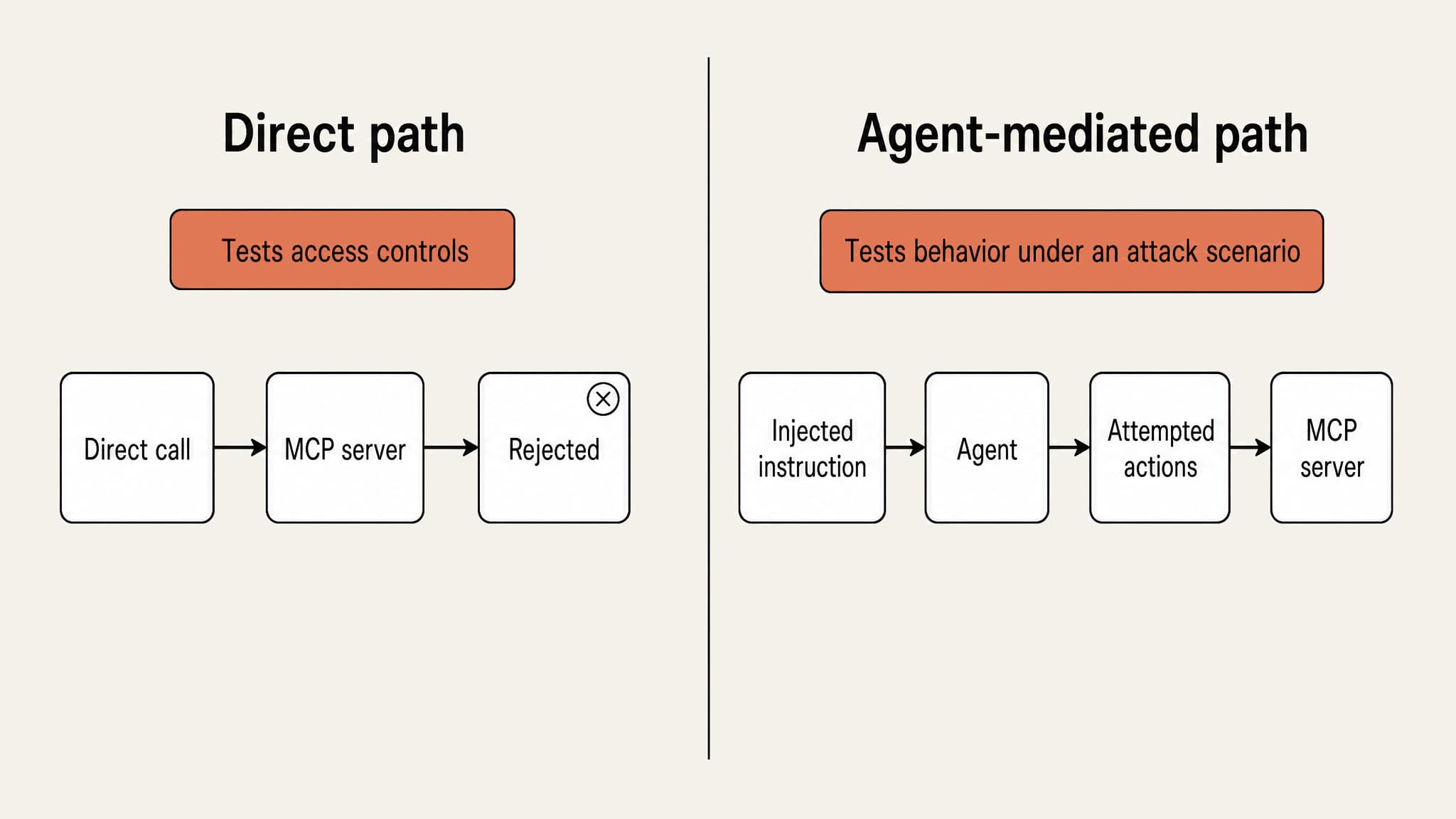
Promptfoo offers direct MCP provider tests and agent-mediated security testing. Select the direct path when you want controlled arguments sent to a tool. Select the agent-mediated path when the failure depends on how an agent interprets an instruction, tool description, or returned content.
Direct calls and agent-mediated tests answer different questions. A rejected direct call tests the application's access controls. An agent resisting an injected instruction tests behavior under that attack scenario.
Swipe to inspect the full diagram →
When to use it
In a sandbox, place an instruction in an issue description that asks the agent to reveal another workspace's data. Check both the agent's attempted actions and what the server actually allowed. Keep secrets synthetic and record the unauthorized operation you intended to prevent.
Limitations
Adversarial evaluations complement authorization and protocol tests. They do not certify that every request is correctly authorized, and a blocked agent attempt does not excuse a server that would execute the same forbidden operation when called directly.
Pricing
Promptfoo Community is free and includes up to 10,000 red-team probes per month. Enterprise and on-premises plans use custom pricing. For security-heavy test suites, probe volume is the clearest threshold before a custom plan becomes relevant.
Which MCP testing tool should you use?
Swipe to see all columns →
| If you need | Use | Add alongside |
|---|---|---|
| A direct look at one server's protocol behavior | MCP Inspector | Your own assertions |
| Debug, regress, and gate across client configurations | MCPJam | Real-client checks for launch-critical flows |
| MCP requests beside existing API workflows | Postman | A separate CI path for MCP checks |
| Python regression tests beside the server | FastMCP + pytest | A test over the deployment boundary |
| Prompt-injection and abuse testing | Promptfoo | Direct authorization tests |
These tools can complement each other. A Python suite can handle server regression checks while Promptfoo adds adversarial runs, or MCPJam can carry an Inspector failure into a release gate while real-client checks cover launch-critical flows.
How do you test an MCP server with MCPJam?
You can start testing in MCPJam without a failure in hand. In the Evaluate tab, generate cases from your server's tools, promote a completed chat session, write a case by hand, or import scenarios you have already written down, such as a test plan. Those cases test how models use your tools; this walkthrough tests the server directly.
It starts from one concrete server failure because that shows the full path from investigation to a regression check. It uses the example issue tracker from earlier, where create_issue must reject users who have read-only access. On your server, substitute a tool that writes data and an identity that should only read. A denial is not enough if the handler has already written to the database.
How do you investigate a failing call?
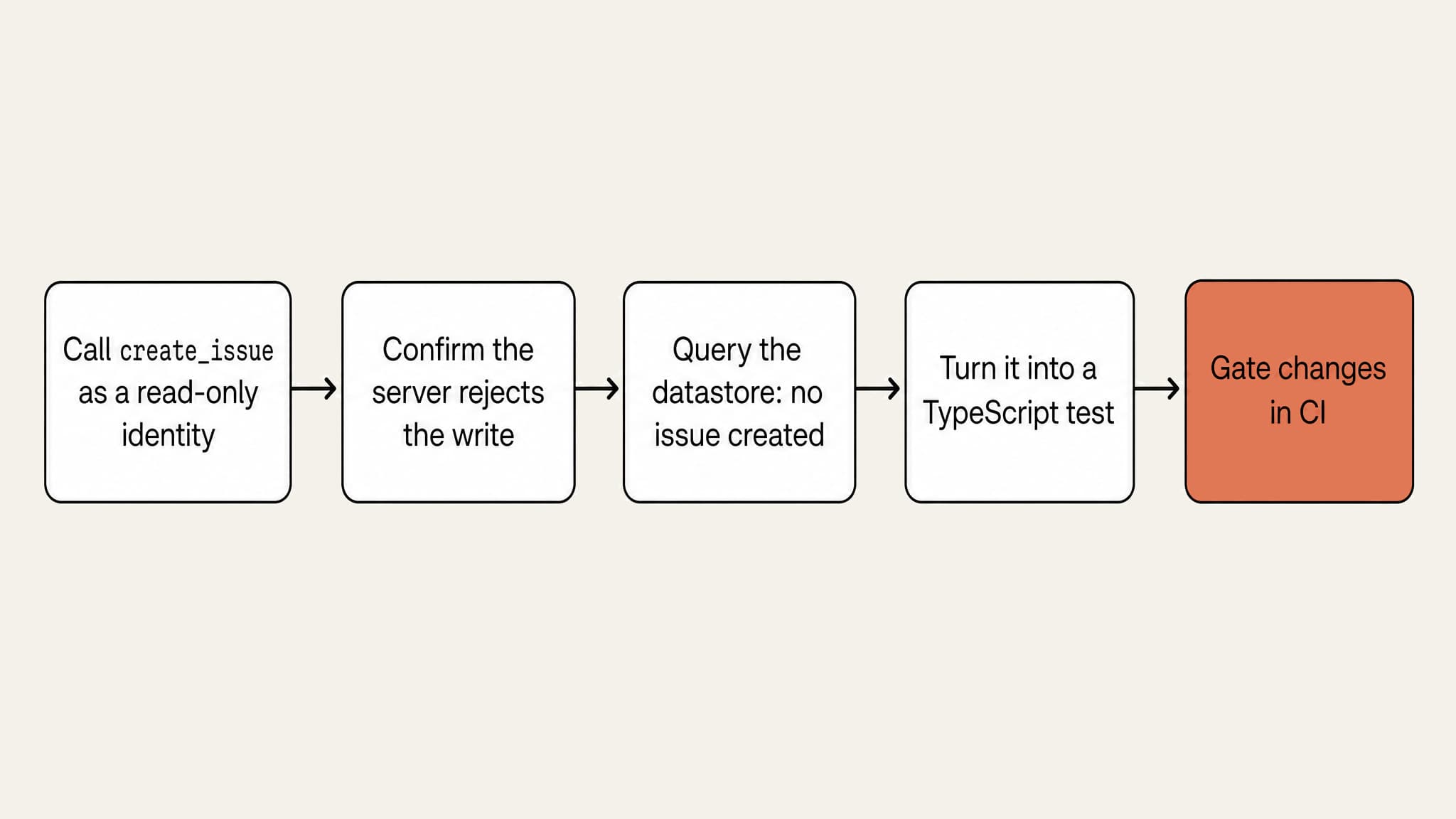
Connect MCPJam Inspector to your staging server with a read-only test identity and call create_issue, or your server's equivalent write tool, with the fields a normal call would require. Confirm that the server rejects the write, then query the test datastore independently to verify that no issue was created. The test passes only when the request is denied and application state stays unchanged.
Save the tool arguments, server commit, and sanitized trace together. Remove bearer tokens and personal data before sharing evidence.
How do you gate changes in CI?
Turn the failing case into a TypeScript test using @mcpjam/sdk and Vitest. Keep fixture setup and datastore assertions in your application test helpers. The SDK sends the tool call, while your test helpers verify application state before and after it. Because the datastore check runs independently of the tool response, this setup catches cases where the server returns a denial but still writes data.
Swipe to see all columns →
| Case | Expected outcome | State check |
|---|---|---|
| Authorized creation | Successful tool result | Exactly the intended issue exists |
| Read-only identity (any write, such as create_issue) | Operation is refused | No issue is created, although denial logging may occur |
| Invalid arguments | Validation rejects input | Existing records remain unchanged |
| Interrupted request | Failure is visible | Inspect whether a write completed before deciding to retry |
Run mcpjam server doctor against the candidate endpoint to validate connection, capabilities, and primitives, then run mcpjam oauth conformance when OAuth behavior is part of the release. Both are CLI commands with pass/fail exit codes. Keep the direct tool test in Vitest for business-state assertions, and add agent-driven evaluations only when release risk depends on tool selection or task completion.
Swipe to inspect the full diagram →
Start testing your server
Start with one release-blocking behavior in MCPJam Inspector. Test the expected success and failure paths, then save the case that exposed the bug. When the behavior is stable, use the SDK quickstart to add the check to your pull-request workflow so the same failure cannot return unnoticed.
Open MCPJam Inspector at app.mcpjam.com and test your server before the next release.
Frequently asked questions
How do I debug an MCP server that works locally but fails inside Claude or ChatGPT?
Compare the endpoint, credentials, advertised capabilities, and inputs used in each environment. Repeat the same request in an inspector, then check the target client again. MCPJam's client-configuration testing helps investigate differences in tool selection, arguments, and client behavior.
Which tools support Streamable HTTP MCP server testing?
MCPJam, MCP Inspector, Postman, and FastMCP's client connect over Streamable HTTP. Promptfoo's MCP provider supports remote URL-based servers, but its provider documentation does not name the transport, so verify that path before treating it as Streamable HTTP coverage.
What is the best MCP Inspector alternative?
Choose MCPJam when you want direct Inspector-style debugging plus CI gates and client-configuration testing. Stay with MCP Inspector when you only need direct protocol inspection. It is free and covers that job.
Is MCPJam open source, and what is the difference between its free and paid tiers?
MCPJam's Inspector, core CLI, and SDK are open source. Free is $0 with 200 credits per day and 30-day trace history. Pro adds 5,000 credits per month and unlimited trace history. Team adds 50,000 credits per month, basic RBAC, and priority support. Enterprise adds SSO, audit logs, and advanced RBAC.