Writing MCP server unit tests
Testing is an essential component to building any production ready software. It makes sure that pieces of the application are working as expected, but it also helps ensure that future changes aren't breaking.
There are many layers of testing: end-to-end (E2E), integration, and unit testing. Unit testing focuses on the smallest testable pieces of software, like individual functions or endpoints. For example, a typical API endpoint test might look like this:
const res = await request(baseUrl).get("/api/users/485012");
expect(res.status).toBe(200);
expect(res.body).toEqual({ id: 42, name: "Ada Lovelace" });
This same principle applies to MCP servers; you can write assertions for every primitive: tools, prompts, and resources. Our new SDK makes unit testing MCP servers straightforward.
The MCP Client
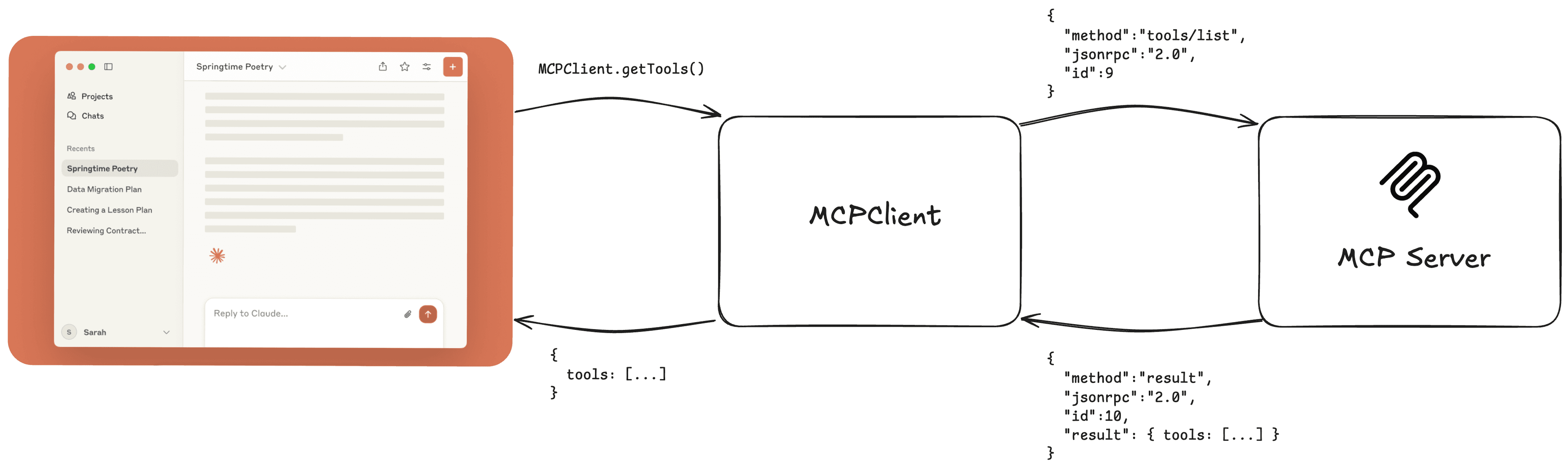
At the core of MCP testing is the MCP Client, which communicates with servers via JSON-RPC. It's the same client used in production to send requests and receive responses. We have an article on that here.
We use the MCP client to send requests to the server, and do assertions on what's returned from the server.
Subscribe to the blog
We share our learnings with you every week.
Writing a unit test
We built an SDK to build MCP clients, which can be used to write unit tests for servers. Let's write a basic unit testing for a Pokemon MCP server with our MCPClientManager and Jest, a Javascript testing framework.
npm install @mcpjam/sdk
npm install --save-dev jest
Test that your server connection works
The first step is checking that the client is able to connect to your MCP server. We use the MCPClientManager to send a connection request to your server. The object you pass into MCPClientManager to set up a server connection is the same as what you would expect in a mcp.json file.
MCPClientManager.connectToServer(serverId: string, config: object);
import { MCPClientManager } from "@mcpjam/sdk";

test("Test server connection", async () => {
    const client = new MCPClientManager();
    const connectionRequest = client.connectToServer("pokemon", {
        command: "python",
        args: ["../src/pokemon-mcp.py"]
    };
    expect(connectionRequest).not.toThrow(error);
});
Setting up a testing suite
Now that we've tested the server's connection, we can set up a test suite with a beforeAll to initialize every test case with a MCP client. We'll be using the MCPClientManager here too.
import { MCPClientManager } from "@mcpjam/sdk";

let manager;

beforeAll(async () => {
    mcpClient = new MCPClientManager({
        pokemon: {
            command: "python",
            args: ["../src/pokemon-mcp.py"]
        },
    });
});
Checking that all tools exist
We can create a test that checks that the tools/list request works as expected. This request is always initiated when a client connects to your server. I highly recommend this being the first check before you test individual tools.
You can use mcpClientManager.listTools(serverId: string)
test("list tools returns correct tools", async () => {
    const res = await manager.listTools("pokemon"); //
    const arrayOfTools = res.result.tools;

    expect(arrayOfTools).toBeDefined();
    expect(Array.isArray(arrayOfTools)).toBe(true);
    expect(tools.some(tool => tool.name === "get_pokemon")).toBe(true);
    expect(tools.some(tool => tool.name === "get_pokemon_type")).toBe(true);
    ...
});
Writing a unit test for tool execution
We can then create a Jest test case to test assertions to a tool call. With MCPClient, we can deterministically invoke a MCP tool and check its results.
With the MCPClientManager, executing the tool can be invoked with the executeTool function:
const result = mcpClientManager.executeTool(serverId: string, toolName: string, params: object);Then take the tool result and write some expect assertions.
test("should call get_pokemon tool correctly", async () => {
    const result = await mcpClientManager.executeTool("pokemon", "get_pokemon", {
        name: "pikachu",
    });
    expect(result.content).toBeDefined();
    expect(Array.isArray(result.content)).toBe(true);
    expect(result.content[0].text).toContain("Pikachu");
    expect(result.content[0].text).toContain("Abilities:");
});
Expecting errors
You want to test that your tools are also properly returning errors. Expected errors are important for scenarios such as when the incorrect input parameters are passed to the tool and when the user is attempting to make an unauthenticated tool call.
test("should handle pokemon not found", async () => {
    const result = await manager.executeTool("pokemon_mcp", "get_pokemon", {
        name: "digimon",
    });
    expect(result).toBeDefined();
    expect(result.content).toBeDefined();
    expect(Array.isArray(result.content)).toBe(true);
    expect(result.content[0].text).toContain("Error");
});
Testing other MCP primitives
Unit testing other primitives like resources and prompts are no different and the same patterns as testing tools apply. Here are some functions from MCPClientManager that is helpful for testing other parts of the MCP server:
mcpClientManager.listResources(serverId: string);
mcpClientManager.readResource(serverId: string, params: object);
mcpClientMangager.listResourceTemplates(serverId: string, params: object);
mcpClientManager.listPrompts(serverId: string);
mcpClientManager.getPrompt(serverId: string);
See an example
Our team built a sample Pokemon MCP server with test cases to demonstrate unit testing with the MCP client manager. Use this as a reference for writing unit tests for your own servers:
https://github.com/MCPJam/pokemon-mcp-and-testing
What's next
We're continuing to mature our testing SDK and would really appreciate your help. The SDK is open source and the project can be found here. Some things on the roadmap for the SDK:
- Build out helper functions to test assertions. Create helpers to test for MCP connection failures, tool output structure, nested objects.
- SDK to help test MCP servers that support MCP-UI and OpenAI apps.
- Build an agentic framework to do end to end testing. This is a level higher than unit testing. We think there's tremendous value with tests that simulate an end user's experience.
MCPJam Inspector
The MCPJam inspector is a visual testing tool that essentially allows you to do manual unit testing. Deterministically invoke tools, prompts, resources, or do an E2E test in the LLM playground. It's a really useful tool to make sure that your MCP server works in a production environment.
Start up the inspector and get testing with a single command:
npx @mcpjam/inspector@latest