Debug MCP servers at the JSON-RPC level
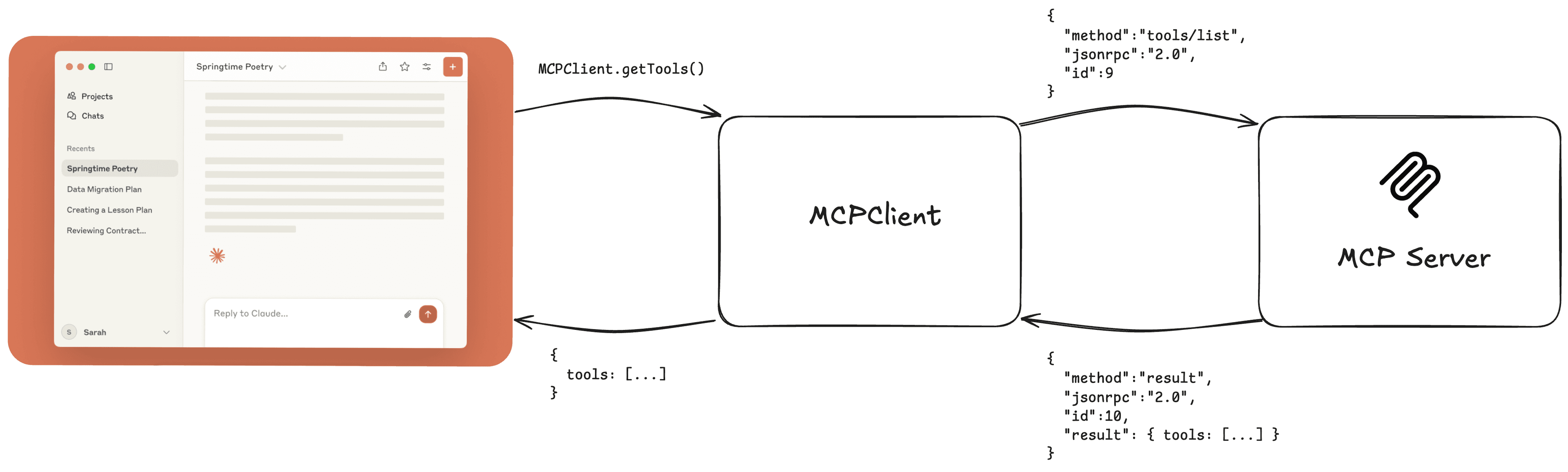
Whereas REST is the backbone of communication between web apps and API servers, JSON-RPC is the communication layer between clients (Claude Desktop, Cursor, etc) and MCP servers. It provides a structured way for clients to invoke MCP server tools, and MCP servers to send results back along with notifications.
In this article, we'll cover why JSON-RPC is a good choice for MCP, the types of messages sent back and forth, and what to look out for when you're debugging your MCP server at the JSON-RPC level.
Why JSON-RPC was chosen for MCP
MCP needed a lightweight communication protocol that serves the following needs:
- Lightweight and human readable - The protocol doesn't require heavy dependencies, and is readable for developers to debug. JSON provides a simple structure for both.
- Bi-directional - Both clients and servers need to send requests, receive responses, and sync via notifications async.
- Flexible on transport - Clients connect to MCP servers via stdio, SSE, or Streamable HTTP. JSON-RPC is a communication protocol that's adaptable for all.
- Real world use cases - We're seeing a lot of MCP servers also being used for internal use cases. It's a communication protocol that doesn't have to be served over HTTP.
Subscribe to the blog
We share our learnings with you every week.
Types of messages for MCP
There are three main categories of JSON-RPC messages that clients and servers send to each other: request / response, notifications, and errors.
Request / Response
The client sends a request message to the server, with the expectation of the server returning a response back. This is what the connection initiation handshake looks like:
Client sends initialize message to start the connection handshake:
{
  "jsonrpc": "2.0",
  "id": 1,
  "method": "initialize",
  "params": {
    "protocolVersion": "",
    "capabilities": {
      "roots": {
        "listChanged": true
      },
      "sampling": {}
    },
    "clientInfo": {
      "name": "ExampleClient",
      "version": "1.0.0"
    }
  }
}
Server returns a confirmation:
{
  "jsonrpc": "2.0",
  "id": 1,
  "result": {
    "protocolVersion": "2025-03-26",
    "capabilities": {
      "logging": {},
      "prompts": {
        "listChanged": true
      },
      "resources": {
        "subscribe": true,
        "listChanged": true
      },
      "tools": {
        "listChanged": true
      }
    },
    "serverInfo": {
      "name": "ExampleServer",
      "version": "1.0.0"
    },
    "instructions": "Optional instructions for the client"
  }
}
The thing to pay attention to with the server's response is the protocolVersion and capabilities. The client can look at the capabilities the server has to understand whether or not it supports things like resources and prompts. The client can also look at the protocol version for version control. Version control will be important for changes like the OAuth update in the upcoming November spec update. Older servers won't be supporting that change, and clients need to know that.
This is what it looks like when an MCP client sends a message that invokes a tool:
{
  "method": "tools/call",
  "params": {
    "name": "add",
    "arguments": {
      "a": 3,
      "b": 4
    }
  },
  "jsonrpc": "2.0",
  "id": 2
}
The server responds with the result:
{
  "jsonrpc": "2.0",
  "id": 2,
  "result": {
    "content": [
      {
        "type": "text",
        "text": "The sum of 3 and 4 is 7."
      }
    ]
  }
}
You get the idea. The same style of request / response messages are applicable to MCP resources and prompts too.
Notifications
The protocol supports real-time notifications where servers and clients can send updates to each other. An example of this is tool updates. An MCP server might send a notification to the client to let the client know that its tools changed and that the client needs to re-fetch the tools.
Here's what a notification message looks like:
{
  "jsonrpc": "2.0",
  "method": "notifications/tools/list_changed"
}
Errors
Both sides need to be able to handle error messages when they come in. Errors will have an error param with a code and message. The best part of error handling with JSON-RPC is that it's human-readable.
{
  "jsonrpc": "2.0",
  "id": 1,
  "error": {
    "code": -32000,
    "message": "Server error",
    "data": {
      "reason": "Internal server error encountered during tool execution"
    }
  }
}
Inspect JSON-RPC messages in your server
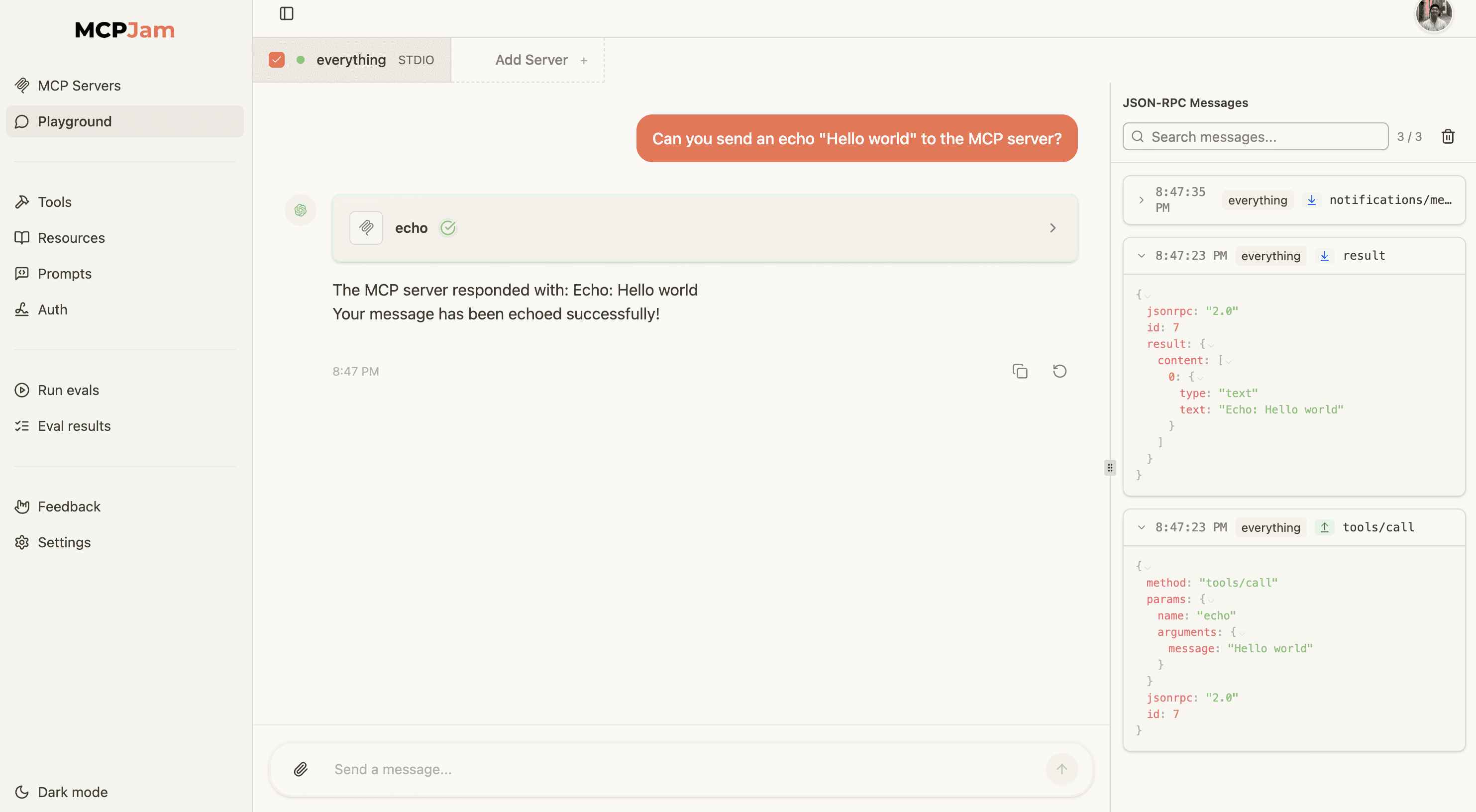
We recently built a way to inspect every JSON-RPC message sent to and from your MCP server. You can view JSON-RPC messages in your server's tools, resources, prompts tabs, and in the LLM playground. Debugging your MCP server at the JSON-RPC level provides visibility into every request, response, and error exchanged between the client and server. This allows you to catch malformed messages and unexpected behavior. While checking protocol compliance is a great first step, you can also read our comparison of MCPJam vs MCP Inspector V2 to learn how to test agent decisions and end-to-end behavior.
To get started with MCPJam inspector:
- Launch the inspector with
npx:npx -y @mcpjam/inspector@latest - Connect to your MCP server via stdio, SSE, or other supported transport methods.
- Navigate to the Tools, Resources, or Prompts tabs to invoke methods and view the corresponding JSON-RPC messages.
- Use the LLM playground to interact with your server in a real-world scenario and monitor all JSON-RPC traffic in the sidebar.