6 Best MCP Evals Tools for Agent Reliability (2026)
Compare the 6 best MCP evaluation tools for 2026 to ensure AI agent reliability. See how MCPJam, Promptfoo, and others automate cross-client testing and CI/CD.
In this guide9 sectionsHide
MCP evaluations test whether an AI agent can use an MCP server to complete a task correctly. A useful evaluation checks the tools the agent chose, the arguments it sent, the final outcome, and any actions it should not have taken.
This guide compares six MCP evaluation tools for agent reliability. It looks at how each tool sources the agent run, exposes interaction data, decides pass or fail, and supports rerun/gate workflows, so you can see which approach fits your testing setup.
TL;DR
- Choose MCPJam when the main requirement is testing an MCP server across models and client configurations, diagnosing tool-level failures, and gating releases.
- Choose mcp-eval for code-defined Python regression tests.
- Braintrust and LangSmith evaluate the agent application you instrument rather than the MCP server itself, so use them when the application is what you are testing. Choose Braintrust for shared datasets and experiment comparison, DeepEval for MCP-specific metrics in Python tests, LangSmith for trajectory analysis over instrumented agent runs, or Promptfoo for configuration-driven model and MCP server comparisons.
- Whichever tool is used, evaluate tool selection, arguments, final state, and prohibited actions independently rather than collapsing reliability into one average score.
What should an MCP evaluation measure?
Define what success means before choosing a framework. A useful evaluation tool should let you run the test, capture the interaction, score the result, and rerun failures.
How do you measure tool use, execution paths, and task outcomes?
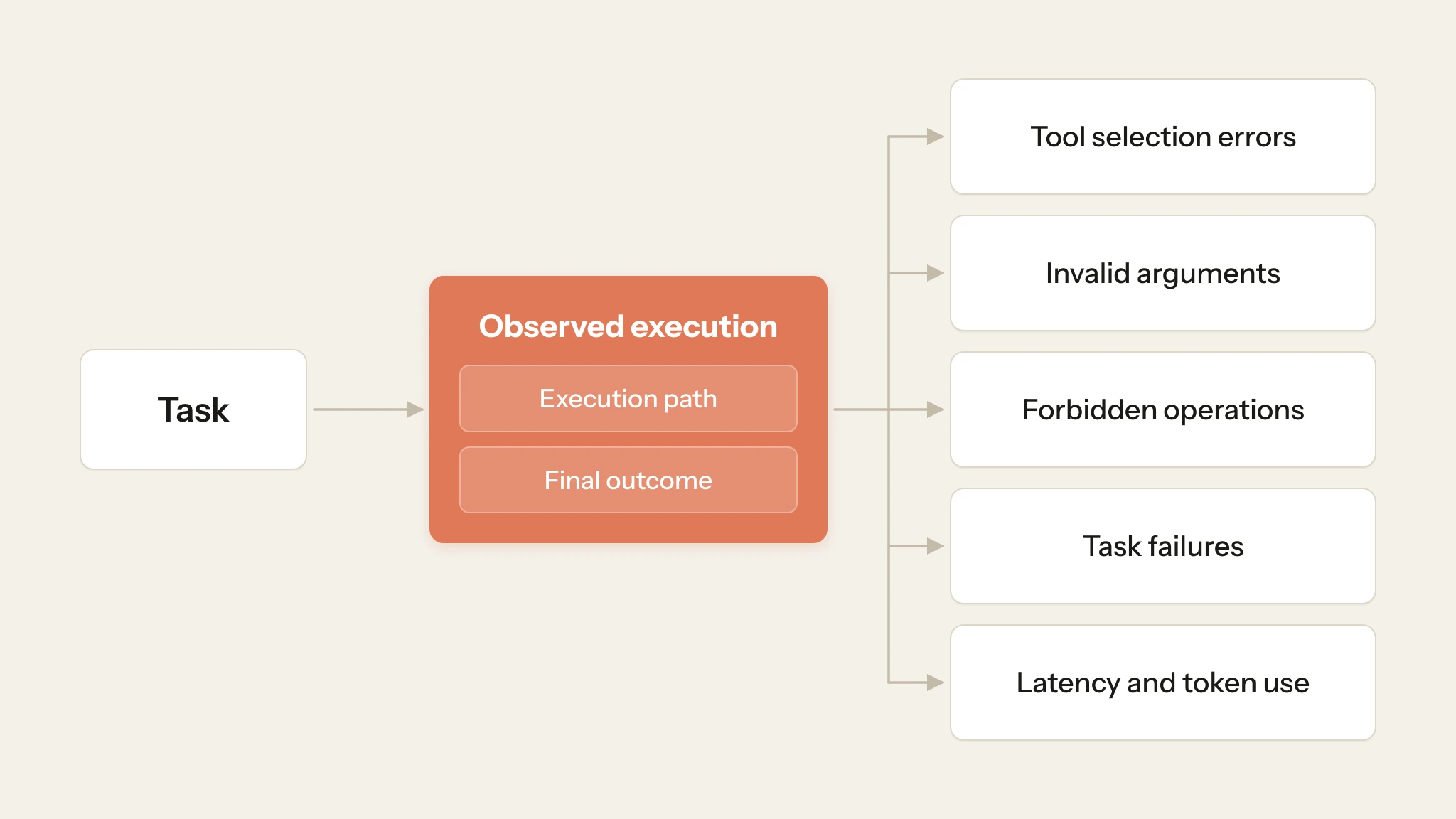
Check both the final outcome and how the agent got there. The User Value Chain splits a run into connection, discovery, tool selection, tool call, tool response, and user value, so you can see where it went wrong, not just that it did. In your suite, separate tool-selection errors, invalid arguments, forbidden operations, and task failures instead of hiding them inside one score.
Use exact argument checks for values that must match, such as an issue ID or workspace. Allow equivalent search phrases when the task permits them. If the task is ambiguous, the agent may ask a clarifying question. Define how the test answers it and how it recognizes completion. Track latency and token use separately from correctness: record the duration and token count of every run, report them next to the verdict rather than inside it, and compare them with a baseline so a slow or costly path shows up even when the answer is right.
Swipe to inspect the full diagram →
Why do protocol versions and client configurations matter?
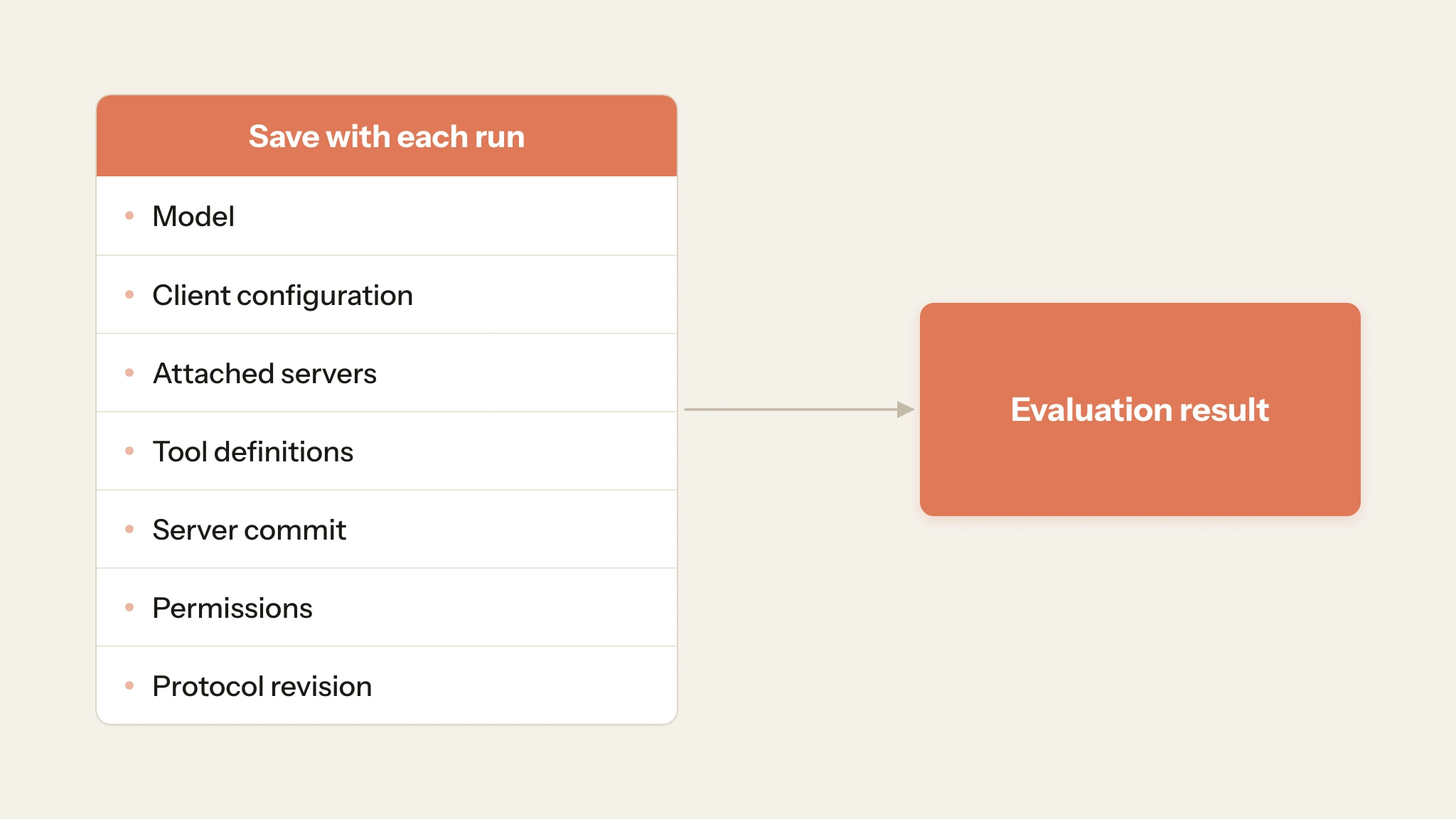
An evaluation result only applies to the setup that produced it. Save the model, client configuration, attached servers, tool definitions, server commit, permissions, and protocol revision with each run. The protocol revision matters because the connection model changed: earlier revisions open with an initialize handshake and can carry a session, while the 2026-07-28 revision is sessionless, with each request self-contained and an optional server/discover call for discovery. A result recorded under one revision does not show how the server behaves under the other, so check version-specific behavior against the specification for the revision you tested, such as the 2026-07-28 specification.
Changing the model measures model variation. Changing the client, such as an emulated profile versus the real client runtime, can change how the same server is called. Do not assume a result carries over to a client you did not test.
Swipe to inspect the full diagram →
How did we evaluate these MCP tools?
The comparison uses four dimensions: where the agent run comes from, interaction data, what decides pass or fail, and rerun/gate workflows. Where the agent run comes from identifies who runs the agent and server. Interaction data covers the traces and tool calls available for inspection. Pass/fail logic covers deterministic checks and model-based judges. Rerun/gate covers regression replay and CI.
MCP evaluation tools
Swipe to see all columns →
| Tool | Where the agent run comes from | Interaction data | What decides pass or fail | Rerun / gate | Best For |
|---|---|---|---|---|---|
| MCPJam | Runs cases against your MCP server with different models and client configurations | Transcripts, tool calls, tokens, duration, verdicts | Deterministic assertions + advisory judge | Hosted suite via Action/CLI or SDK inside CI | Cross-client pre-release testing and CI release gates |
| mcp-eval | Runs an agent against real MCP tools | Tool calls, responses, timing, scenario outputs | Tool/content/performance assertions + judges | pytest / CLI / GitHub Actions | Code-defined MCP server and agent regression tests in Python |
| Braintrust | The application/task function runs the agent | Application traces, outputs, experiment data | Datasets + scorers | Experiment comparison, with CI gates wired by your pipeline | Evaluating the agent applications you instrument: shared datasets, scorers, and experiment comparison |
| DeepEval | Application code supplies test cases and MCP interaction records | Inputs, outputs, MCP calls / available servers | MCPUseMetric + MCPTaskCompletionMetric | Python test workflow / CI | MCP-specific evaluation metrics inside Python test workflows |
| LangSmith | The application runs; LangSmith evaluates traces and experiments | Messages, tool results, trajectories, traces | AgentEvals match modes + LLM judge | Offline experiments + pipeline gates | Evaluating the agent applications you instrument: trajectory evaluation and production trace analysis |
| Promptfoo | Runs configured model/provider against MCP server | Prompt, tool-use behavior, assertions | Deterministic + model-graded assertions | Config reruns + CI/CD | Configuration-driven model and MCP server comparisons |
MCPJam
MCPJam Evaluate workflow lets teams define cases, expected tool calls and arguments, deterministic checks, and an optional LLM judge. It can run the same cases across selected models and client configurations while recording transcripts, tool calls, token use, duration, and verdicts. Use the recorded transcript and expected-versus-actual calls to diagnose failures. MCPJam can also run emulated client profiles and harness hosts such as Claude Code or Codex. Keep their results separate because an emulated client profile is not the same as a run in the actual client runtime. In CI, file-defined suites can run with mcpjam cloud eval run --file, and CI can query results with mcpjam cloud eval status. Tests that need to start the server, seed fixtures, or assert local state can run through the MCPJam SDK inside the CI job and save results to MCPJam.
Best for
Teams publishing MCP servers into external clients that need pre-release client-configuration testing, failure diagnosis, and release gates in one workflow.
Limitation
Hosted eval runs use the servers attached through the suite's environment and execute through MCPJam. Use the SDK when CI needs to start or control the server, fixtures, or application state inside the job. An emulated run does not prove the same behavior in the real client, so label which kind of run produced each result.
Pricing
The free plan includes 200 credits per day, unlimited seats, and a one-time grant of 500 evaluation iterations. Pro is $24/month billed annually, and Team is $199/month billed annually. Evaluations use 3 credits per prompt, before any hosted-model usage. Bring Your Own Key (BYOK) can cover in-session model usage, so budget MCPJam usage and model-provider usage separately.
mcp-eval
LastMile AI's mcp-eval (mcpevals on PyPI) is an open-source Python evaluation framework for MCP servers and agents. It can test servers written in any language, runs an agent against real MCP tools, and supports pytest, dataset, and @task test styles. Its assertions can check whether a tool was called, skipped, called a specific number of times, or called in a required order. mcp-eval also ships GitHub Actions with pull-request comments and report artifacts, and its CLI can generate test cases with an LLM.
Best for
Python-oriented teams that want code-defined MCP server or agent regression tests with explicit tool-call assertions and CI integration.
Limitation
mcp-eval does not prescribe a single provider, model, agent, or client configuration; those remain part of the test setup.
Pricing
mcp-eval is open source under Apache 2.0, so the framework itself is free. Budget for model execution, judge calls, and CI compute.
Braintrust
Braintrust evaluates agent applications rather than MCP servers: it is a general-purpose evaluation and tracing platform, not an MCP-specific runner. It organizes datasets, task functions, scorers, experiments, and traces so teams can compare revisions of an agent application. For an MCP-backed agent, your application runs the task and sends the relevant output, tool-call, or trace data to Braintrust for scoring and experiment comparison.
Best for
Teams whose application already runs the agent and that want shared datasets, scorers, experiment comparison, and trace analysis across revisions.
Limitation
Braintrust evaluates the execution data your application provides. You still need to run the MCP-backed agent and expose the output, tool-call, or trace data required for scoring.
Pricing
Starter is $0 with 1 GB of processed data and 10,000 scores per month, then $4/GB and $2.50 per 1,000 scores. Pro is $249/month with 5 GB and 50,000 scores, then $3/GB and $1.50 per 1,000 scores.
DeepEval
DeepEval is an open-source Python evaluation framework. For MCP workflows, MCPUseMetric scores primitive selection and arguments, while MCPTaskCompletionMetric evaluates whether the agent completed the user's task. MCPUseMetric supports llm, hybrid, and system_one modes. Jev is TypeSafe AI's System One model. hybrid uses an LLM for extraction and Jev for decisions, while system_one uses Jev without an LLM. Both Jev-backed modes require a TypeSafe AI API key. When you want to score actual tool use, include the MCP calls the agent made. If those records are omitted, MCPUseMetric instead evaluates whether using any available primitive would have helped.
Best for
Python teams that want MCP-specific metrics as code and prefer evaluation logic versioned beside application tests.
Limitation
DeepEval is primarily a local framework. Hosted collaboration and reporting come through Confident AI, and judge-model calls can add separate usage costs. Keep the evaluation mode fixed when comparing runs because scores from different modes are not directly comparable.
Pricing
DeepEval itself is free and open source. Confident AI has a free hosted plan, while Starter begins at $200 per organization per month. Judge-model usage is billed separately by the provider you use.
LangSmith
LangSmith evaluates agent applications rather than MCP servers: it is a general-purpose observability and evaluation platform for offline experiments and production traces. The trajectory evaluators discussed here come from LangChain's open-source AgentEvals package and integrate with LangSmith. AgentEvals supports strict, unordered, subset, and superset trajectory matching, plus an LLM judge that can compare against a reference trajectory. Use strict when order is contractual, subset when the agent must not call tools outside the reference set, and superset when extra calls are acceptable.
Best for
Teams that already instrument an agent application and want offline experiment comparison plus trajectory analysis over production traces.
Limitation
LangSmith requires the application to emit the messages and traces being evaluated. The trajectory evaluators discussed here come from AgentEvals rather than an MCP-specific execution layer.
Pricing
LangSmith Developer starts at $0 per seat and includes limited usage. Plus starts at $39 per seat per month, with additional usage billed separately. Teams should compare seat count with trace and evaluation volume rather than treating the seat price as the full cost.
Promptfoo
Promptfoo is an open-source CLI and configuration-driven evaluation tool. Its MCP integration connects configured models or providers to MCP servers and supports deterministic and model-graded assertions. Use Promptfoo to compare controlled changes such as tool descriptions or provider configurations. Keep the dataset and server state fixed, and distinguish direct MCP tool calls from model-driven runs when tool selection is part of the evaluation. Record the schema representation sent to the provider when an adapter transforms it, and confirm that it matches the application you plan to deploy.
Best for
Developer teams that want configuration-driven comparisons across models, providers, MCP servers, assertions, and CI workflows.
Limitation
Promptfoo is strongest in developer-driven workflows. Keep provider settings, datasets, and server state stable when comparing configurations, and validate client-specific behavior separately when launch depends on it.
Pricing
Promptfoo Community is free. Enterprise and on-premises plans use custom pricing. Model and judge provider calls are separate usage costs, so a large configuration matrix can still raise spend on the free tool.
Which MCP evaluation tool fits your workflow?
Swipe to see all columns →
| Requirement | Use | Add alongside |
|---|---|---|
| Server tests across models and client configurations before release | MCPJam | Real-client checks for launch-critical flows |
| Code-defined server and agent regression tests in Python | mcp-eval | Your provider, model, and client configuration |
| Shared datasets, scorers, and experiment comparison | Braintrust | Your application's execution and trace capture |
| MCP-specific metrics beside existing Python tests | DeepEval | Recorded MCP calls in each test case |
| Trajectory matching and production trace analysis | LangSmith | An instrumented application that emits traces |
| Model and server comparisons driven by config files | Promptfoo | Fixed dataset and server state |
How do you build a trustworthy MCP evaluation suite?
How do you define success beyond the final answer?
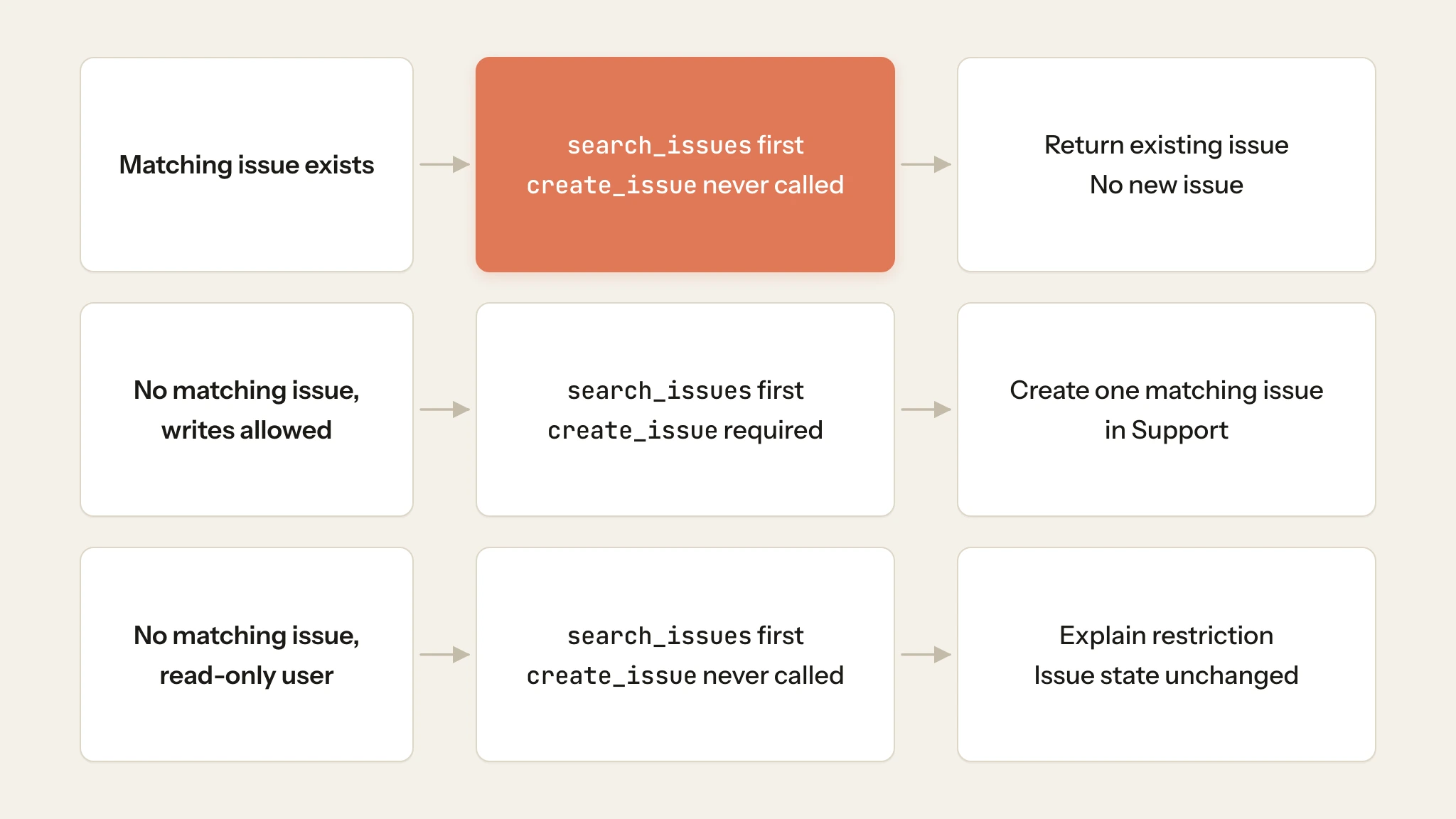
Consider an example issue tracker whose MCP server exposes three tools: search_issues, get_issue, and create_issue. A user asks the client: "Find the login-timeout issue in the Support workspace. Create it only if it does not exist."
Define the expected behavior for each starting state before running the evaluation:
Swipe to see all columns →
| Starting state | Required result | Failure to catch |
|---|---|---|
| Matching issue exists | Return the existing issue and create nothing | Creates a duplicate issue while the answer sounds correct |
| No matching issue, writes allowed | Create one matching issue in Support | Wrong workspace, duplicate writes, or false success |
| No matching issue, read-only user | Explain the restriction and leave issue state unchanged | Unauthorized creation or a fabricated issue ID |
Check state through a trusted test helper rather than asking the evaluated model whether it succeeded. This scenario requires search_issues before creation. Do not impose an exact sequence on unrelated tasks that permit several valid approaches.
In MCPJam's Evaluate, create a separate case for each starting state and keep the user prompt the same. For every case, add the assertion "First tool called was" search_issues so the agent checks for an existing issue before doing anything else. In the cases where nothing should be created, such as when a matching issue already exists or the user is read-only, also add "Tool was never called" for create_issue. Partial argument matching, the default, is enough when you only need to verify specific fields, such as the target workspace. Evaluate checks the recorded tool calls and the final message, not application state.
Your test setup must seed the three starting states and check the datastore afterward. Use the SDK through Vitest or Jest when those fixture and state assertions need to run against the server built from the pull request.
Swipe to inspect the full diagram →
How do you repeat, diagnose, and gate regressions?
Repeat important evaluation cases instead of treating one successful run as sufficient. Language models produce probabilistic output, so the same prompt can pass once and fail on the next run; repeated runs show how often a case fails. Reset fixture state and conversation context between runs, and include variations such as paraphrased requests, ambiguous inputs, recovery scenarios, and distractor tools. When a case fails, classify the cause separately as tool selection, arguments, execution, final state, or scoring so the team knows what actually regressed.
Across those repeated runs, report the metric that matches the reliability requirement. pass@k measures whether at least one of k attempts succeeds, while pass^k measures whether all k attempts succeed. Use pass^k when repeated consistency matters, such as a workflow that must complete correctly every time, rather than relying only on an average pass rate.
Set release gates according to the consequence of failure. A forbidden write or access-control violation should block release regardless of the suite's average score. Lower-risk regressions can be compared with an accepted baseline and investigated when performance deteriorates. CI should also fail when a required case does not run to completion rather than treating a missing result as a pass.
How do you turn a failure into a regression test?
Failures discovered outside a formal evaluation suite are often the most useful regression cases. Swarms and User Testing can surface tasks, wording, or multi-turn interactions that developer-authored cases did not anticipate. For example, a tester might refer to an issue using a product nickname, causing the agent to search for the wrong term and miss the correct record.
Instead of recreating that interaction manually, promote the failed session to a test case. Add the expected tool behavior, then include a related variation so the fix is not tied to one exact prompt. Once the case passes reliably, add it to your CI workflow so the same failure is checked on future changes.
Start evaluating your MCP server
Start with one task that reflects how users actually interact with your MCP server. In MCPJam’s Evaluate, define the expected tool behavior, run the case across the models and client configurations you support, and inspect failures at the tool-call and argument level.
Once the behavior is stable, turn the case into a regression check and run it before release.
Frequently Asked Questions
Which tools evaluate end-to-end MCP tasks?
For an MCP server that AI clients call, start with MCPJam, which runs cases against your server under selected client configurations, or mcp-eval, which runs a test agent from Python tests. Braintrust, DeepEval, and LangSmith evaluate the agent application or the interactions it records. Promptfoo fits configuration-driven comparisons of models and MCP servers. Expose the final state whenever the task changes external data.
How do I test reliability as my tool catalog grows?
Run the same cases each time the catalog changes and compare tool selection and task completion after every change. MCPJam does this across selected models and client profiles with LLM-assisted evaluation. DeepEval and LangSmith can add judge-based scoring, but they do not provide MCPJam's client-emulation layer. Change one dimension at a time, such as the number of tools, so a regression has one cause.
Which tools catch MCP regressions in CI/CD?
MCPJam supports hosted and SDK-based CI workflows. A hosted run starts with mcpjam cloud eval run. With --wait, the CLI exit code reflects the verdict: 0 when every waited run passed and 1 when a completed run's verdict failed. Without --wait, poll mcpjam cloud eval status and assert that run.result is passed. The SDK runs evaluations inside your CI job when you need local fixtures or a server your pipeline starts. mcp-eval ships GitHub Actions with PR comments, and Promptfoo has CI/CD integrations.