What Is WebMCP? Architecture, APIs, and Testing
What is WebMCP? An experimental browser API that lets a webpage expose structured tools to AI agents, how it differs from MCP, and what to test before release.
In this guide10 sectionsHide
Most web interfaces are designed for people, not agents. A browser agent often has to infer what a button, field, or control means from page content and the DOM, then act through the same interface a person uses. WebMCP, which Chrome documents as a proposed web standard, takes a different approach: the site declares what a feature does and exposes structured tools that an agent can call directly.
WebMCP is an experimental browser API that adds that agent-facing layer. It lets a page expose structured actions directly while keeping the normal human-facing interface in place.
WebMCP is separate from the standard Model Context Protocol (MCP). MCP connects agents to tools, data, and workflows outside the page. WebMCP is scoped to the page currently open in the browser, and its tools exist only while that page is loaded.
TL;DR
- WebMCP lets a webpage register structured, page-scoped tools for browser agents, so the agent calls a defined action instead of guessing at one from the UI.
- WebMCP and MCP are complementary. WebMCP works with the active webpage and browser session; MCP exposes capabilities through a server or local process.
- The imperative API registers tools with JavaScript. Chrome also provides a declarative form API, which the WebMCP specification draft does not yet define.
- WebMCP is experimental. Sites should treat it as progressive enhancement, keep normal authorization and validation intact, and clearly state when a tool will purchase, delete, publish, or otherwise change application state.
- Test WebMCP in MCPJam by calling tools directly from the WebMCP tab in the Inspect section, then running the same task through the Playground to check model-driven tool selection, arguments, and the visible page result.
Why browser agents struggle with a page's UI
Browser agents often work through the human-facing interface by reading page content, inspecting the DOM, and operating visible controls, so a layout change, a renamed button, or a different rendering path can change how the same task has to be performed even when the underlying feature has not changed.
This matters most where a task depends on state that only exists in the open page: an authenticated session, cookies, a shopping cart, or form data mid-entry. An agent that can only click and read has to reconstruct that state from the interface every time. A few categories where this shows up:
- E-commerce: searching products, applying filters, updating cart quantities, or preparing checkout details without reconstructing the interface from individual controls.
- Travel: searching routes, dates, or availability through a defined action, while the visible booking experience stays available to the user.
- SaaS dashboards: changing a filter, creating a record, or updating an item in the current workspace.
- Forms and onboarding: filling structured fields while keeping submission or confirmation under user control when the action should not run automatically.
What is WebMCP?
WebMCP is a proposed browser API from the Web Machine Learning Community Group. It gives a web page an agent-facing tool surface tied to the browser page. A tool is a named action, such as searchFlights or updateCartQuantity, with a description, an input contract, execution logic, and a result.
The browser mediates discovery and invocation. The page exposes one or more tools; a browser agent (an AI agent operating within the current browser session) discovers their names and schemas, selects the one that matches the user's request, and supplies matching arguments. The page executes the action and returns a result to the agent, and the webpage can update its own visible state at the same time.
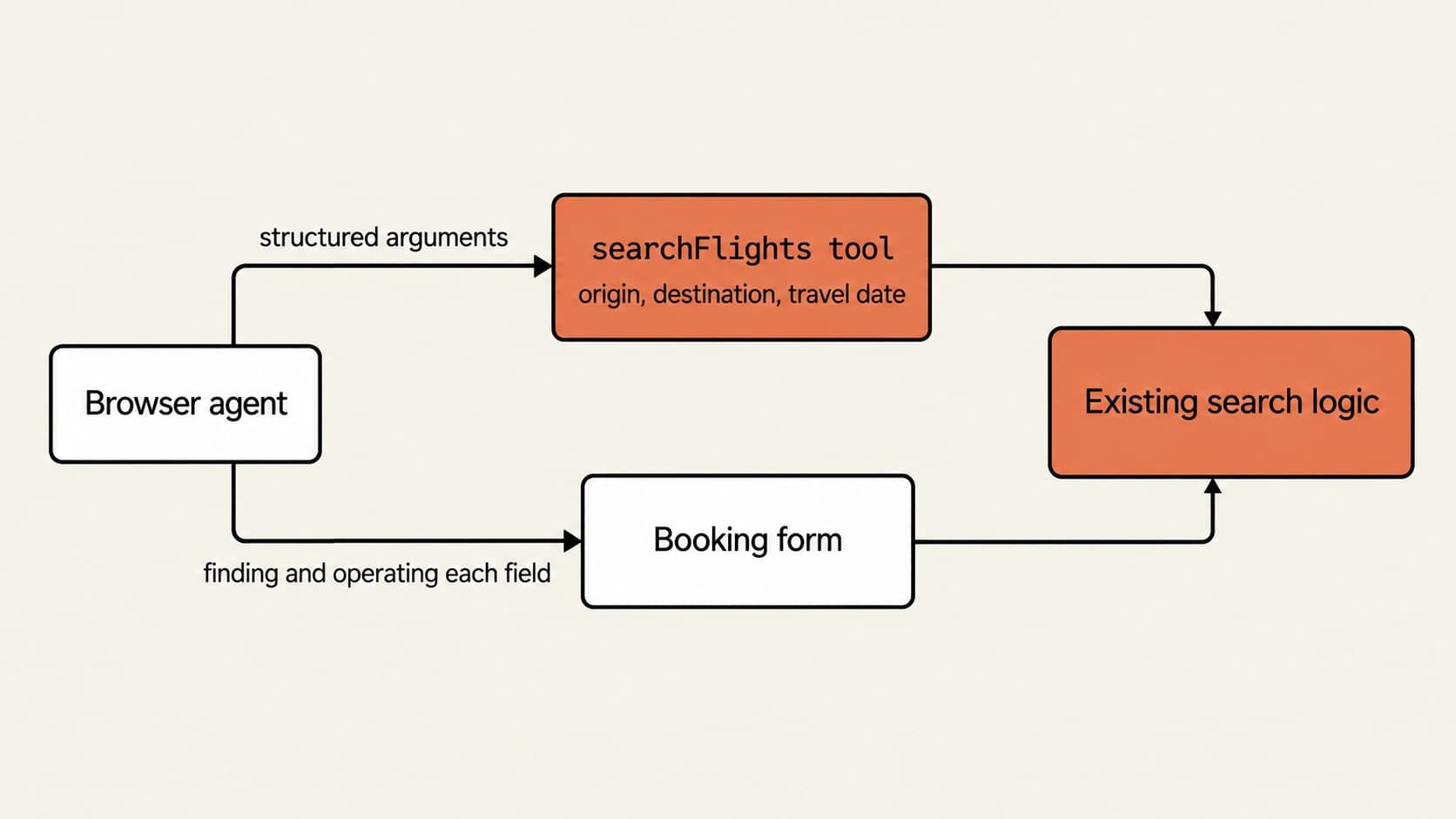
For example, a travel site could expose a searchFlights tool that accepts an origin, destination, and travel date. The agent passes those values as structured arguments, and the page runs its existing search logic instead of finding and operating each field in a dynamic booking form. The user still sees the normal website. WebMCP adds a machine-readable path into the same search logic; it does not replace the UI or the backend.
Swipe to inspect the full diagram →
Browser agents do not all expose WebMCP in the same way. A compatible client can use a page's structured tools alongside its normal browser or computer-use capabilities, so developers should treat WebMCP as a client capability. Taking Codex as an example, when WebMCP tools are available in its browser environment, it can call those tools instead of relying only on clicks and form fields.
WebMCP vs. MCP: architectural differences
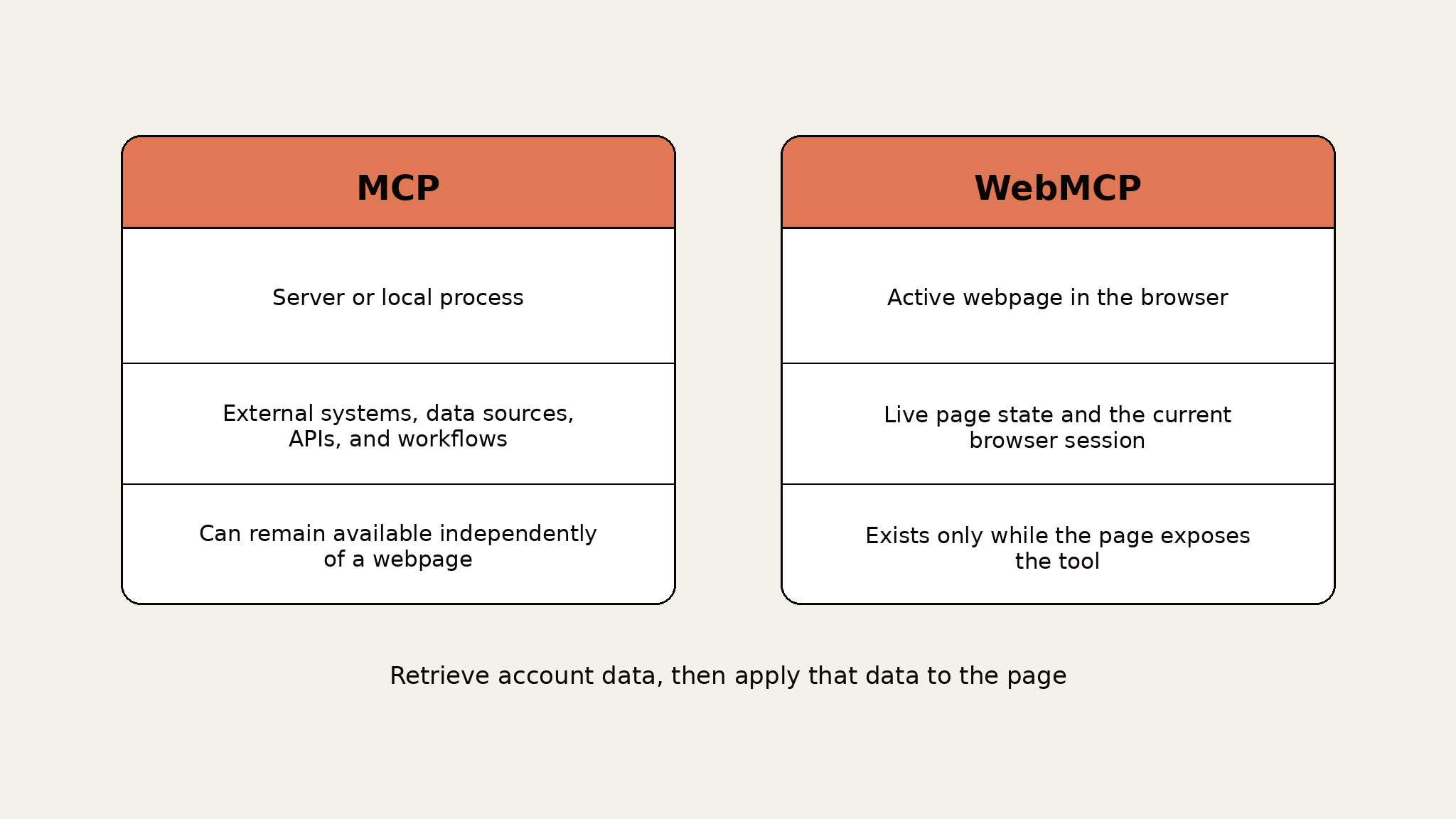
WebMCP and MCP solve different parts of the same integration problem. A Webfuse comparison makes the same distinction: WebMCP handles browser-side page interactions, while MCP connects agents to backend data and services. WebMCP is neither an extension of MCP nor a replacement for it.
Swipe to see all columns →
| Dimension | MCP | WebMCP |
|---|---|---|
| Runtime | Server or local process | Active webpage in the browser |
| Context | External systems, data sources, APIs, and workflows | Live page state and the current browser session |
| Lifecycle | Can remain available independently of a webpage | Exists only while the page exposes the tool |
| Typical use | Reusable service capabilities and background work | Actions tied to the site the user currently has open |
For agents, WebMCP tools connect to application logic instead of requiring the agent to identify every visible control for an action. That makes the interaction less dependent on presentation details.
The two can work together. An agent could use MCP to retrieve account data from a service, then use a WebMCP tool to apply that data to the page the user is viewing.
Swipe to inspect the full diagram →
How WebMCP works: browser API approaches
Approach 1: Imperative API
The imperative API registers a tool through JavaScript, using document.modelContext.registerTool(). Each tool has a name and description, a JSON Schema input definition, and an execute callback. Use this approach for single-page apps, dynamic state, asynchronous work, or workflows that need custom application logic.
registerTool() accepts an AbortSignal. When you abort the signal, the tool is unregistered. The method does not return a separate unregister function.
Scroll code horizontally →
const controller = new AbortController();

await document.modelContext.registerTool(
  {
    name: "searchFlights",
    description: "Search available flights for a route.",
    inputSchema: {
      type: "object",
      properties: {
        from: { type: "string" },
        to: { type: "string" }
      },
      required: ["from", "to"]
    },
    async execute({ from, to }, { signal }) {
      const results = await searchFlights({ from, to, signal });
      updateFlightResults(results);
      return { results };
    }
  },
  { signal: controller.signal }
);

// When this page or component no longer exposes the tool:
controller.abort();
This approach gives full control over execution, application state, errors, and asynchronous behavior, and it fits component-based frontends where tools need to register and unregister with the component lifecycle. The tradeoff is that it requires client-side JavaScript and explicit lifecycle management, and the tool's description, schema, and side effects need deliberate design, since the model relies on that contract to choose the right tool.
Approach 2: Declarative API
Chrome's declarative API turns HTML forms into WebMCP tools. The form carries toolname and tooldescription, and its fields become tool parameters; an optional toolparamdescription attribute gives the agent a more precise parameter description.
Scroll code horizontally →
<form
  action="/newsletter"
  method="post"
  toolname="subscribeToNewsletter"
  tooldescription="Subscribe an email address to updates.">
  <label>
    Email
    <input type="email" name="email" required>
  </label>
  <button type="submit">Subscribe</button>
</form>
Submission behavior is explicit. Without toolautosubmit, the browser can populate the form and leave final submission to the user. With toolautosubmit, agent invocation can submit the form directly. Chrome also provides agentInvoked, respondWith(), toolactivated, and toolcancel, so the application can distinguish agent-triggered behavior from a normal submission and return a result.
This approach reuses existing semantic HTML for straightforward input workflows, and it can keep the user in control of final submission by omitting toolautosubmit. It is less flexible than JavaScript registration for complex application state or custom asynchronous flows, and the declarative API is not yet in the community specification, so implementation details can still change.
Comparison table: WebMCP approaches at a glance
Swipe to see all columns →
| Approach | Best for | Advantages | Constraints | Complexity |
|---|---|---|---|---|
| Imperative API | SPAs, dynamic state, custom logic | Full control over execution and lifecycle | Requires JavaScript and explicit cleanup | Medium |
| Declarative API | Straightforward HTML form workflows | Reuses semantic HTML and can keep submission user-controlled | Less flexible; not yet in the community specification | Low |
Use the imperative API when the tool needs custom JavaScript behavior, dynamic state, or explicit lifecycle control. Use the declarative path when an existing form maps cleanly to the tool and Chrome's current behavior is acceptable for an experimental integration.
Specification status, Chrome's implementation, and progressive enhancement
It helps to separate three things: what the WebMCP specification defines, what Chrome currently implements, and what this article recommends.
The WebMCP specification is still a draft, not a W3C Standard, so it can change. It defines the imperative API but has no declarative section yet.
Chrome's implementation goes further than the specification: the declarative form API, including toolautosubmit, agentInvoked, and respondWith(), is part of Chrome's experimental implementation and origin trial, not the specification draft. These are Chrome-specific implementation details; agent clients can expose WebMCP differently, so Chrome's behavior should not be treated as a universal client contract.
Some guidance in this article is our recommendation, not part of WebMCP itself. For example, WebMCP does not require progressive enhancement or user confirmation for consequential actions; sites must decide whether to add those safeguards.
Because the specification and Chrome's implementation are both still moving, production sites should treat WebMCP as progressive enhancement: the site works through its normal human-facing interface when WebMCP is unavailable, and the agent-facing tool layer is added on top where the API exists.
Feature detection should happen before registration:
if (document.modelContext?.registerTool) {
  // Register WebMCP tools here.
}
This keeps WebMCP from becoming a hard dependency for users or browsers that do not expose the API.
WebMCP security considerations
WebMCP gives agents access to application actions inside an authenticated browsing context, so tool design is part of the site's security boundary. WebMCP's main security risks, as its specification lists them, include prompt injection, misleading tool semantics, privacy leakage through over-parameterized tools, and cross-origin concerns; OWASP's prompt injection guidance covers broader defensive practice for LLM applications generally.
An e-commerce page might expose updateCartQuantity or applyCoupon, letting an agent work with the live cart without a sequence of visual clicks. For a consequential action like placing an order, the tool name and description need to state the side effect plainly; a name like finalizeCart is ambiguous if it actually charges the user's card.
A CRM page might expose setLeadStatus with allowed status values in its input schema. The tool can operate on the record already open in the authenticated session, but the app's existing permissions still determine whether the user can make that change. WebMCP does not enforce that decision for you.
A few concrete rules follow from this:
- State the real action and its side effects in the tool's name and description. Do not give a harmless-sounding name to an action that purchases, deletes, publishes, or changes account state.
- Limit parameters to data the action actually needs. Do not ask the agent for unrelated personal or cross-site information.
- Keep the application's existing authorization and server-side validation in place. WebMCP is another path into application behavior, not a reason to bypass the checks the normal UI already enforces.
- Use the readOnlyHint annotation for tools that do not change state, and untrustedContentHint when a tool returns user-generated or external content.
- Keep origin exposure narrow. The registerTool() options include exposedTo for explicit trusted cross-origin access. The specification gates WebMCP behind the tools Permissions Policy with a default allowlist of 'self'; Permissions-Policy: tools=() disables WebMCP in documents where it should not run at all.
- Require user confirmation for consequential actions. In declarative flows, leaving out toolautosubmit keeps final form submission with the user. In imperative flows, add a confirmation step before execute runs.
How to test WebMCP tools before production
WebMCP needs testing at both the tool layer and the agent layer. A tool can execute correctly when called directly and still fail in practice if a model picks the wrong tool, supplies the wrong arguments, or produces a result that does not match the visible page state.
A practical test sequence:
- Direct execution: call the tool with known arguments and inspect its response.
- Page-state validation: confirm the visible application state changed as expected, including failure and cancellation paths.
- Agent testing: give a model a natural-language task and check which tool it selected, the arguments it generated, the returned result, and the final page state.
How MCPJam helps with WebMCP
MCPJam runs the same two-layer test against WebMCP pages. In the WebMCP tab under Inspect, you open a WebMCP-enabled page, inspect its registered tools, invoke a tool with known inputs, and compare the result against what changed on the page. Then you move the same page into the Playground, where a model gets a natural-language request, picks a tool, supplies arguments, and acts on the page. Running both lets you separate a deterministic tool bug from a model-selection or argument-generation problem. The full workflow is in MCPJam's WebMCP testing guide.
For teams already using the broader MCPJam platform for pre-production testing, this keeps WebMCP inspection inside the same workflow instead of treating browser tools as a separate debugging process.
Try MCPJam for free to inspect a WebMCP-enabled page, call its tools directly, and run the same task through a model before release.
FAQ
What is WebMCP?
WebMCP is an experimental browser API proposal that lets webpages expose structured tools to AI agents operating in the browser. Those tools are tied to the live page and browser session.
How is WebMCP different from MCP?
MCP exposes tools and data through servers or local processes. WebMCP exposes temporary tools from the active webpage, where they can work with current browser state and UI context.
When should I use the declarative WebMCP API?
Use it for straightforward HTML form workflows when Chrome's current experimental behavior fits the application. Keep the form usable without WebMCP, since the declarative API is not yet part of the community specification.
When should I use the imperative WebMCP API?
Use it when the tool needs custom JavaScript, dynamic frontend state, asynchronous work, explicit cancellation, or lifecycle control.
Is WebMCP ready for production use?
It remains experimental. A production site can experiment with it as progressive enhancement, but the normal UI, authorization, validation, and fallback behavior should not depend on WebMCP being available.
How should developers test WebMCP tools?
Test direct invocation first, then test the same task with a real model. Compare tool selection, arguments, response data, and visible page state, so you can tell whether a failure comes from the tool implementation or agent behavior.
What are the main security risks of WebMCP?
WebMCP's main security risks include prompt injection, misleading tool semantics, privacy leakage, and cross-origin concerns. Tool names and descriptions should state side effects clearly, schemas should request only necessary data, and the application should keep its normal authorization and validation controls in place.