MCPClientManager - A Better Way to Build MCP Clients
Everyone's building MCP servers, but we don't often think about what's actually consuming them: MCP clients. MCP clients are applications that connect to MCP servers and use the server for its tools and context. Popular clients include Claude, ChatGPT, Cursor, but agents like Codex and Kilo Code are also considered to be MCP clients.
Most of the attention in the MCP ecosystem has been on MCP servers, leaving the MCP client ecosystem pre-mature. You can see that most clients support tools but not much of anything else.
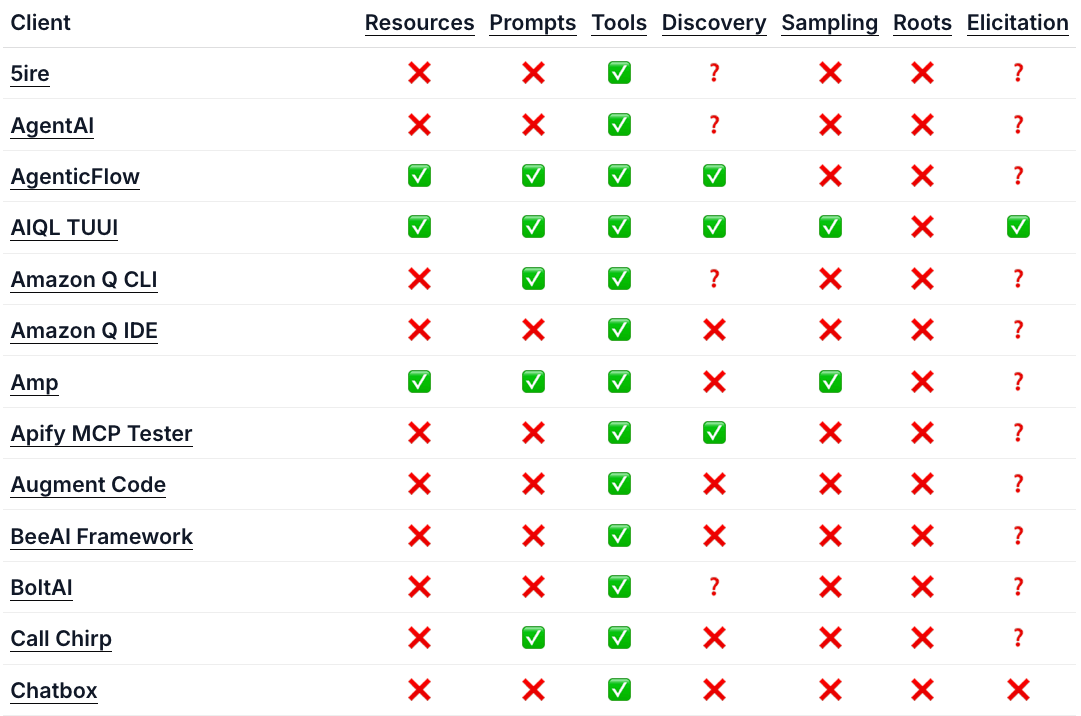
The MCP server ecosystem becomes richer by the day, with new capabilities like MCP UI coming out. There's been no innovation in the client ecosystem and a lack of capabilities support, which also bleeds into a poor server developer experience. As a server developer, there's no incentive to use resources, prompts, elicitation, or any other MCP capability besides tools given the lack of support on the client side.
We're changing that with MCPClientManager and the release of the MCPJam's SDK.
What is MCPClientManager
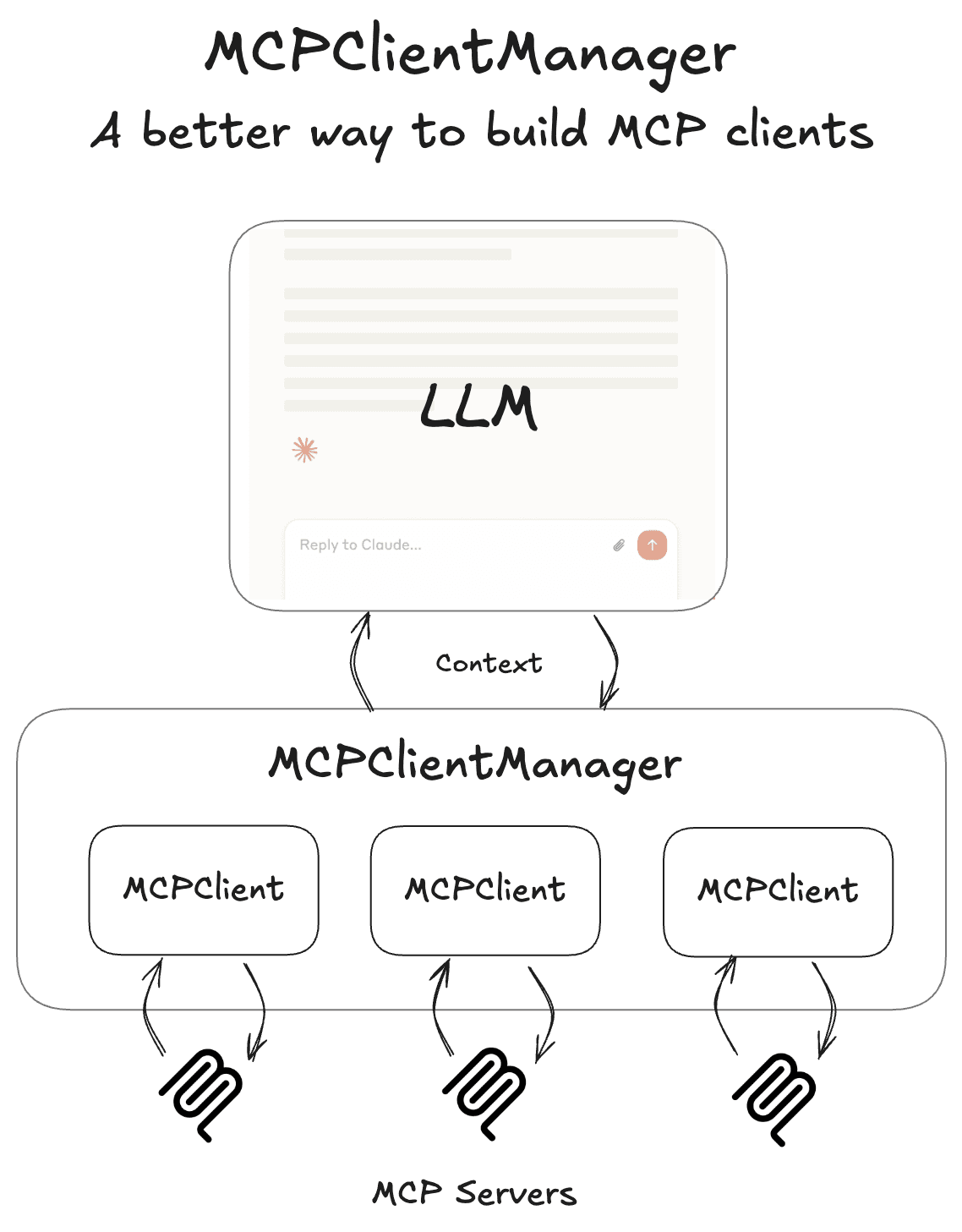
The MCPClientManager is a utility class that provides a way to manage multiple MCP server connections the way any real world MCP client does. The class lets you manage the connection lifecycle, fetch / call tools, and load context into popular agent SDKs like Vercel AI SDK to name a few capabilities. This reduces the lift of building useful chat interfaces and agents that are connected to MCP.
The MCPJam team proposed to have MCPClientManager be a part of the Typescript SDK. You can view that proposal here (SEP-1669).
Capabilities
Here are some code snippets of how MCPClientManager is used:
Connecting to multiple servers
You can initialize multiple MCP server connections. Connections are configured with the familiar mcp.json format. All transports, stdio, SSE, and Streamable HTTP are supported along with headers for OAuth.
Example of initialization with a stdio server and a remote server with authentication
import { MCPClientManager } from "@mcpjam/sdk"

const manager = new MCPClientManager({
  filesystem: {
    command: "npx",
    args: ["-y", "@modelcontextprotocol/server-filesystem", "/tmp"],
  },
  asana: {
    url: new URL("https://mcp.asana.com/sse"),
    requestInit: {
      headers: {
        Authorization: "Bearer YOUR_TOKEN",
      },
    },
  },
});
Fetching and using tools, resources, prompts
Fetch all tools and execute them. Same goes with resources and prompts. You can also fetch an individual one by passing in a serverId.
import { MCPClientManager } from "@mcpjam/sdk"

const manager = new MCPClientManager({
  filesystem: {
    command: "npx",
    args: ["-y", "@modelcontextprotocol/server-filesystem", "/tmp"],
  },
  asana: {
    url: new URL("https://mcp.asana.com/sse"),
    requestInit: {
      headers: {
        Authorization: "Bearer YOUR_TOKEN",
      },
    },
  },
});

const tools = await manager.getTools(["filesystem"]); // 'filesystem' serverId
const result = await manager.executeTool("filesystem", "read_file", {
  path: "/tmp/example.txt",
});
assert(result, { text: "this is example.txt: ..." })
const resources = await manager.listResources();
Building a full MCP client with Vercel AI SDK
Real world MCP clients like Claude and Codex combine their connection to MCP servers with an agent / LLM. We built an adapter with Vercel's agent framework, AI SDK, to create a fully functioning MCP client.
import { MCPClientManager } from "@mcpjam/sdk";
import { generateText } from "ai";
import { openai } from "@ai-sdk/openai";

const manager = new MCPClientManager({
  filesystem: {
    command: "npx",
    args: ["-y", "@modelcontextprotocol/server-filesystem", "/tmp"],
  },
});

const response = await generateText({
  model: openai("gpt-4o-mini"),
  tools: manager.getToolsForAiSdk(),
  messages: [{ role: "user", content: "List files in /tmp" }],
});

console.log(response); // { text: "The files are examples.txt..."  }
Subscribe to the blog
We share our learnings with you every week.
MCPClientManager is one abstraction higher than the JSON-RPC communication layer of MCP, it is the foundation of building MCP clients. Here are some of the things that this utility class unlocks:
- Building LLM chat interfaces connected to MCP servers
- Build agents equipped with MCP tools
- Create unit tests for your MCP servers
- Create E2E tests for your MCP servers
Using MCPClientManager in the SDK
We're waiting to progress the proposal and have it be a part of the official Typescript SDK. MCPClientManager is available in the MCPJam SDK. You can install it with npm:
npm install @mcpjam/sdkWhat's coming next
We want to expand what agent SDKs that MCPClientManager can connect to. We created an adapter for Vercel AI SDK, but we'd also like to have adapters for Mastra, Langchain, and the native APIs for OpenAI, Anthropic, etc.
We also want to expand the testing use cases for MCPClientManager. It's useful to build unit tests and E2E tests for your MCP server, and we plan on providing additional utilities to comprehensively test servers.
We invite the open source community to help mature the SDK. You can find the SDK's repo here: https://github.com/MCPJam/inspector/tree/main/sdk
Please also join our Discord, we'll have discussions on how to drive this project forward and invite anyone interested to join us in maturing this SDK.