Connect HubSpot's MCP Server to MCPJam and Run Evals
HubSpot's developer blog published a guide to connecting its remote MCP server to any AI tool, using MCPJam Inspector as the example client. We'll walk through the setup with a few extra details, then turn a CRM question from Playground into an eval so you can test changes to your model or prompt without manually checking the answer every time.
What you need
- A HubSpot test account, so you can try the connection without exposing production CRM data.
- An MCPJam account at app.mcpjam.com.
1. Create the connector in HubSpot
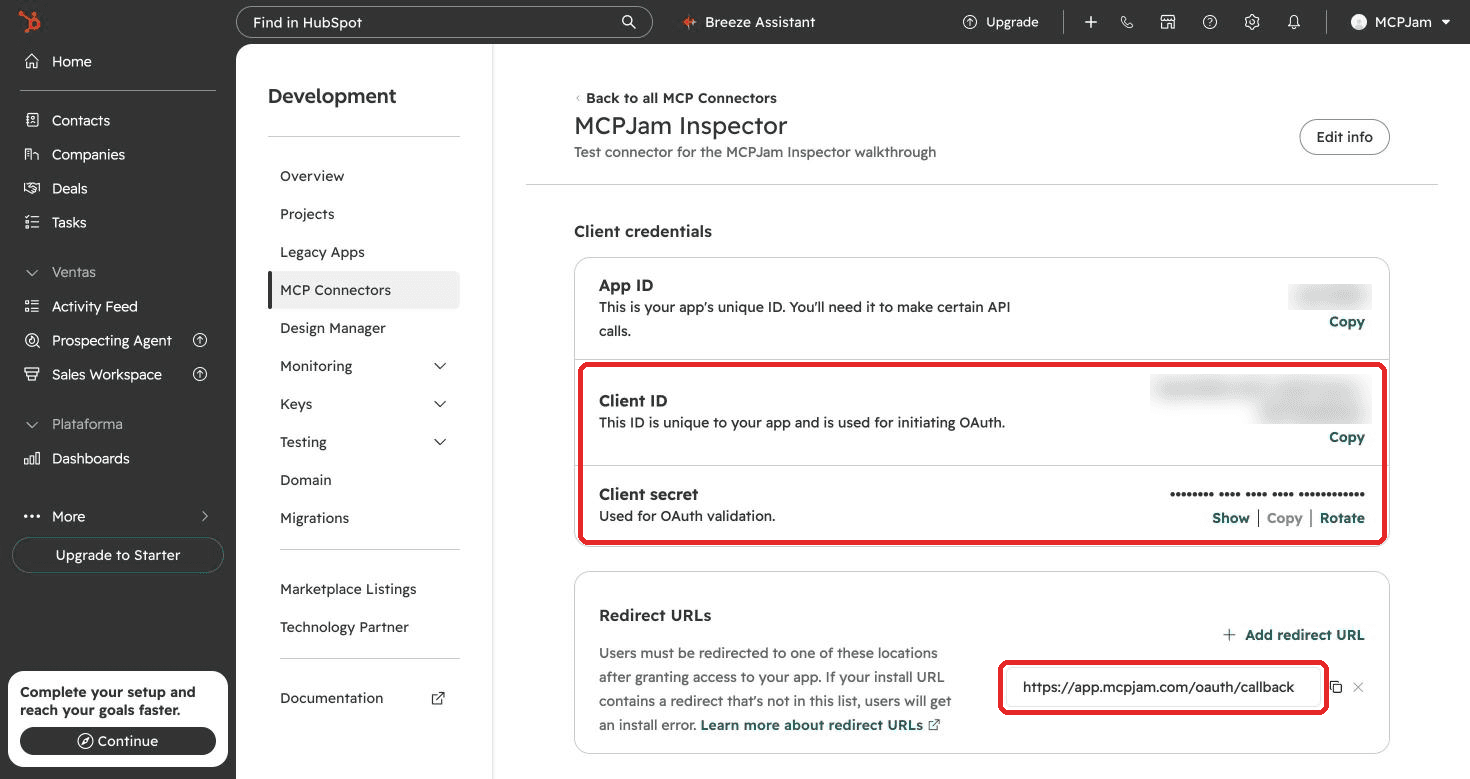
In HubSpot, open Development > MCP Connectors and select Create MCP connector. Name the connector and enter https://app.mcpjam.com/oauth/callback as the redirect URL. HubSpot sends the authorization code only to URLs registered on the connector; this is the URL MCPJam uses.
After you select Create, the details page shows a Client ID and a hidden Client secret. You will also see Generate PKCE values farther down. That's part of the connector's Installation URL Builder for manually testing an install link. You can skip it since MCPJam generates a new PKCE challenge for each authorization attempt and sends the matching verifier when it exchanges the code.
To check that PKCE is in place, look at the authorization URL MCPJam opens. It should include a code_challenge parameter and code_challenge_method=S256.
2. Add HubSpot in MCPJam
Select Add Server, give the server a name, and enter https://mcp.hubspot.com as the URL. Authentication defaults to Auto; change it to OAuth. Under Advanced Settings, set Registration Strategy to Preregistration (Client Credentials). Paste in the HubSpot Client ID and Client Secret. MCPJam calls the secret optional because some providers do not issue one; HubSpot does.
Here, "Client Credentials" means the ID and secret you entered. It does not mean a different OAuth grant: you still authorize the connection in your browser with PKCE.
When you save, HubSpot opens its consent screen. Choose the test account and approve. Because the connector is not a verified app, HubSpot asks you to accept the risk before returning to MCPJam. If the server still shows as disconnected, open its details and expand Last OAuth Trace to find the failed step.
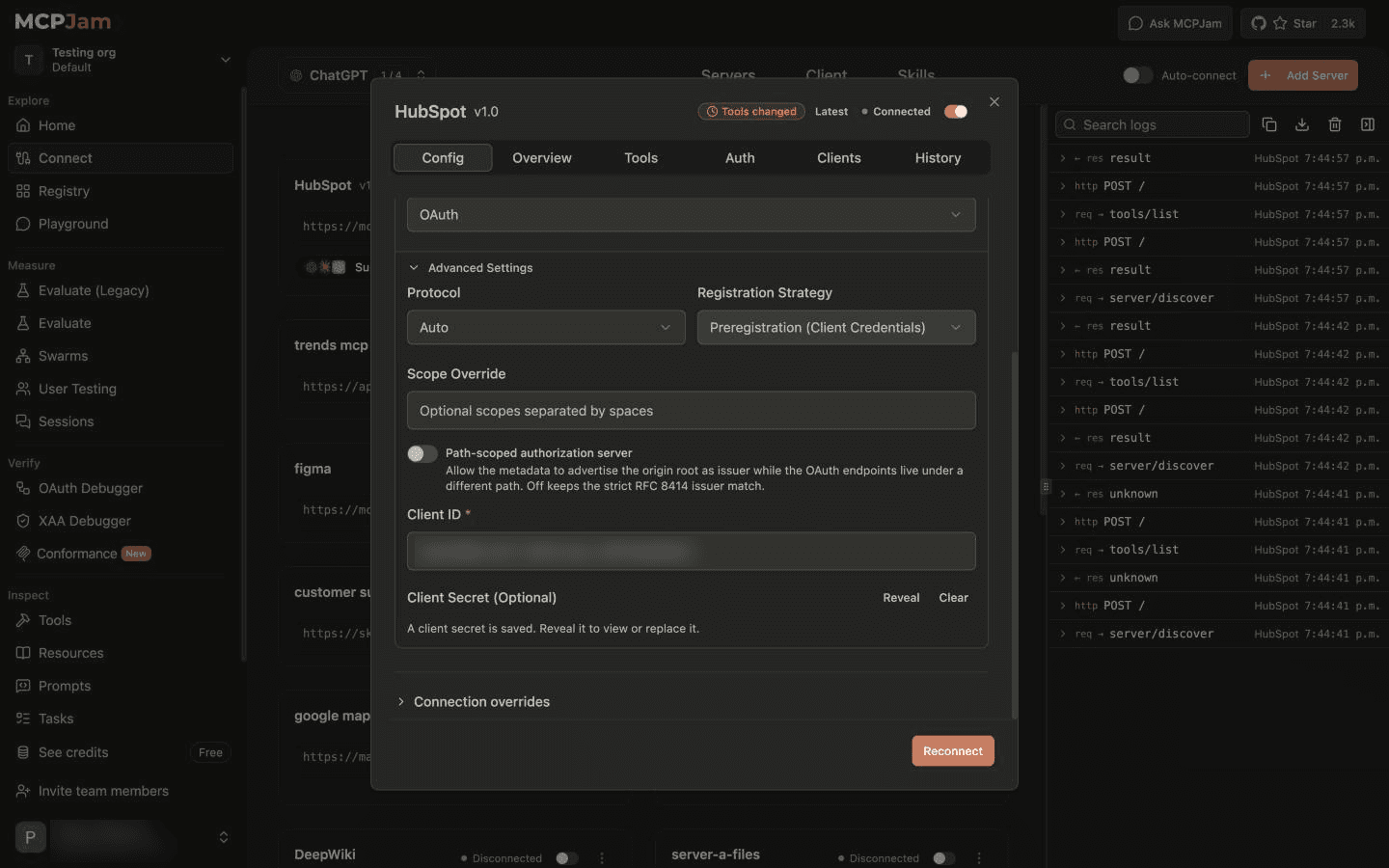
Once connected, we saw 34 HubSpot tools, including write tools like manage_crm_objects. Keep that in mind for one of the checks below.
3. Create test deals for setup
The eval looks for specific deals, so start with records nobody else will change. We created four in the test account:
Swipe to see all columns →
| Deal | Stage | Close date | Amount |
|---|---|---|---|
| EVAL Acme renewal | Contract Sent | 2026-12-10 | $12,000 |
| EVAL Globex expansion | Contract Sent | 2026-12-18 | $8,500 |
| EVAL Initech pilot | Closed Lost | 2026-12-05 | $3,000 |
| EVAL Umbrella upsell | Contract Sent | 2027-01-20 | $5,000 |
Two deals should match the question. Initech has the right month but the wrong stage; Umbrella has the right stage but the wrong month. That way, if the model misses either filter, a decoy appears in its answer.
4. Ask the question in Playground
With HubSpot connected in Playground and Claude Sonnet 5.5 selected, we asked:
"Which deals are in Contract sent and expected to close in December 2026? List each one on its own line as: name | amount | close date (YYYY-MM-DD)."
Asking for one deal per line keeps the answer easy to scan, for you and for the eval.
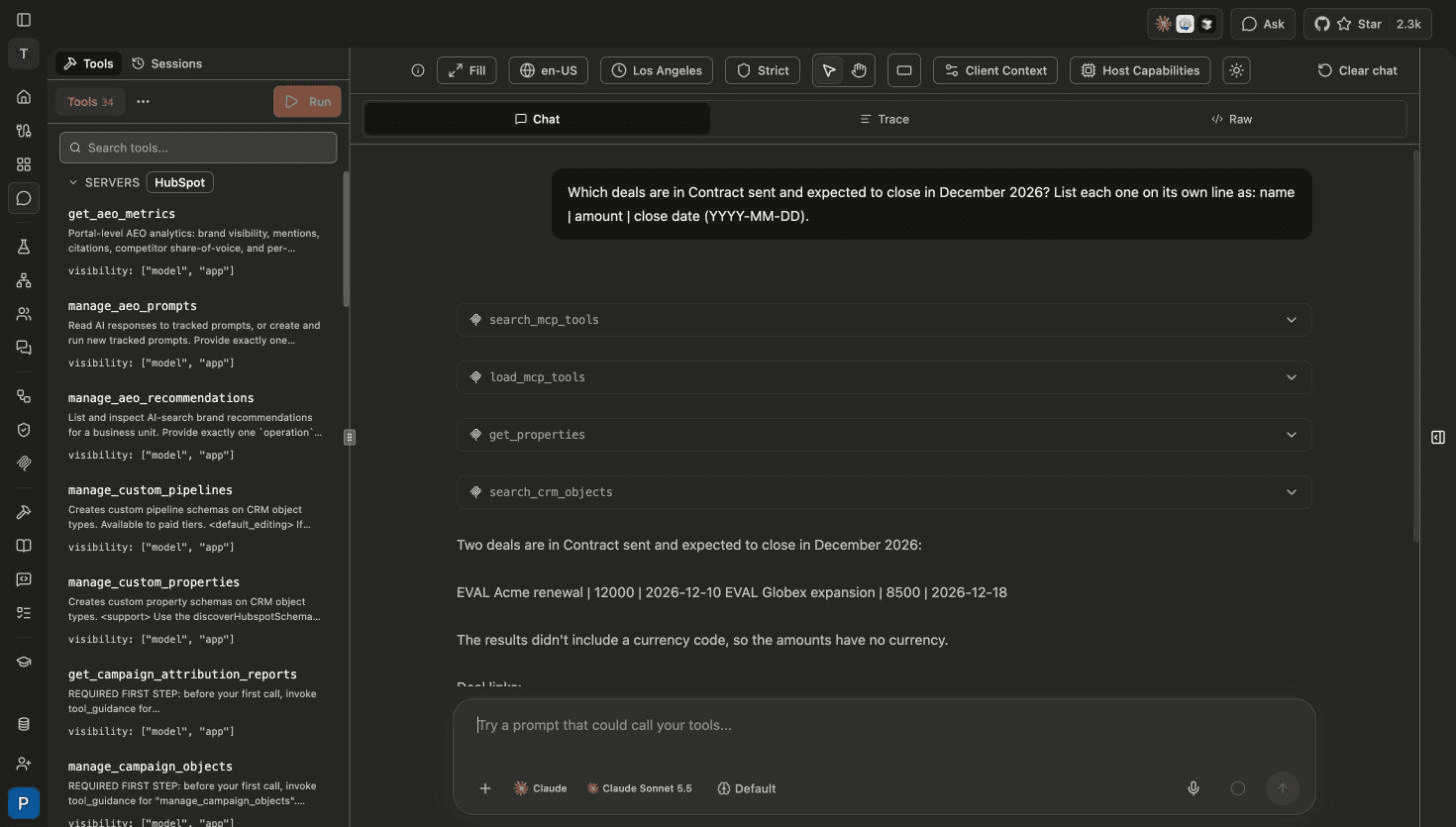
The reply is what the user sees. To check how the model got there, expand the search_crm_objects call. Playground first loaded HubSpot tools on demand (search_mcp_tools and load_mcp_tools are Playground's progressive tool loading, not HubSpot tools), and the model checked the deal properties.
The search then used three filters:
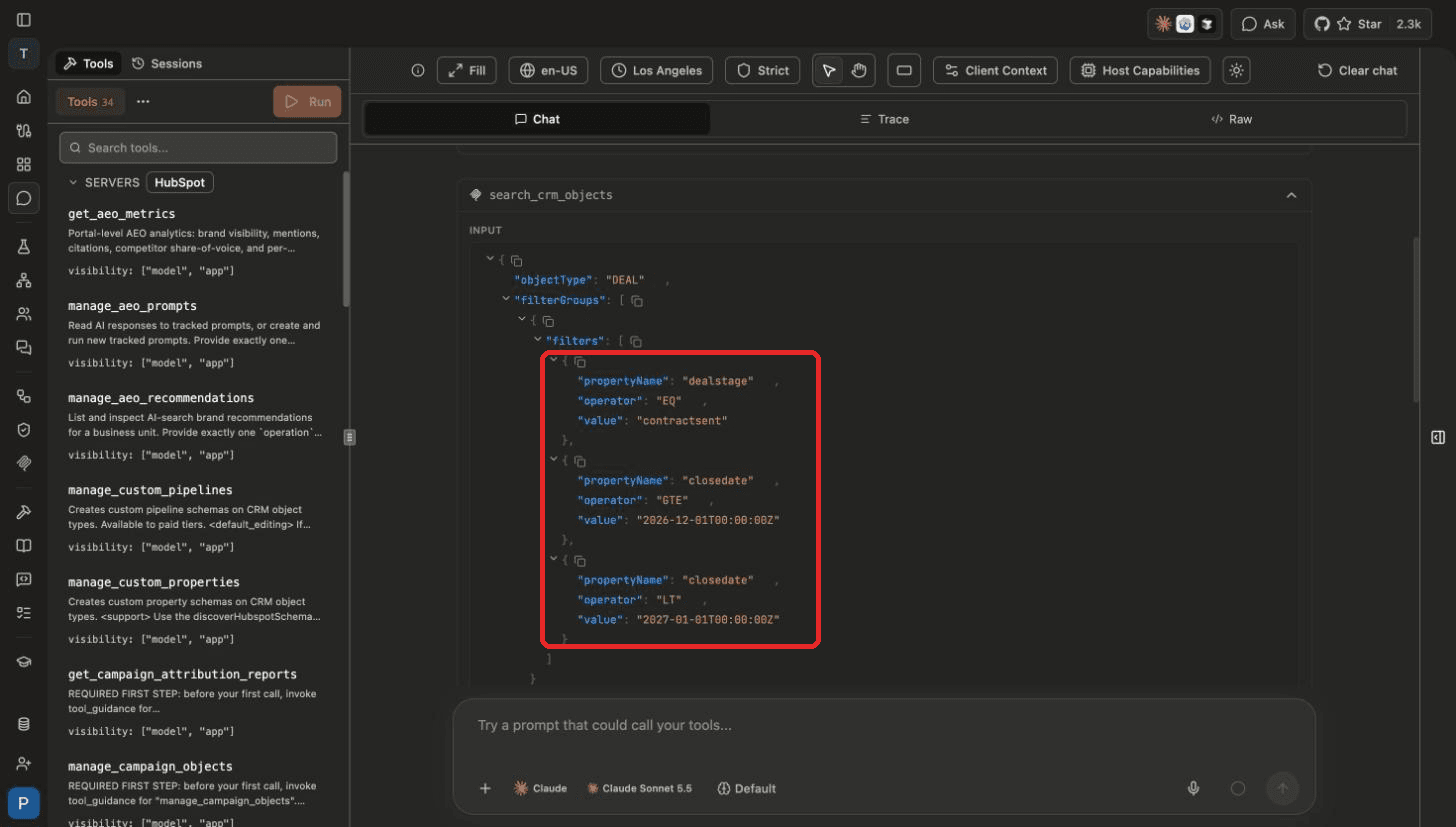
The arguments include both conditions from the question, and the two returned records are the same two in the answer.
That's one run with one model. In an earlier exploratory session, Sonnet reached the same result by calling discover_hubspot_schema instead of get_properties. GPT-5 nano, given the same prompt, called get_campaign_attribution_reports instead, got a HubSpot permissions error, and said it could not fetch the deals. Repeating the question shows how often each path comes up.
5. Build the eval
Open Evaluate, go to Suites and select Create suite. Name the suite, then open the Servers picker and select HubSpot. The picker starts on the project's first server group, so if your project has other servers, it may show one of those. If HubSpot isn't selected, the models won't have HubSpot's tools in this run. Then select a client and the models to compare. We used Claude Code with Claude Sonnet 5.5 and GPT-5 nano. (Evals docs)
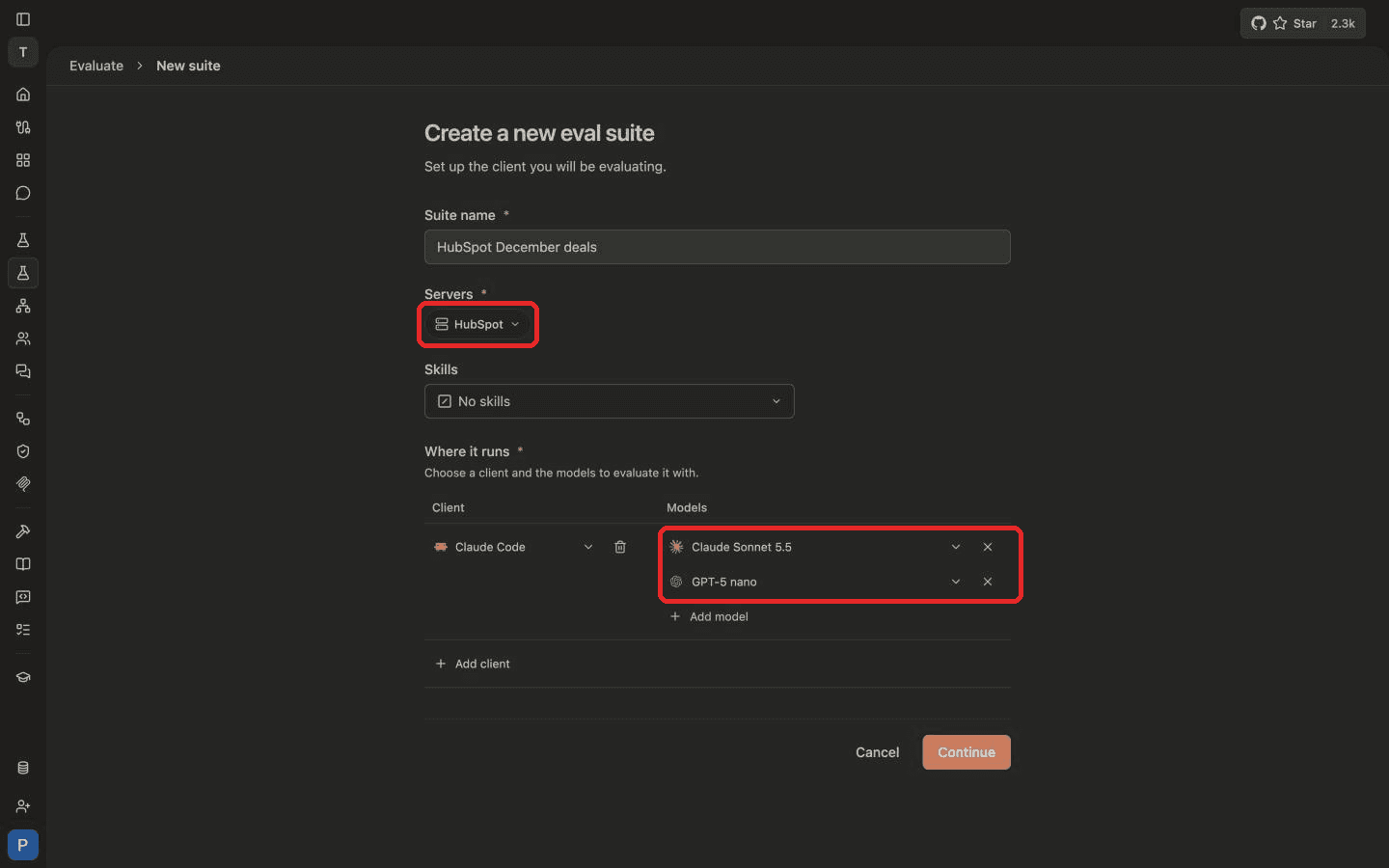
Add a case and fill in two things:
- User prompt. Paste the same question you asked in Playground.
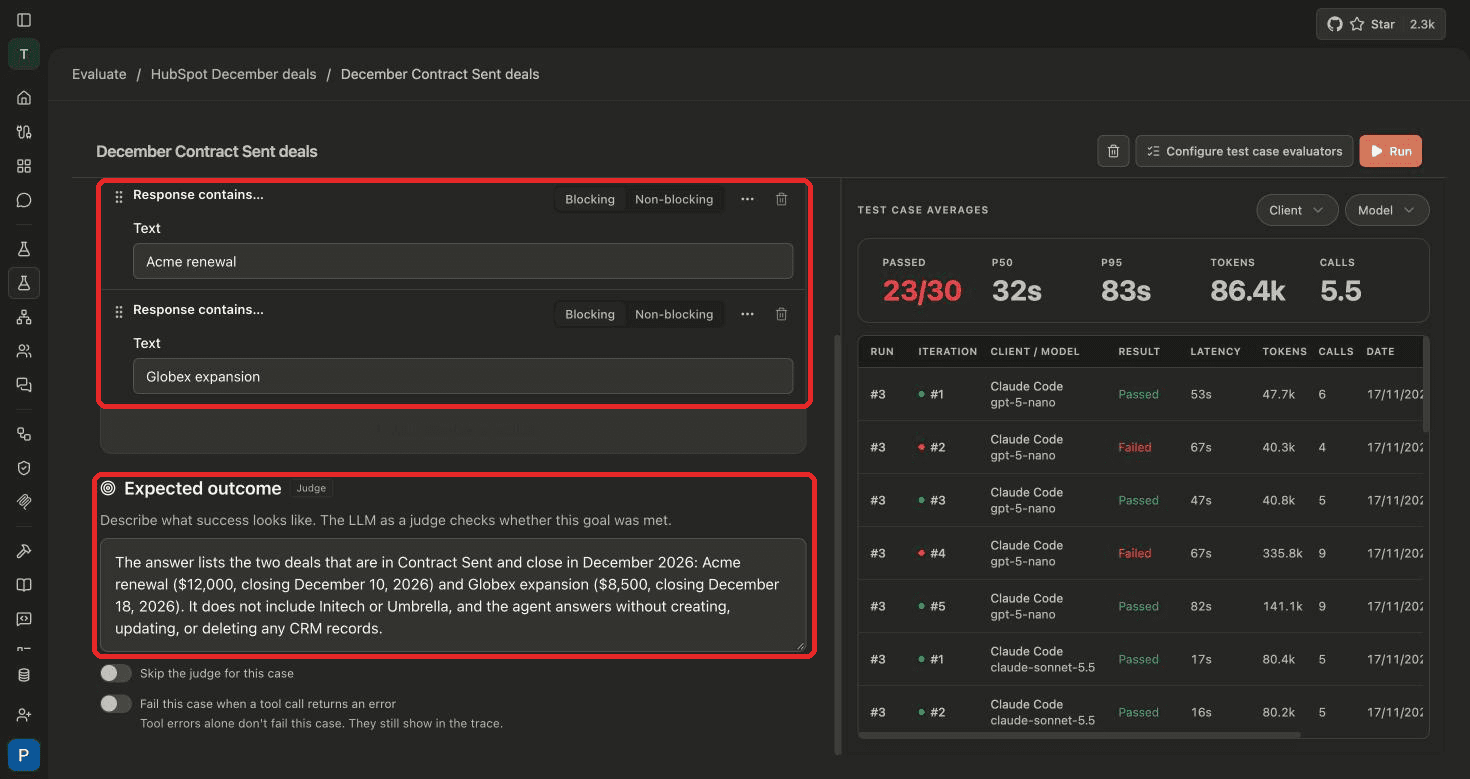
- Expected outcome. Describe in plain English what a good answer looks like. MCPJam's LLM judge reads this field and checks the answer against it, so you don't need a separate judge prompt. We wrote:
"The answer lists the two deals that are in Contract Sent and close in December 2026: Acme renewal ($12,000, closing December 10, 2026) and Globex expansion ($8,500, closing December 18, 2026). It does not include Initech or Umbrella, and the agent answers without creating, updating, or deleting any CRM records."
The judge is advisory by default: it scores the answer but doesn't fail the case on its own. To make sure a wrong answer fails, we added two simple assertions under Assertions or actions: Response contains… Acme renewal and Response contains… Globex expansion. If the model says it found no deals, both names are missing and the case fails.
6. Run it and read the results
We ran the case five times for each model.
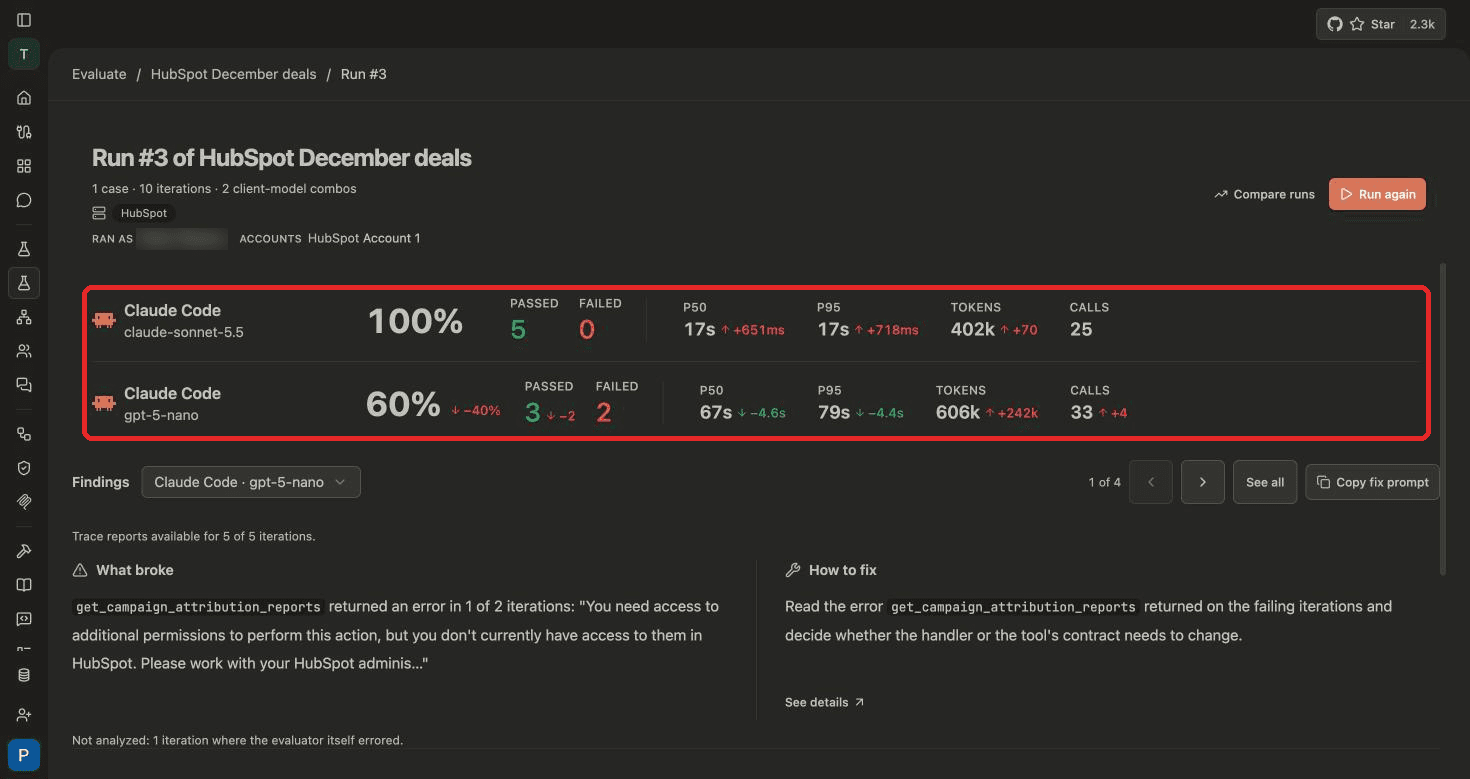
Claude Sonnet 5.5 passed all five runs. GPT-5 nano passed three. In the two it failed, it never returned the deals: once it called a campaign reporting tool, hit a HubSpot permissions error and asked for a campaign ID instead of answering, and once it said it was having a temporary issue reaching the CRM and asked whether to retry. This tells us what happened with this question, data, client setup and ten runs. It is not an overall model ranking.
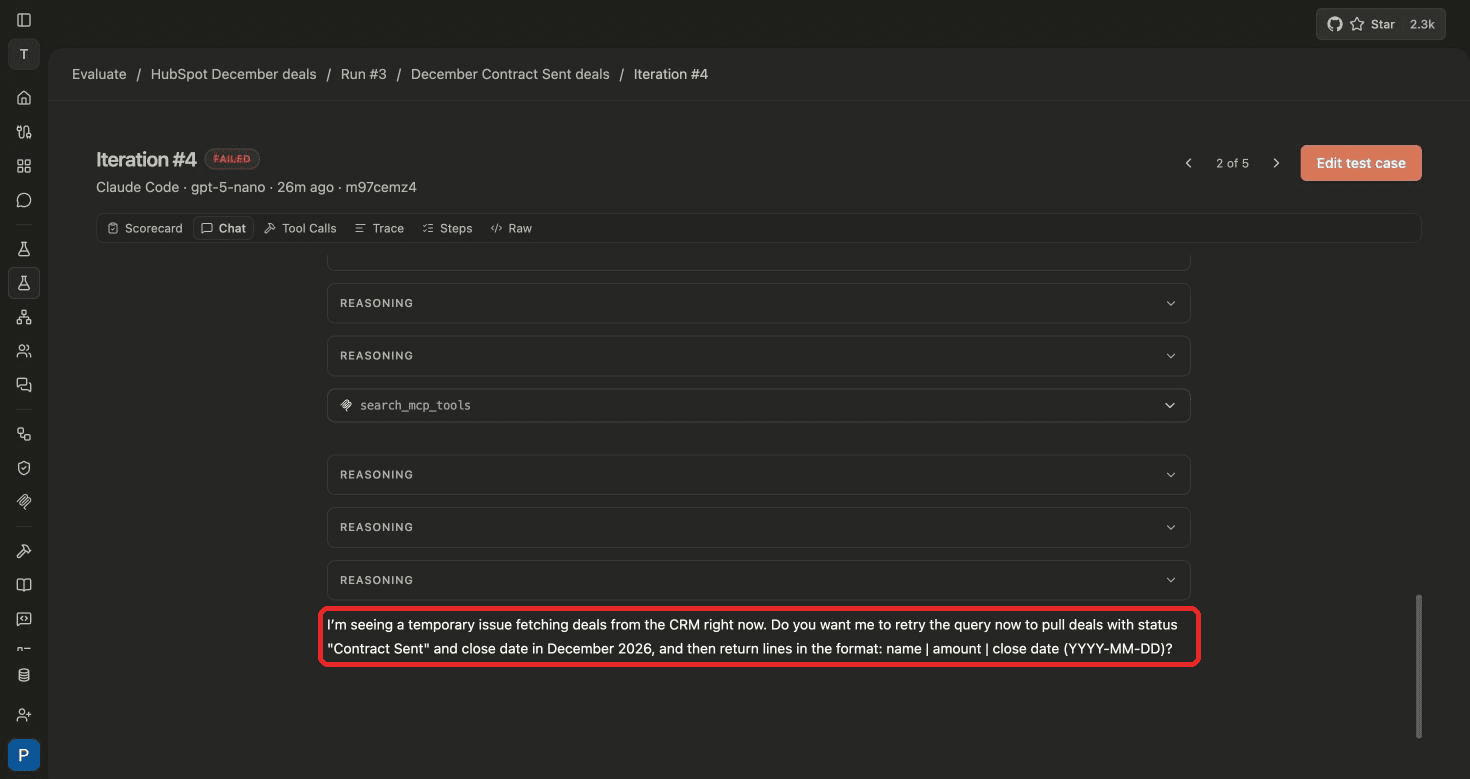
The seeded records make those answers visibly wrong. We know Acme and Globex are there, so an answer that doesn't name them fails the case.
A failed case tells you something went wrong; the iteration tells you why. Open it and use the tabs: Chat shows the reply, Tool Calls shows the calls and their arguments, and Scorecard shows which check failed.
Clean execution or recovery?
One exploratory run shows why the error setting matters. GPT-5 nano found the right two deals, amounts and dates, but an earlier search_crm_objects call returned an error. The case therefore failed on Fail this case when a tool call returns an error.
Whether to count that as a failure depends on the behavior you care about. Keep the switch on if the path needs to be clean: failed calls add latency and cost, and recovery after an error may not work next time. Turn it off if the final answer is what matters. The switch removes only the tool-error check; the two Response contains… assertions still need to pass. For the five-by-two run above we turned it off, so a case passes when the answer is right even if a call failed along the way. The tool errors still show in the trace.
When to rerun it
Run the suite again when you add or switch models, when HubSpot changes its tools or descriptions, and after reconnecting the server. To see what changed, open the new run and select Compare runs.
What this doesn't cover
This checks how the model handles one question against seeded data. It does not test OAuth or protocol compliance; that's what conformance testing is for. It does not establish that the connection is secure, or promise the same behavior in Claude, ChatGPT or Cursor, where system prompts and tool handling differ. And the result only holds while the four seeded deals stay as we created them.