
How Bright Data evaluates their MCP Server with MCPJam
Bright Data recently launched their Web MCP, a powerful MCP server that provides real time web access. AI assistants connected to the Web MCP server can now browse the web for powerful use cases such as research, market analysis, academia, and more.
They've been creating some of the best web crawling, scraping, and browser infrastructure. It's exciting to see them bring those same services to today's agentic software using MCP.
Bright Data has been using MCPJam to build and test Web MCP, and we're so excited for their launch. They also used MCPJam's evals CLI to ensure that Web MCP maintains high performance and wrote about it in their launch week blog.
In this article, we'll cover two techniques Web MCP uses to optimize for context window use, and how they use MCPJam evals to ensure the server maintains high performance even with future changes.
Web MCP Advanced Tool Selection
The Web MCP has 62 tools, but you can choose which tools to use by selecting "Tool Groups", bundles of tools based on use case. For example, if you're building a stock market AI assistant, you may only want to turn on "Finance Intelligence".
Having dynamic tooling efficiently solves two problems with MCP server design, token efficiency and context overload.
Token efficiency: Tool's descriptions and schemas take up the token context window. A server with 60 tools can take up to 20% of Claude 4's context window. Dynamic tools reduces # of tools needed.
Context overload: If you were to load all tools, there's a much higher chance the LLM will hallucinate on which tools to call. Dynamic tools ensure only necessary context is loaded.
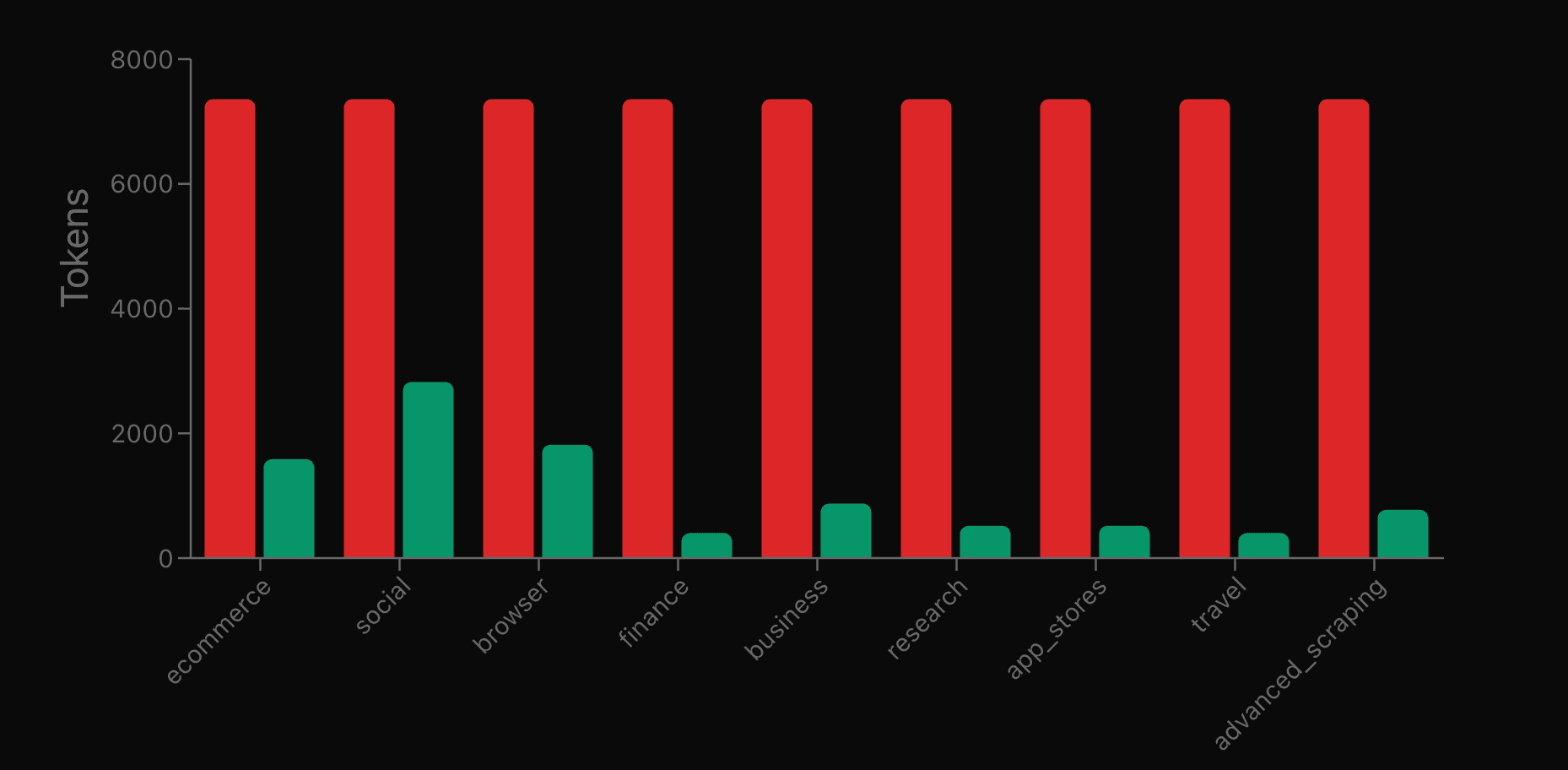
The below shows Web MCP's token use with (green) and without advanced tool selection.
Token optimization with Strip-Markdown
The tools' payloads (return values) are also a point where tokens can be optimized. Since the payload of Web MCP's tools are web data, they need to optimize so that the LLM is only receiving the bare necessary data contents of the web, no HTML, no delimiters, no extra fluff.
The Bright Data team explored different solutions such as JSON and TOON, choosing Strip-Markdown as the solution. Here's an example of Strip-Markdown:
Raw Markdown:
# Product Reviews
## Customer Feedback
- **John D.** - ⭐⭐⭐⭐⭐
*"Great product! Highly recommend."*
[Read more](https://example.com/review/123)
- **Sarah M.** - ⭐⭐⭐⭐
*"Good value for money."*
[Read more](https://example.com/review/456)

[Buy Now](https://example.com/buy)With Strip-Markdown:
Product Reviews

Customer Feedback

John D. - ⭐⭐⭐⭐⭐
"Great product! Highly recommend."
Read more

Sarah M. - ⭐⭐⭐⭐
"Good value for money."
Read more

Product Image

Buy Now
To achieve this, they used the RemarkJS strip-markdown package. The impact of payload token reduction is felt. Assuming on average a customer runs 1000 workflows a day with Web MCP, Bright Data is saving their customers $11k / year with these reduction techniques.
If you're interested in reading more about their payload reduction, I recommend checking out their launch day post about it here.
Maintaining Web MCP's performance with MCPJam evals
As the Bright Data team builds on top of Web MCP, they may introduce new tools, modify existing tools, or change the underlying web scraping services their MCP server relies on. They need to ensure that Web MCP maintains high performance and customer workflows are not breaking.
Bright Data uses MCPJam evals CLI to ensure this. MCPJam evals helps Bright Data answer the questions "Do LLMs know which tools in Web MCP to select?", and "are the tools being used correctly?".
To achieve this, MCPJam evals creates a simulated AI agent that connects to the Bright Data Web MCP. We then create real-world test scenarios such as "Search for Nike shoes on Amazon" and check if the right tool amazon_product_search is being called with the right parameters.
The MCPJam evals test cases are set up in Web MCP in their GitHub repo here. They have pre-configured test cases for each tool group, and running the evals can be done in a single command.
Running the e-commerce tool group evals:
mcpjam evals run \
  -t tool-groups.json/tool-groups.ecommerce.json \
  -e server-configs/server-config.ecommerce.json \
  -l llms.json
Output:
Running tests
Connected to 1 server: ecommerce-server
Found 13 total tools
Running 2 tests

Test 1: Test E-commerce - Amazon product search
Using openai:gpt-5.1-2025-11-13

run 1/1
user: Search for wireless headphones on Amazon and show me the top products with reviews
[tool-call] web_data_amazon_product_search
{
  "keyword": "wireless headphones",
  "url": "https://www.amazon.com"
}
[tool-result] web_data_amazon_product_search
{
  "content": [...]
}
assistant: Here are some of the top wireless headphones currently on Amazon...

Expected: [web_data_amazon_product_search]
Actual:   [web_data_amazon_product_search]
PASS (23.8s)
Tokens • input 20923 • output 1363 • total 22286
MCP evals are useful to catch future regressions and track token use. If test cases for a certain tool group begin to fail, we can assure that there was a regression introduced either to the tool itself, or the underlying service. Evals can also be integrated into a CI/CD pipeline to be run on every deployment.
Read our docs here to learn more about evals CLI.